


Destiny 2 – PC option menu – First Look

Destiny 2 – PC option menu – First Look
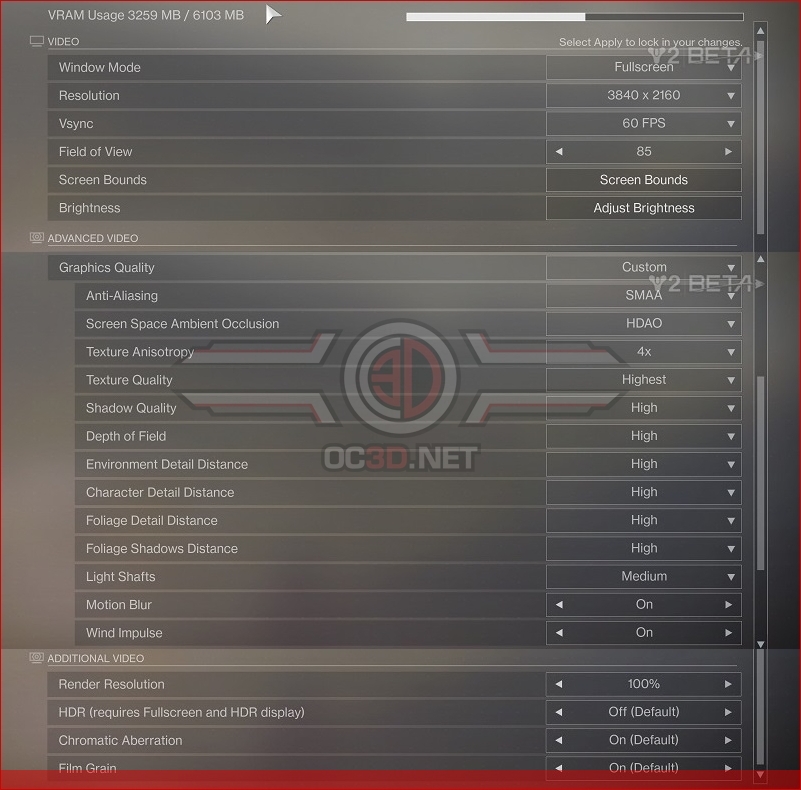
Below is a list of all available graphics options on Destiny 2’s PC beta release. The PC version also includes a VRAM usage tool to let users know how much VRAM the game is using.
Thankfully options like Film Grain and Chromatic Aberration can be turned off in the game’s graphical options menu, with the game’s FOV being easily adjustable between 55 degrees and 105 degrees.
PC Graphical Options
– FOV – 55 – 105 (85 Default)
– Graphics Quality – Low, Medium, High, Highest (Or Custom)
– Anti-Aliasing – Off, FXAA, SMAA, MSAA
– Screen Space Ambient Occlusion – Off, HDAO, 3D
– Texture Anisotropy – Off, 2x, 4x, 8, 16x
– Texture Level – Lowest, Low, Medium, High, Highest
– Shadow Quality – Lowest, Low, Medium, High, Highest
– Depth Of Field – Lowest, Low, High, Highest
– Environmental Detail Distance – Low, Medium, High
– Character Detail Distance – Low, Medium, High
– Foliage Detail Distance – Low, Medium, High
– Foliage Shadows Distance – Medium, High, Highest
– Light Shafts – Medium, High
– Motion Blur – On/Off
– Wind Impulse – On/Off
– Render Resolution (% Scale)
– HDR (On/Off)
– Chromatic Aberration (On/Off)
– Film Grain (On/Off)
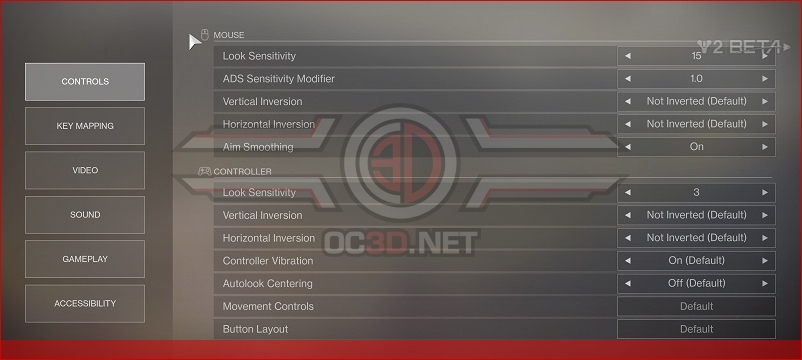
All of the controls in Destiny 2 can be rebound on PC, allowing PC users to easily configure the game’s controls to their liking. Aim Smoothing is turned on within the game by default, so PC users may want to disable this option if they want more precise mouse control.
You can join the discussion on Destiny 2’s Pc graphical options menu on the OC3D Forums.