Gigabyte launches a DRM-fixing tool for Intel’s 12th Gen Alder Lake processors

Gigabyte launches a DRM-fixing tool for Intel’s 12th Gen Alder Lake processors
While many games are incompatible with Alder Lake due to their use of DRM solutions like Denuvo, others can run abnormally thanks to Intel’s hybrid x86 architecture and their inclusion of high-efficiency E-cores. Thankfully, disabling these cores can eliminate these compatibility issues, and future Windows/game updates will eliminate these CPU compatibility issues.
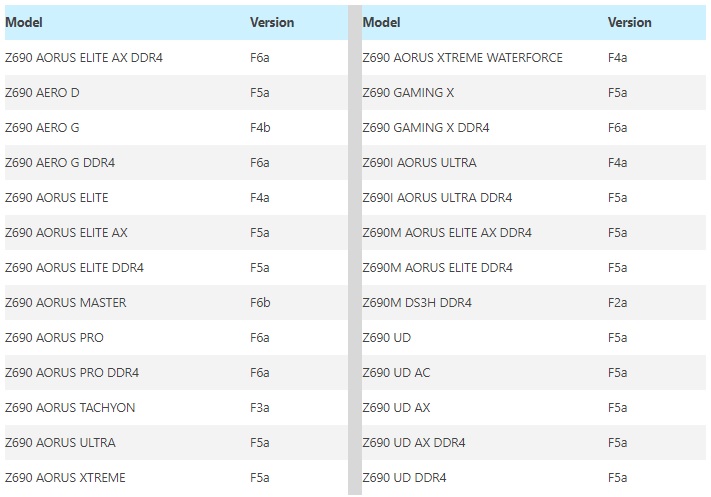
To help address this issue, Gigabyte has released a software tool that can address these compatibility issues by switching off Intel’s E-cores. Their software utility requires no BIOS tinkering or a difficult setup process, making it easier for Alder Lake users to play games that are otherwise unsupported by Intel’s 12th generation hybrid processors. That said, some Z690 users may need to update their motherboard’s BIOS for this tool to work.
Most PC gamers are unaffected by Alder Lake’s compatibility woes, but some major releases, like Assassin’s Creed Valhalla, Star Wars Jedi: Fallen Order, and Total War Warhammer are affected.
What follows is Gigabyte’s Press Release for their DRM Fix tool. A download link for the tool is also available below.

PR – “Enjoy The Game!” with Intel 12th Gen. Processors featuring GIGABYTE’s DRM fix tool
Portable and easy to use software to boost your gaming performance.
Gigabyte Technology, one of the top global manufacturers of motherboards, graphics cards, and hardware solutions, announced today the GIGABYTE DRM Fix Tool to greatly improve the performance on certain game titles when using an 12th gen Intel processor and avoid possible issues when running those games.
Earlier this month, Intel just released the latest 12th generation processors with the advantages of new architecture and high performance to the market. However, users are aware that the E-cores in processors may trigger the DRM software to incorrectly recognize them as another system. GIGABYTE releases the new GIGABYTE DRM Fix Tool on 600 series platform in response to this issue. By this Windows-based utility, users can easily switch on and off the E-Cores on the fly to avoid abnormal game operation due to the DRM issue.
GIGABYTE’s DRM Fix Tool requires the latest BIOS version in order to have impact. Users can easily control the status of the E-cores through the UI of this utility without any complicated installation. GIGABYTE’s DRM Fix Tool provides a much easier solution to the DRM issue compared to other solutions which require adjusted BIOS settings, PS/2 keyboard connection, or even exclusive button on the chassis and keyboard.
GIGABYTE DRM Fix Tool and its related BIOS are ready on the GIGABYTE official site. Please visit GIGABYTE’s website and download for the latest BIOS version and the GIGABYTE DRM Fix Tool.
https://download.gigabyte.com/FileList/Utility/mb_utility_drm-fix-tool.zip
Gigabyte’s List of the Latest BIOS’ for GIGABYTE Z690 motherboards is available below.
You can join the discussion on Gigabyte’s DRM-fixing tool for Intel’s 12th Generation Alder Lake processors on the OC3D Forums.