


Support at last for ‘two finger’ typists!

Do you ‘hunt & peck’?
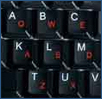 There are those who can touch type and those who can’t. For those who can’t, like myself, typing is a mixture of checking the screen and looking at the keyboard to find the right key, also known as ‘hunt & peck’. A QWERTY keyboard isn’t helpful to those who lack the ability to touch type. Now there may be help at hand from a US company, Fast Finger Keyboards, who have developed a different keyboard layout, with all the keys laid out in alphabetical order. They hope that the new keyboard layout will assist those who are new to computers, or struggle with a QWERTY keyboard.
The keyboard also features Instant Messaging shortcut keys, which double up as the function keys. It does feature a traditional QWERTY layout too, and the key configuration can be changed easily with a toggle switch. The keys do have both forms of markings, both QWERTY style and alphanumeric. Whilst we are not sure that it would be welcomed by most seasoned ‘two fingered’ typists, as it would mean learning a new key layout, it could prove very helpful to those new to using a PC
You can visit the Fast Finger Keyboards website for more information on the keyboards. Are you a hunt & pecker? Could you see the layout taking off? Or are you a bit of a Mavis Beacon? Discuss in our forums here.