


Halo Campaign Evolved receives HUGE graphical upgrade


Halo Campaign Evolved’s newest update fixes most of our bugbears with the game
Halo Campaign Evolved has received a new update on PC and consoles that addresses some of our biggest issues with the game’s remaster. As highlighted in our PC Performance Review for Halo: Campaign Evolved, the game’s strong Chromatic Aberration and Film Grain have a huge impact on the visuals, reducing clarity with no way to lessen or remove these effects. Now, with the game’s August 17th update, Chromatic Aberration and Film Grain toggles are available. In our eyes, this is a huge graphical upgrade for Halo: Campaign Evolved. Additionally, a “none” upscaling option is available.
⭐️ The August 17th update for #HaloCE is now available.
🟢 New:
• Chromatic Aberration toggle
• Film Grain toggle
• "None" Upscaling option⬆️ Improved:
• Active camo cloaking
• Jackal staggering when targeting hands and feet
• PS5 frame rates
• AMD GPU load times🔧…
— Halo Support (@HaloSupport) August 17, 2026
Another big fix applies to users of Frame Generation. Until now, Frame Generation lowered cutscene frame rates and generated new frames to hit a 30 FPS cap. This effectively lowered cutscene framerates to 15 FPS when 2x Frame Generation is enabled. Things get worse when players force higher frame-generation levels. Now, Frame Generation is automatically disabled during cutscenes to maintain 30 FPS playback. Frame Generation now only applies to gameplay.
Full release notes for Halo: Campaign Evolved’s August 17th update are available here.
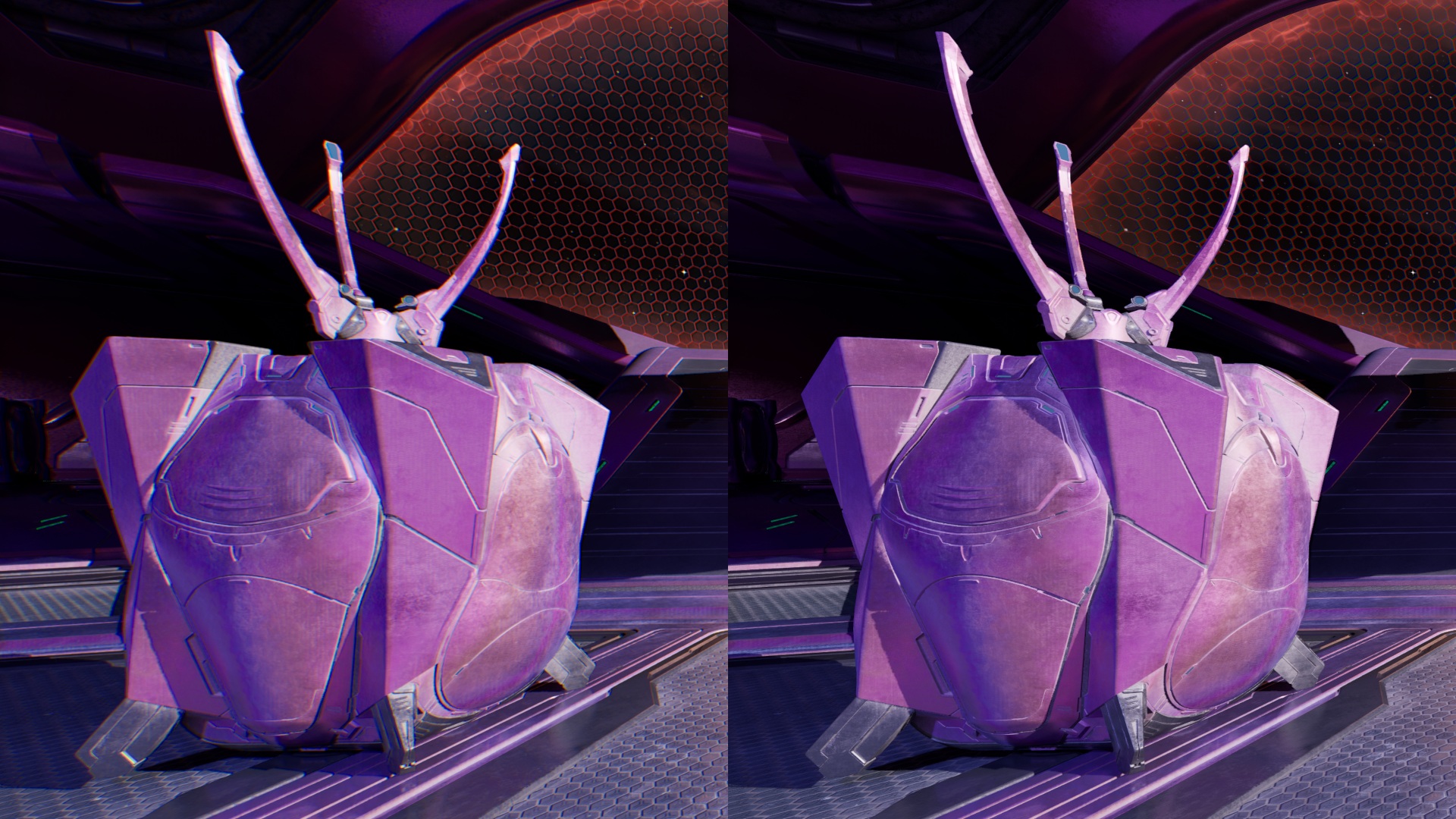
(Chromatic Aberration On VS Off)
New Graphics Options
The ability to toggle Chromatic Aberration and Film Grain allows gamers to achieve much cleaner visuals in Halo: Campaign Evolved, sacrificing the game’s filmic look for increased clarity and fluidity. Honestly, disabling these features makes Halo: Campaign Evolved look much better, letting gamers see finer details with less fringing and visual noise.
While many see Film Grain and Chromatic Aberration as desirable effects, they are applied too strongly in Halo: Campaign Evolved. While the toggle is good, fans of these effects may want a slider to adjust their intensity. That said, I am happy with these effects turned off.
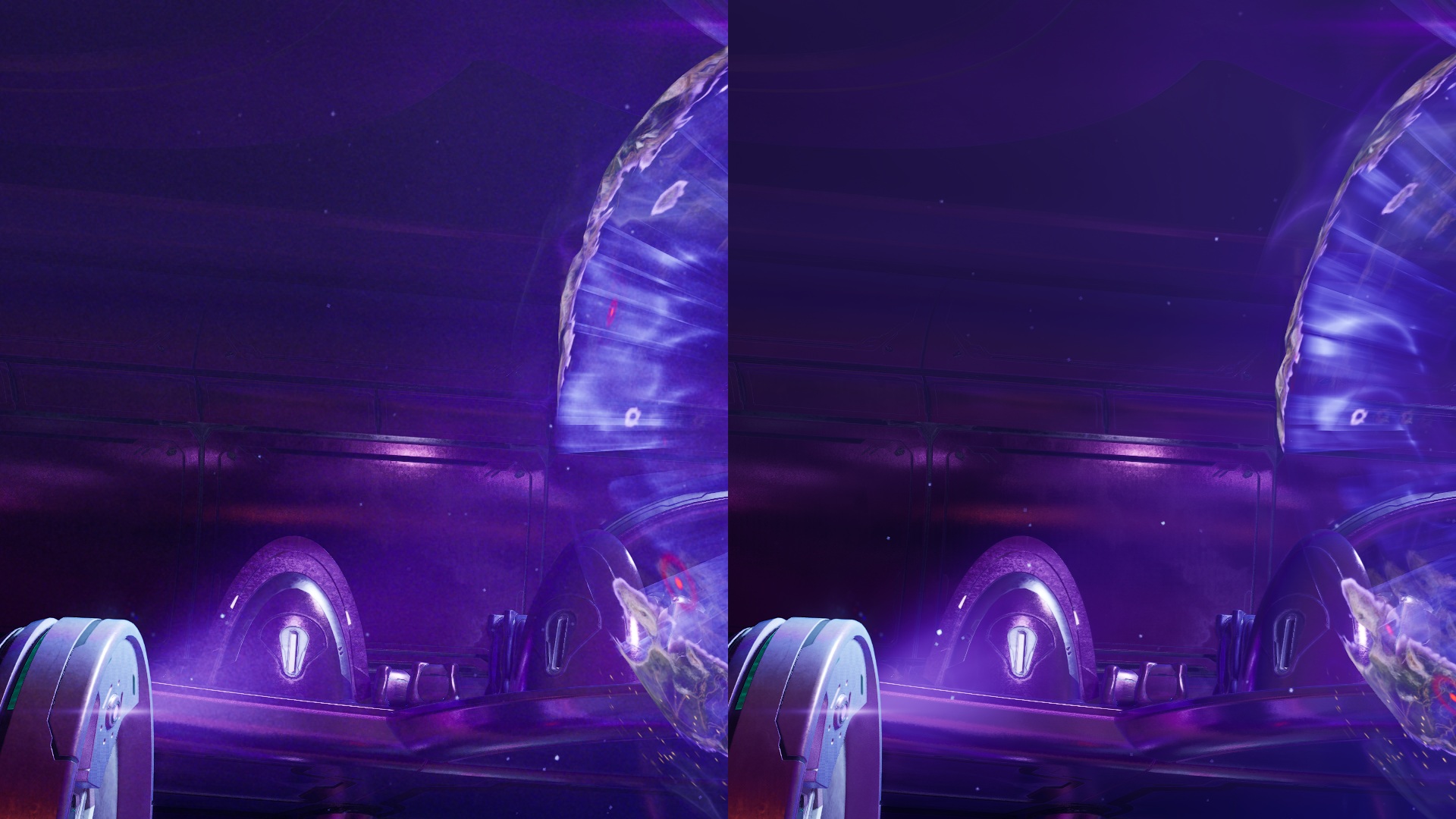
(Film Grain On VS Off)
Do games need to look filmic?
Chromatic Aberration and Film Grain are graphical effects that emulate visual artefacts when filming through lenses and onto photographic/camera film, respectively. Games emulate these effects to give them a more filmic look, making them feel more like classic cinema. While these effects may be desirable to some players, their digital integration can lessen detail. In a setting where improved visuals are desirable, it is easy to see why many gamers don’t want to see these artefacts introduced into games.
For starters, why do we need chromatic aberration in a first-person shooter? Does Halo need to be viewed as if it were through a camera’s lens? Surely this effect shouldn’t be present if the intention is to see the game through Master Chief’s eyes? If so, why is film grain also present? Film grain is not present in human vision, so why is it in this first-person gaming experience? Are gamers supposed to play as Master Chief, or view the game through a helmet-mounted film camera?
In my opinion, film grain and chromatic aberration shouldn’t be in games unless the effect is necessary for artistic reasons. For a futuristic first-person shooter, these effects are not necessary. If anything, they detract from immersion by emulating effects the human eye doesn’t see. Should the Master Chief see film grain? If not, why is it turned on by default for gamers? Developers, if you include these effects, consider whether they are really necessary, and if so, add a toggle. Even if you think they are necessary for your vision, many gamers will disagree and want to turn it off.
You can join the discussion on Halo: Campaign Evolved’s newest update on the OC3D Forums.
