


Is your PC ready for Control Resonant?

Can you run it? Control Resonant’s PC system requirements have arrived
Remedy Entertainment has just released its PC system requirements for Control Resonant, which is coming to PC and consoles on September 24th. These system requirements confirm that Control Resonant will be a challenging game to max out on PC. However, the game will be much easier to run if gamers dial down settings like ray tracing.
Remedy’s newest games have all been graphical showcases. Control and Alan Wake 2 are both great-looking games. This is especially true on PC, where Remedy has made excellent use of modern PC hardware and graphical effects. Like Control, Control Resonant will be playable with and without ray tracing. On PC, the game will even include a path tracing mode.
Like prior Remedy games, Control Resonant supports several advanced PC features. This includes ultra-wide screen support, an uncapped framerate, modern upscalers like DLSS 4.5 and FSR 4.1, and their accompanying Frame Generation technologies. On PC, the game calls for 120GB of SSD storage and 16GB of system memory. VRAM requirements are also fairly low for a modern game, which is good news for users of older graphics cards.
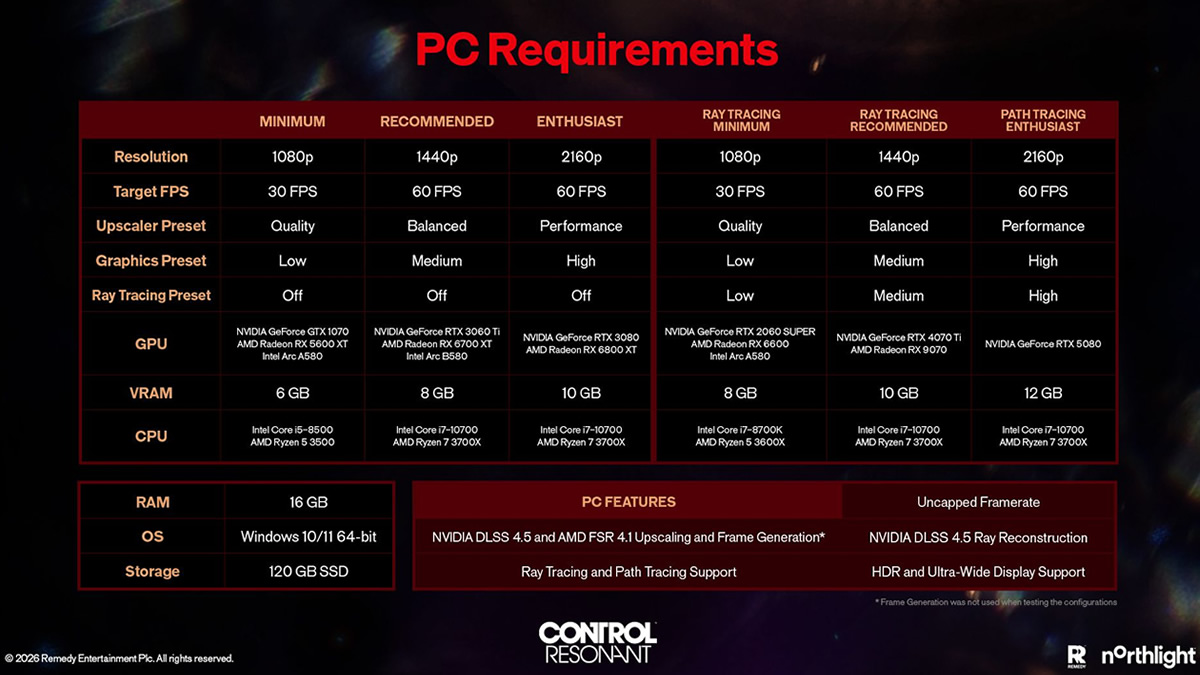
PC System Requirements
Overall, Control Resonant’s PC system requirements are reasonable. Upscaling is enabled for all supported hardware, with the game supporting DLSS 4.5 and FSR 4.1 upscaling and Frame Generation. Note that the framerate targets below are real framerates without Frame Generation enabled.
Minimum
- CPU – Intel Core i5-8500 or AMD Ryzen 5 3500
- Resolution – 1080p
- Target FPS – 30 FPS
- Upscaler Preset – Quality
- Graphics Preset – Low
- Ray Tracing Preset – Off
- GPU – Nvidia GeForce GTX 1070, AMD RX 5600 XT, Intel ARC A580
- VRAM – 6GB
Recommended
- CPU – Intel Core i7-10700 or AMD Ryzen 7 3700X
- Resolution – 1440p
- Target FPS – 60 FPS
- Upscaler Preset – Balanced
- Graphics Preset – Medium
- Ray Tracing Preset – Off
- GPU – Nvidia GeForce RTX 3060 Ti, AMD RX 6700 XT, Intel ARC B580
- VRAM – 8GB
Enthusiast
- CPU – Intel Core i7-10700 or AMD Ryzen 7 3700X
- Resolution – 2160p (4K)
- Target FPS – 60 FPS
- Upscaler Preset – Performance
- Graphics Preset – High
- Ray Tracing Preset – Off
- GPU – Nvidia GeForce RTX 3080 or AMD Radeon RX 6800 XT
- VRAM – 10GB
Ray Tracing
With ray tracing enabled, Control Resonant will require much higher-end PC hardware. That said, the game won’t demand something like an RTX 5090 for 4K 60 FPS performance. That said, the game does call for an RTX 5080 with DLSS Super Resolution set to Performance mode.
Minimum Ray Tracing
- CPU – Intel Core i7-8700K or AMD Ryzen 5 3600X
- Resolution – 1080p
- Target FPS – 30 FPS
- Upscaler Preset – Quality
- Graphics Preset – Low
- Ray Tracing Preset – Low
- GPU – Nvidia GeForce RTX 2060 SUPER, AMD RX 6600, Intel ARC A580
- VRAM – 8GB
Recommended Ray Tracing
- CPU – Intel Core i7-10700 or AMD Ryzen 7 3700X
- Resolution – 1440p
- Target FPS – 60 FPS
- Upscaler Preset – Balanced
- Graphics Preset – Medium
- Ray Tracing Preset – Medium
- GPU – Nvidia GeForce RTX 4070 Ti or AMD RX 9070
- VRAM – 10GB
Enthusiast Ray Tracing
- CPU – Intel Core i7-10700 or AMD Ryzen 7 3700X
- Resolution – 2160p (4K)
- Target FPS – 60 FPS
- Upscaler Preset – Performance
- Graphics Preset – High
- Ray Tracing Preset – High
- GPU – Nvidia GeForce RTX 5080
- VRAM – 12GB
Join the discussion on Control Resonant on the OC3D Forums.
