


Windows 11 is making the “Sticky Keys” prompt easier to banish

Windows’ annoying “Sticky Keys” prompt is getting a “Never Ask Again” option
Gamers rejoice. Microsoft is making it easier to stop summoning the “Sticky Keys” and “Filter Keys” prompts in Windows 11. With the OS’ Insider Beta Preview Build 26320.9876 and Experimental build 26340.9882, Windows 11 now has an updated Sticky Keys dialog that allows users to dismiss the prompt permanently. This prompt shows itself when the Shift key is pressed five times in a row.
For many PC users, pressing the Shift key five times in a row is uncommon. However, PC gamers are a subset of users who have likely come across this issue before. Many PC games map sprinting or crouching to the Shift key. This means that a lot of PC gamers have had this prompt pull them out of their full-screen games.
Currently, Windows 11 users need to go to Settings, then Accessibility, then Keyboard to turn off “Sticky Keys” and “Filter Keys” prompts. Soon, Windows 11 users will be able to do this within the prompt itself. This will save users a lot of time and hassle.
[Input]
- The dialogs that ask whether you’d like to turn on Sticky Keys or Filter Keys are being updated, making it easier to dismiss these prompts permanently. If you don’t use these keyboard features, you can choose not to be asked again directly from the dialog, helping you continue what you’re doing with fewer interruptions.
– Microsoft
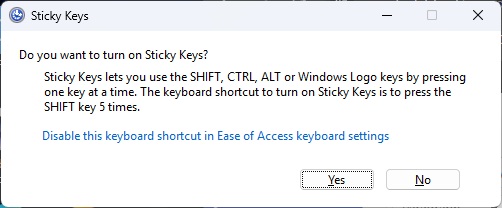
(This prompt will soon have a “Never Ask Again” option)
Right now, it is unclear when this new feature will become available to all Windows users. This change clearly shows Microsoft is now listening to the feedback from Windows users. Gamers have been complaining about this issue for over a decade. It’s great to see Microsoft finally addressing this issue. Expect this update to roll out to all Windows 11 users within the next few weeks or months.
Join the discussion on Windows 11 making the “Sticky Keys” prompt easier to silence on the OC3D Forums.