DLSS 2.0 with Control – Nvidia’s new killer feature

DLSS Performance – Benchmarks
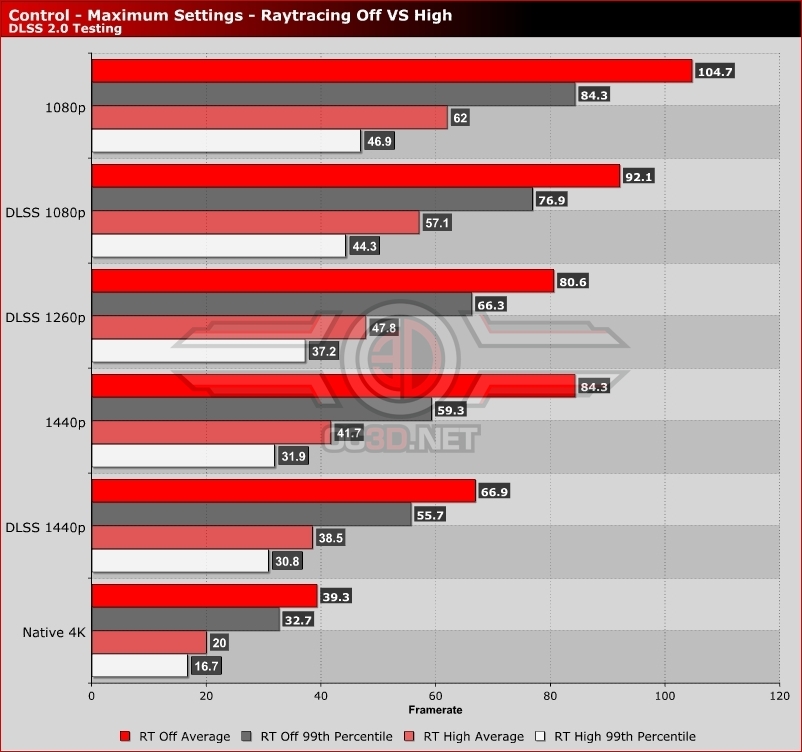
DLSS is designed to increase game performance and offer similar, and arguably higher, levels of image quality. With this in mind, we tested Control at its highest settings (with raytracing on/off) to see how much extra performance DLSS 2.0 can offer.
For starters, let’s compare DLSS to Control’s other image upscaling techniques. Below we have tested Control at 4K at its native render resolution and at lower render resolutions of 1080p and 1440p. In the graph below we have also tested Control at 4K with DLSS base resolutions of 1080p, 1260p and 1440p.
The first thing to note is that DLSS provides a massive performance boost over native resolution rendering, delivering gamers much higher framerates with visuals that are similar to a native 4K presentation. In some areas, DLSS deliver better visuals than native 4K, especially with 1260p and 1440p base resolutions.
When compared to Control’s standard upscaling techniques, DLSS offers slightly less performance than upscaling the same resolution using the game’s standard upscaling feature. That said, the graphics boosts are more than worth the cut in performance. This performance cut is higher when Raytracing is turned off, possibly showing how strained Nvidia’s Tensor cores are when playing some games at higher framerates. Perhaps this is a potential area of improvement for future RTX series graphics cards.
With the right settings changes (see our Control performance analysis for a settings optimisations guide), 4K 60FPS performance with or without raytracing enabled should be possible with control using DLSS. The same will apply to other RTX series graphics cards at lower resolutions.