


Windows 11 is auto-enabling Memory Integrity next month, and it could impact your gaming performance

Microsoft is auto-enabling memory integrity in Windows 11, and that could impact your gaming FPS
Microsoft has announced that it plans to start auto-enabling “Memory Integrity” by default on compatible Windows 11 systems in October 2026. This change will arrive through next month’s Patch Tuesday update, auto-enabling a feature that has been optional in Windows since Windows 10.
What is Memory Integrity
Memory Integrity goes by several names: Virtualisation-based Security (VBS), Hypervisor-protected Code Integrity, and HVCI. It uses a CPU’s virtualisation hardware to create an isolated environment that Windows cannot access directly, making systems more secure. Kernel mode drivers can pass through this protection layer, but regular software cannot. This adds an extra layer of protection to PCs.
For automatic enablement in Windows 11, PCs must meet the following hardware requirements. Note that these hardware requirements are fairly lax.
- Intel CPU: 8th-generation processor or newer,
- AMD CPU: Zen 2 or newer,
- Qualcomm CPU: Snapdragon 8180 or newer,
- At least 8GB of RAM on x64 systems,
- A 64GB SSD, virtualisation enabled in firmware,
- Drivers already confirmed compatible with Memory Integrity.
Can Memory Integrity impact gaming performance?
For years, gamers have disabled Memory Integrity on their PCs to maximise gaming performance. When this feature is enabled, gaming framerates can be lowered in CPU-limited games. However, these performance limitations are more noticeable on older CPUs, making them less of an issue on newer gaming PCs.
Given Memory Integrity’s security benefits, the feature is now required for some PC games. This enables stronger anti-cheat capabilities for game developers, which means that Memory Integrity may become unavoidable for competitive gamers. Riot Games has already created a guide on how to enable Memory Integrity, signalling how important the feature is to their anti-cheat system.
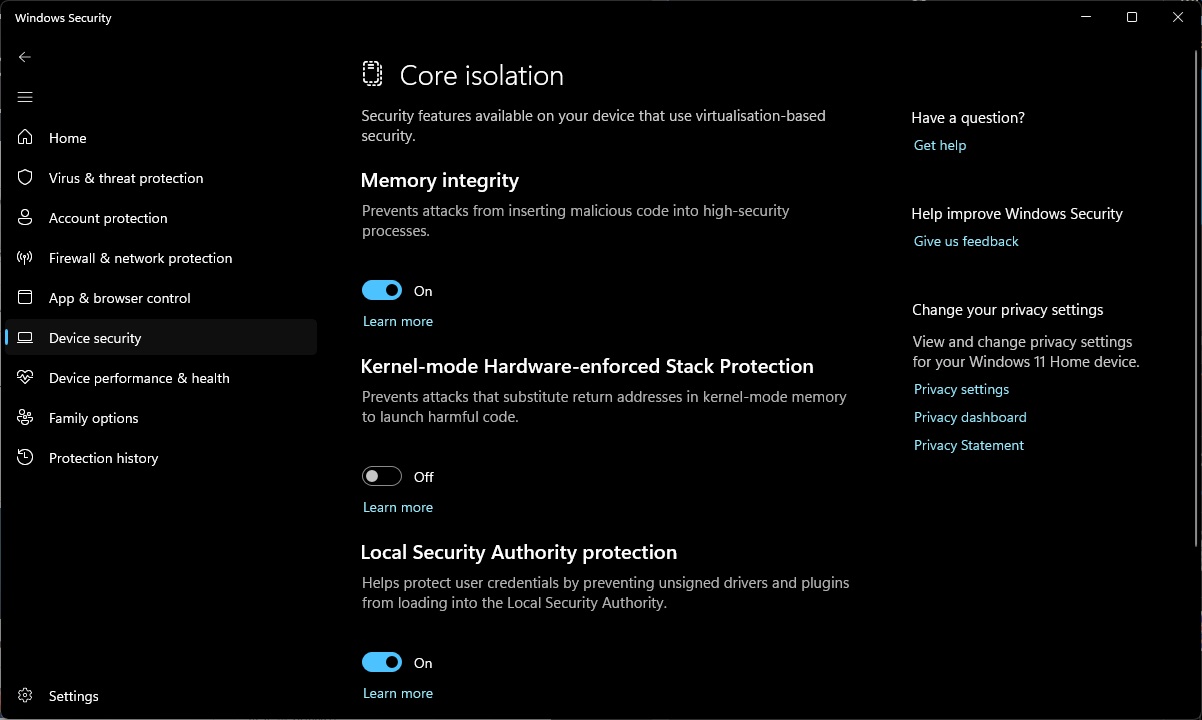
(Memory Integrity Enabled in Windows 11)
Microsoft isn’t forcing Memory Integrity on all Windows 11 users
PC gamers shouldn’t expect Memory Integrity to be enabled on their PCs if they explicitly turned it off using Group Policy, manual registry edits, or similar methods. Microsoft is simply enabling the feature on compatible hardware to beef up the security of their OS. Simply put, it eliminates a potential attack vector, and it’s hard to argue with the benefits of that.
While Memory Integrity can affect performance, newer CPUs handle these virtualisation features better, minimising the impact. For many, this makes enabling Memory Integrity a non-issue. That said, some gamers may want to sacrifice these security benefits to boost their gaming framerates in affected titles. Ultimately, Memory Integrity remains an optional feature; it’s just being auto-enabled on more PCs.
Join the discussion on Windows 11 auto-enabling Memory Integrity next month on the OC3D Forums.
