


Nvidia boosts DLSS Frame Generation with new “Preset C” beta

Nvidia boosts DLSS Frame Generation with new “Preset C” profile
With a new Nvidia App beta update, Nvidia has released a faster “Performance Mode” for its DLSS Frame Generation and Multi Frame Generation technologies. With this beta, Nvidia RTX 40 GPUs, RTX 50 GPUs, and RTX Spark laptops can benefit from DLSS Frame Generation’s new “Preset C” mode.
While this new model has “minor trade-offs in image quality”, it can operate up to 35% faster. That means higher gaming framerates without needing higher Frame Generation levels. Below, we can see how this impacts Nvidia’s RTX 5060 GPU.
By lowering DLSS Frame Generation’s computational requirements with Preset C, gamers can get a higher baseline framerate and higher post-frame-generation framerates. In the example below, with DLSS 6X frame generation, Nvidia’s baseline framerate increased from 42.5 FPS to 58 FPS with their RTX 5060. This results in post-frame-generation framerates moving from 255 FPS to 348 FPS.
Today, via a new NVIDIA app beta update, we’re introducing a new faster Performance Mode for Frame Generation, for GeForce RTX 40 Series and GeForce RTX 50 Series GPUs, and RTX Spark laptops.
DLSS Multi Frame Generation and Frame Generation utilize two AI models, one that leverages game data such as motion vectors and depth to understand object motion between the two rendered frames, and a second model to calculate optical flow for elements like UI or ray-traced effects.
Labeled “Preset C,” in the NVIDIA app’s Frame Generation override, this new Performance Mode replaces the second AI model with a faster and lighter algorithm to boost frame rates for DLSS Frame Generation, Multi Frame Generation, and Dynamic Multi Frame Generation, with minor trade-offs in image quality. On a GeForce RTX 5060, this Performance Mode for Frame Generation is up to 35% faster.
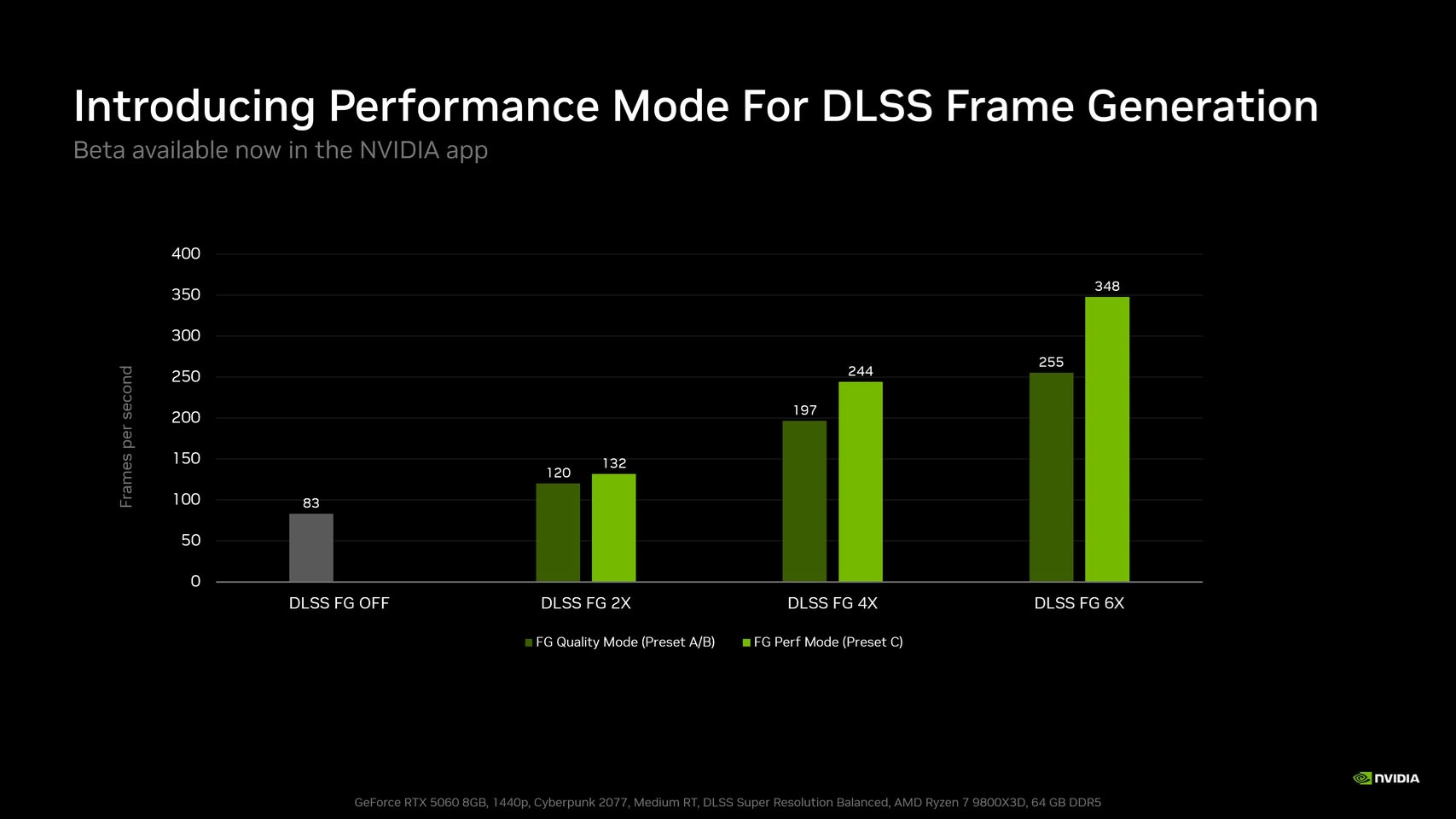
(DLSS Frame Generation runs much faster with Preset C)
How to access “Preset C”
This new “Preset C” DLSS Frame Generation profile is now available through a beta version of the Nvidia App. This can be downloaded within the Nvidia App itself using the following instructions.
It is currently unknown when this new model will leave beta or what is needed for it to do so. Will Nvidia address its “minor trade-offs in image quality” before fully releasing this new DLSS preset? Or will this model be relatively unchanged when it exits beta?
How to apply Preset C to your games:
1. Download and install the latest NVIDIA App update from official website or within the app itself.
2. Open the app, go to Settings > About, and check “Opt in to access Beta or experimental features.”
3. Wait for the beta update to download, then click the on-screen message to install it.
4. Once installed, open the “Graphics” section of the new NVIDIA app beta and select a supported Frame Generation, Multi-Frame Generation, or Dynamic Frame Generation game. Alternatively, select “Global Settings” at the top of the window to apply it to every supported game in your library.
5. Scroll to “Driver Settings.”
6. Click “DLSS Override – Model Presets.”
7. Click “Custom.”
8. Open the “Frame Generation” drop-down and choose “Preset C.”
9. Click “Apply.”
Join the discussion on Nvidia’s new DLSS Frame Gen “Preset C” on the OC3D Forums.
