


Microsoft adds GPU performance to Windows Task Manager


Microsoft adds GPU performance to Windows Task Manager
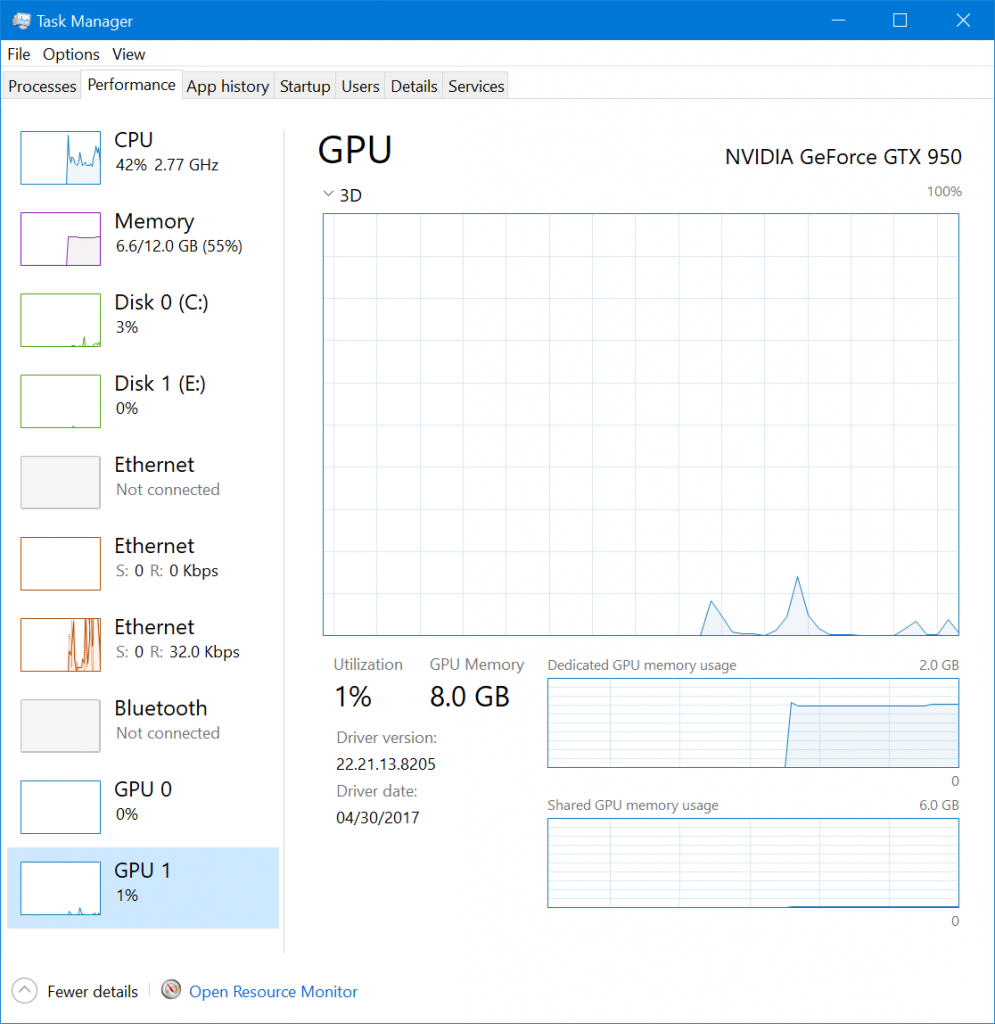
In the latest Insider Build of Windows 10, version 16226, Microsoft has added GPU performance metrics to the Windows task manager.
Previously, if Windows users wanted to chart their GPU utilisation they would need to use an external application like GPU-Z or the graphical analysis options on GPU overclocking utilities. When this new feature makes it to the mainline version Windows 10, users will be able to look at GPU usage without the need for external utilities.
This GPU option for the Windows Task Manager will be able to tell you the model of your GPU, it’s 3D usage/utilisation, the amount of GPU or shared memory that it is making use of and eventually show encode and decode data.
With this new Insider version, Microsoft has also added an option to delete older versions of Windows using Storage Sense, making it much easier to get rid of those Windows.old files.
You can join the discussion on Microsoft’s latest Windows Insider Update on the OC3D Forums.
Microsoft adds GPU performance to Windows Task Manager
In the latest Insider Build of Windows 10, version 16226, Microsoft has added GPU performance metrics to the Windows task manager.
Previously, if Windows users wanted to chart their GPU utilisation they would need to use an external application like GPU-Z or the graphical analysis options on GPU overclocking utilities. When this new feature makes it to the mainline version Windows 10, users will be able to look at GPU usage without the need for external utilities.
This GPU option for the Windows Task Manager will be able to tell you the model of your GPU, it’s 3D usage/utilisation, the amount of GPU or shared memory that it is making use of and eventually show encode and decode data.
With this new Insider version, Microsoft has also added an option to delete older versions of Windows using Storage Sense, making it much easier to get rid of those Windows.old files.
You can join the discussion on Microsoft’s latest Windows Insider Update on the OC3D Forums.