Cooler Master V8 ACE 3DHP CPU Cooler Review

Thermal Testing – Cinebench R24

OC3D CPU Cooler Stress Test

We want to push CPU coolers to their limit, and that requires a workload that will place maximum load on our i5-14600K CPU. Why didn’t we choose an i7 or an i9? The simple answer is that we want to test various CPU Cooler options. If we put the hottest CPU we could in our system, only the best of the best CPU coolers would even pass our testing procedures. Since not everyone uses such a power-hungry CPU, we decided to tone the wattage and thermal loads down by using an i5-14600K. Even so, this CPU consumes a lot of power and generates a lot of heat under all-core workloads. Note that our CPU is operated with a fixed voltage to deliver higher levels of thermal consistency between CPU coolers.

For testing, we have used Cinebench R24. This is an all-core workload that places heavy strain on all available CPU cores. This load pushes CPU thermals higher than any other and does so consistently. We use Cinebench R24 for 30 minutes to see how hot our CPU gets over that time. If CPU temperatures rise to 100 degrees Celsius or over, that CPU cooler has failed our testing. This is part of the reason why there are more coolers on our higher fan RPM cooler charts. Some coolers will pass our thermal testing at higher fan RPMs but fail at lower fan RPMs.

Fan placement matters

When testing air-based CPU coolers, we often place a fan at the top-rear of our Lian Li O11 EVO XL test case to deliver more airflow inside the chassis. This fan can’t be present for liquid cooler testing, as this space is occupied by the cooler’s radiator. When testing the Cooler Master V8 ACE 3DHP, we found that adding this fan actually lowered CPU thermals by about half a degree during our Cinebench testing. We have not added this data to our graphs, as it is a non-standard test case. However, this does highlight how much airflow directionality matters. Clearly, this cooler prefers straight front-to-back PC case airflow patterns.

Adding an extra PC case fan does not always guarantee extra cooling performance. Airflow directionality matters. For this reason, it may be worthwhile to test your PC with various fan configurations to discover what is optimal.

1,500 RPM Fan Test

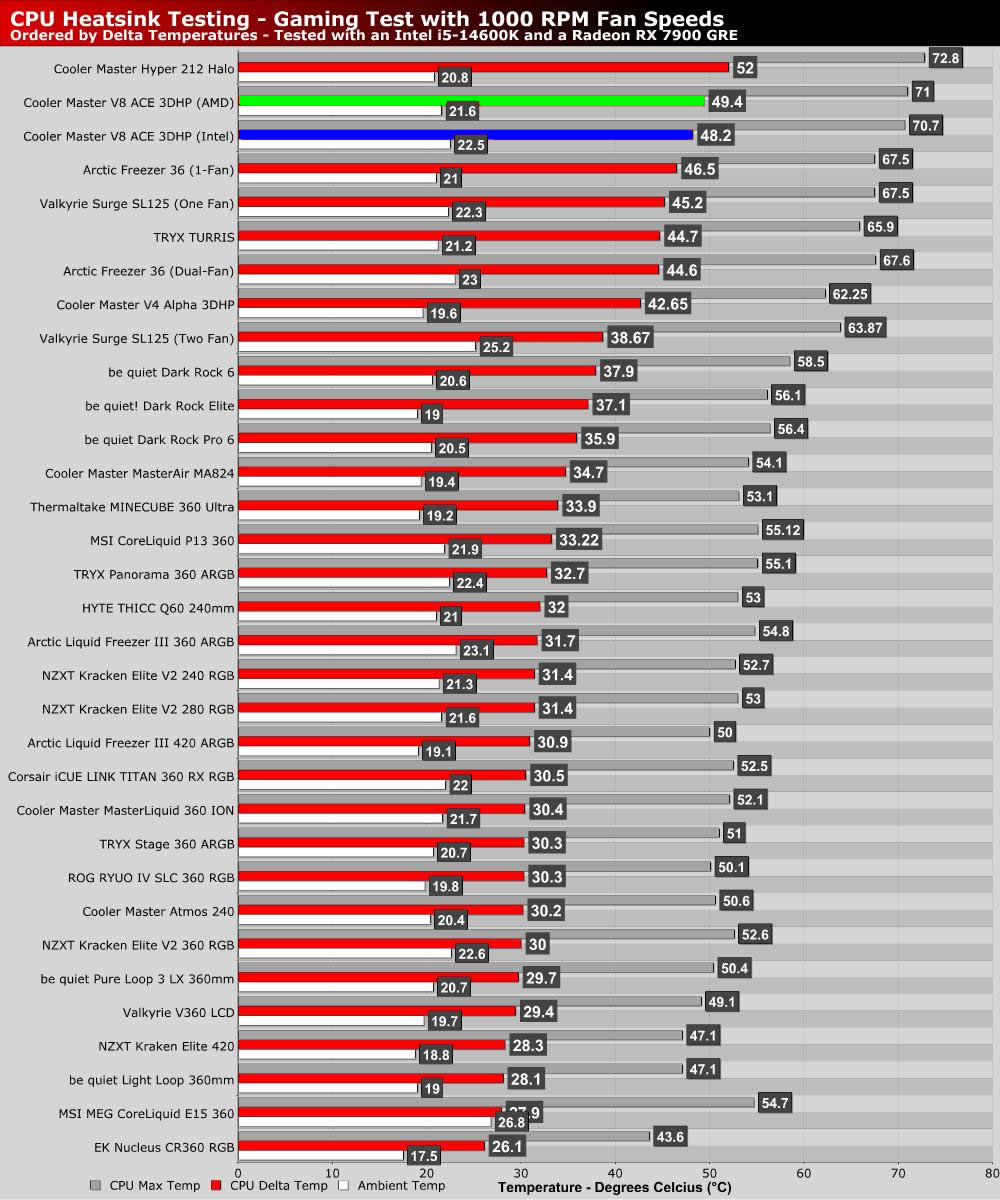
As we saw with our gaming tests, this cooler didn’t perform well with its fans set to 1,000 RPM. In that configuration, this CPU cooler failed our thermal testing. If any core gets over 100 degrees Celsius in our testing, it is an automatic failure.

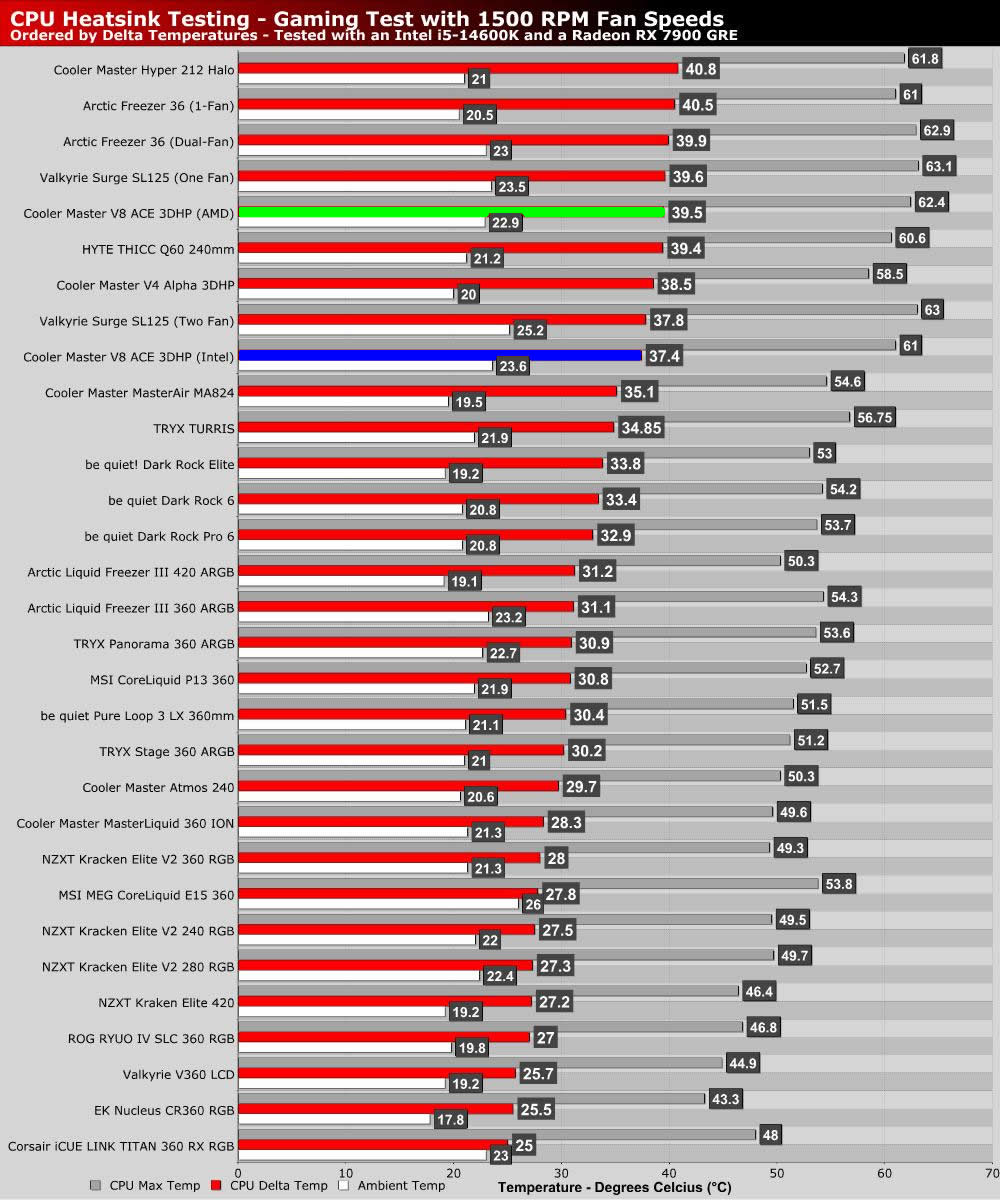
With fans set to 1,500 RPM, core temperatures drop significantly, delivering solid results. Again, we see that Cooler Master’s Intel-specific version of this CPU cooler performs best on our test system, as expected. The cooler’s Intel-specific version is 1.7 degrees cooler. If you are buying this cooler, make sure you get the correct version. The difference isn’t just marketing; the performance improvement is real.

Maximum Fan RPM Test

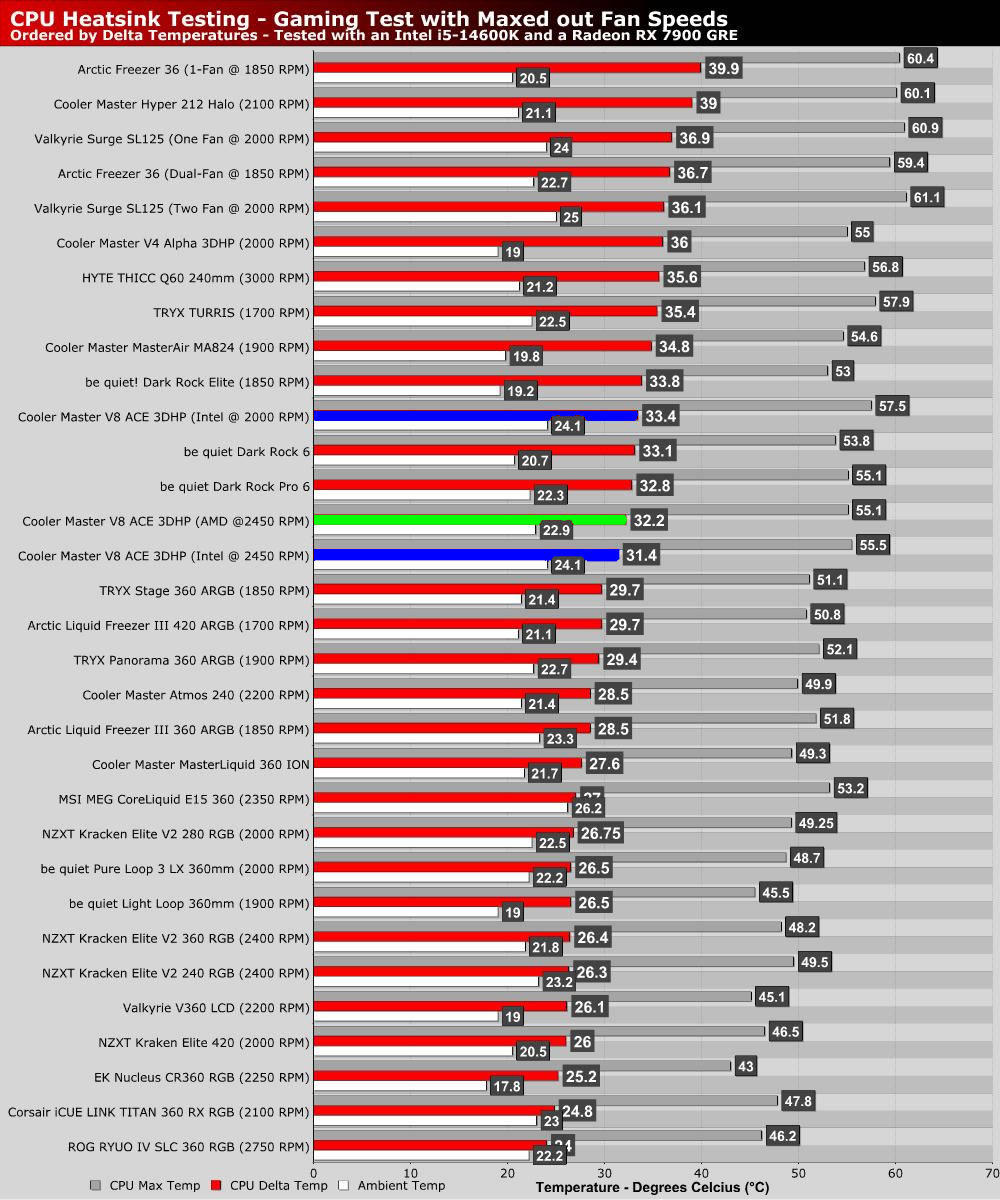
For our big CPU stress test, we opted to test the Cooler Master V8 ACE 3DHP at 2,000 RPM and at this cooler’s maximum fan speed of 2,450 RPM. Note that the Intel version of this air-based CPU cooler is the best-performing air-based CPU cooler on our chart when fans are operating at their maximum RPM values. Additionally, moving from 2,000 RPM to 2,450 RPM resulted in a 3.2-degree drop in CPU thermals.

In this test, the AMD version of this cooler delivered worse results, as expected. We also saw a much smaller thermal gap between 2,000 RPM fan speeds and 2,450 RPM fan speeds. Perhaps this is due to the cooler’s flat base, which inhibits optimal CPU contact with today’s Intel processors. However, it is also worth noting that the AMD version of this cooler is optimised for the lower TDPs of AMD CPUs, which may be impacting its thermal performance.

Mark Campbell

Mark Campbell

A Northern Irish father, husband, and techie that works to turn tea and coffee into articles when he isn’t painting his extensive minis collection or using things to make other things.

Follow Mark Campbell on Twitter
View more about me and my articles.

Uh-oh! It looks like you're using an ad blocker.

OC3D relies on ads to provide free content and sustain our operations. By white listing us on your ad blocker, you help support us and ensure we can continue offering valuable content without any cost to you. We only run our own hand picked ads from Industry brands like MSI, BeQuiet, Sapphire and PC-Specialist - meaning they are all relevent to the content you are reading.

We truly appreciate your understanding and support. Thank you for considering whitelisting OC3D