Intel Core Ultra 200S CPU Review

Introduction
Introduction
Performance above all other considerations. That tends to be the rule doesn’t it. We are always pleased to see theoretical benefits in specific scenarios, but when the chips are down and we have to decide, we go with whichever is fastest. Speed wins. It also is the thing that lasts the longest. There will always be an eventual time when the architectural matters have advanced so much even an old flagship one is bested by an entry level model.
But, if you purchased, for example, a Core i9-10980XE, only now is it really looking challenged by the entry stuff. Here, for example – minor spoilers – the 10980XE is only 1000 points better than the Ultra 5 245K. That 10th Generation setup drew 660 Watts. Way more than twice the Ultra 5 or 7. But we’re getting ahead of ourselves. What we just want to make clear is that we love the quest for performance. Now and then, though, you have to stop and calm everything down. Make it more efficient. Make it cooler. That’s what Intel are aiming for with these new Arrow Lake processors.
What Intel Desperately Needed
If you’ve been around these hallowed halls you’ll be aware of two main things about the Intel 14th Generation processors. Firstly, that they are incredibly fast. The i9-14900KS in particular is befitting of its flagship status. Secondly, and a little less pleasurably, it’s toasty. If it was any toastier it would be actual toast. We’ve tried it with some of the beefiest cooling solutions on the market, true money-no-object stuff. Still we regularly saw 90°C. Undervolting is the solution to this, and we wrote a handy guide you can read here.
We understand though that not everyone wants to play with their BIOS, even with a simple guide. That’s fine. Computers cost a lot of money and warranties are stern. What you, and we, really need then is a more efficient processor. One that brings all the performance we love from the Core i9 14th Gen, but doesn’t heat up the planet. Intel clearly thought so too. Enter the Intel Core Ultra processors. As you’ll see on the next page it’s clear that the watchword for this release is efficiency. The press-briefing was all about efficiency. All of the literature mentions it. Less power equals less heat. Less heat is what the Intel Core range is crying out for.
Technical Specifications
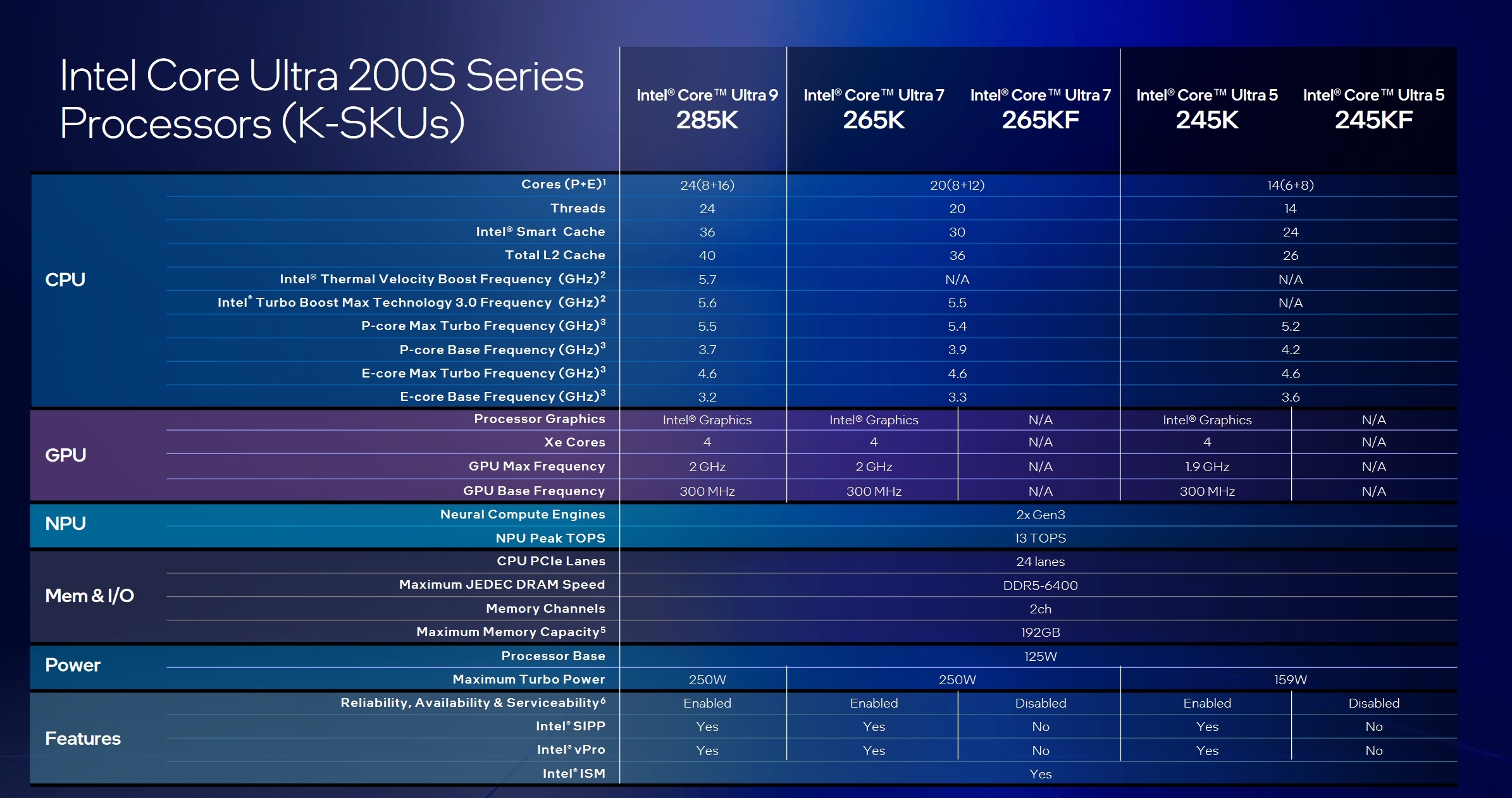
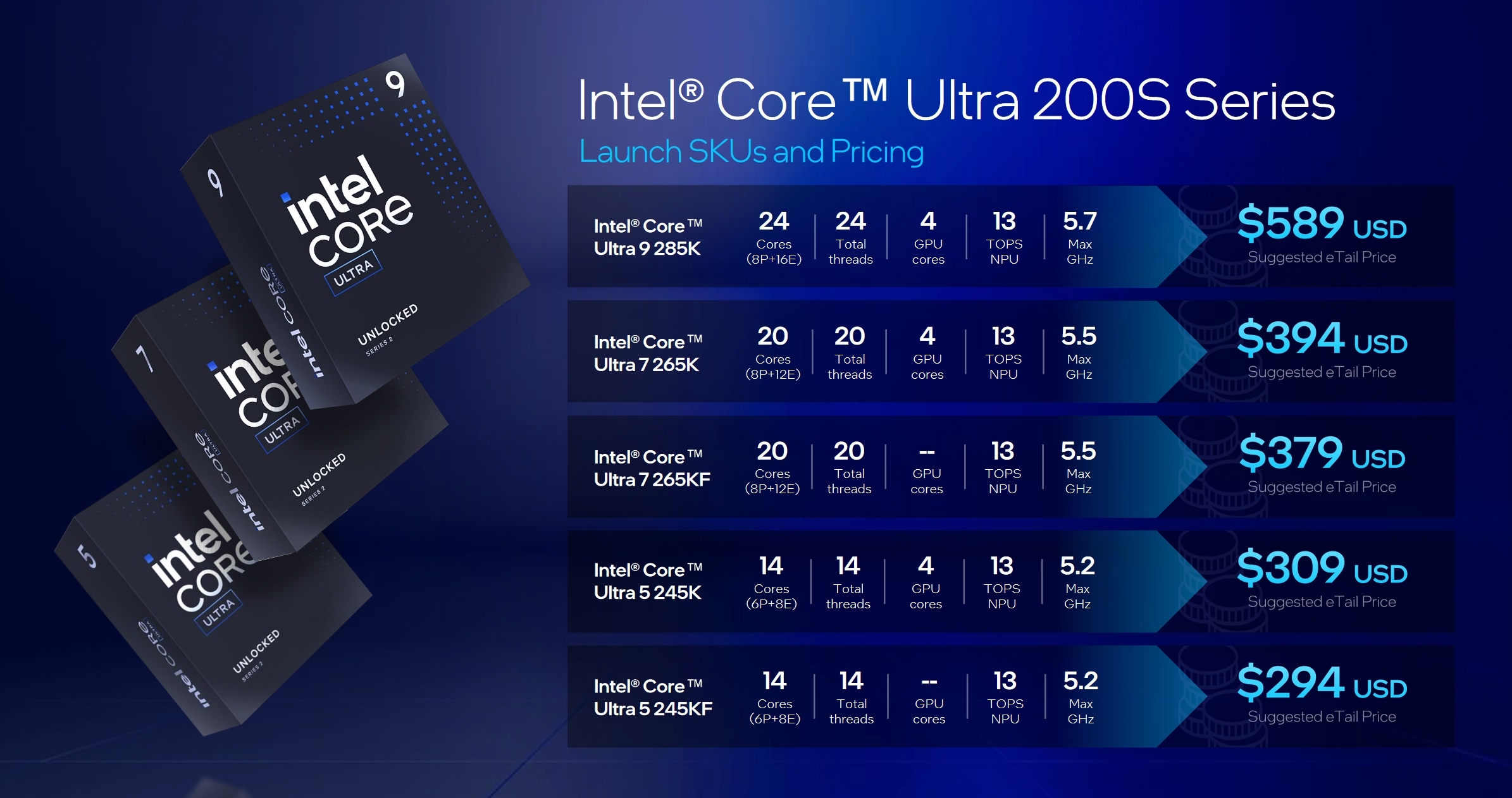
We’ve spent so long with the naming convention being “generation plus number” that the Ultra 200S series comes as something of a shock. Instead of the flagship being the Core i9-15900K it’s the Core Ultra 9 285K. There are V versions of these, for mobiles and laptops, but these are the desktop models. As you can see they largely ape the core-count and thread numbers of current Intel products. AI is a large component with NPU – Neural Processing Unit – cores found on all the processors.
Given how much lower down the pecking order the Ultra 5 is from the Ultra 7, we expected more of a price ‘bracket’. However, the Core Ultra 9 285K is rocking up to market priced very similarly to the Core i9-14900K. If it genuinely is cooler and more efficient, but just as fast, it seems a no brainer.
We’ve got the K versions of the processors in the office. Although they come with the Intel graphics, we’re sticking with our RTX card for our testing. Onboard graphics are fine for offices and very light gaming, but no good to us and our power-hungry desires. If you like more serious number breakdowns, or merely an idea of the number of PCI lanes, this table has all the information you require.