


MSI P55-GD80 Motherboard

BIOS Options
The BIOS layout of the P55-GD80 is pretty similar to other motherboards and is easily navigated via the use of arrow and enter keyboard inputs. The one area which we will be concentrating on today though is the Cell Menu. This is the section where all of the overclocking settings are to be found.
The main page is separated into three areas, CPU, Memory and Voltage settings and is navigated by the usual scroll method. CPU Features is the first setting we arrive at which is handy as this is perhaps the first area any overclocker should visit to turn off the power saving features of a CPU that can hinder a stable overclock.


The memory area is very thorough giving both the SPD settings, current settings and available timings and sub timings to tweak at your leisure. As with most high end motherboards on sale today, the MSI P55-GD80 has a plethora of options available to ensure you get the absolute maximum from your memory kit.


There are four memory dividers, each setting the frequency depending on your base clock setting. While the divider menu itself does not display this frequency, the adjusted DRAM frequency display (greyed out) does show the resulting frequency so it is possible to see the results of your tweaking immediately, ideal if like me, your maths is not your strong point.


The ClockGen tuner contains settings for configuring the driving clocks of both the CPU and PCIe. There are two amplitude control settings ranging from 700-1000mV. These settings control the clock driving control voltage but interestingly there are no clock skew settings available to delay the driving clock values.
In the main voltage section you can see that the MSI has afforded the end user the tools by which to fry there shiny new hardware thanks to a massive voltage range allowed on each component. A massive 2.1v can be pumped through the CPU which should be enough for even the most ardent of overclockers who like to dabble in extreme cooling. Among the other crazy voltages is an allowable 2.4v for the DRAM Voltage.


If you wish, you can save power by altering the phase control settings on the CPU, VTT, PCH and DDR in the Green Power section of the BIOS. Also, if bling is not your thing you can also adjust the motherboard LED settings as well as the motherboards on board touchpad (power & reset) buttons. Last of all we come to the fan control area where all of the on-board headers can be adjusted via percentages which is ideal for those looking to have a quiet system.

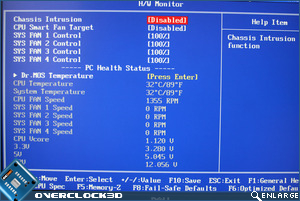
Apart from the usual CPU and system temperatures, you can also view the DrMOS temperatures. I don’t quite know why you would really want to do this other than to check that everything is running normally but it is a nice feature nonetheless and something few other manufacturers include on their mainboards. Once you have everything setup just how you like it, you can save everything to one of 6 profiles. This time saving feature is becoming more and more common these days but it is invaluable as a time saving feature and one which I hope is here to stay.
Should you overclock fail to boot then you can set the amount of ‘retries’ in the BIOS. In testing we did not have an overclock which could not recover and I didn’t have to use the CMOS clear option once as the MSI recovered from a bad overclock very well.


So then, a very good looking motherboard with a matching, easy to navigate, simple to use BIOS yet complex enough for those looking to get the absolute maximum from their system. Thus far it seems that MSI can do no wrong and I must say I am inclined to agree, However, many motherboards I have tested in the past have been good talkers but when it comes down to providing the goods, all too many times I have seen those boards clam up, talking the talk but failing to walk the walk.
Let’s see if this is the case with the P55-GD80…
