


P45 Showdown – Asus P5Q Deluxe vs MSI P45 Diamond

MSI P45 Diamond
In stark contrast to the P5Q Deluxe, the MSI box dwarfs that of its Asus rival: the package is twice as thick! The front of the box signifies that this is without doubt a board directly aimed at the gaming enthusiast, with a picture of some sort of alien being. If that wasn’t enough to give you a hint of the potential, then the ‘G’ – Gaming series emblem is also printed next to a ’45nm ready’ logo.


The box itself is not in a ‘chrome-esque’ style like the Asus, but is reflective and very well presented. Popping the lid via Velcro fasteners we see what features MSI want us to know about including Green Power, Xpress Cool and Rapid Boost, which make up the second generation ‘DrMOS’. Perhaps the most intriguing aspect besides being P45 is the inclusion of a watercooled Northbridge, which the inside panel explains in detail (and which I will cover later). Below this is a cut out section showing the Circu-Pipe block and South bridge cooling. Last of all, MSI show off their X-FI based sound card which is a huge advance from onboard audio and a great inclusion to a motherboard directed at gamers.
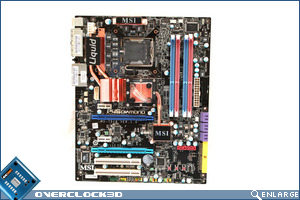
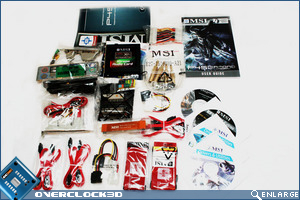


Top left we see the mainboard itself. When unpacking the box, I was shocked to see that the mainboard sat inside a plastic cradle, but the ‘lid’ was simply a piece of foam. Even though the board reached us in perfect condition, I would like to have seen some better protection for the hardware than this. The board itself has the usual array of MSI colouration, which isn’t very well coordinated and, dare I say it, quite gaudy looking. Looks aren’t everything though, and despite the technicolour board your eyes will be immediately drawn to the Circupipe cooler on top of the Northbridge.
Along with the waterblock itself, there is also an extended section to further dissipate heat that is once more attached via heatpipe to the Mosfets and Southbridge, making for a very efficient cooling setup presuming the waterblock is up to the task. MSI have not included a third PCIe x16 slot, which makes sense as there is little need for more than two currently on a Crossfire board, that is unless you fancy a dabble with say a dedicated RAID card.
Now here was where I was impressed. Inside the box was a separate box, and at first I thought MSI had sent us two motherboards. However, on opening this second box I was greeted with a whole host of goodies (above right). Here is where the MSI has put the Asus to shame. The multitude of manuals, driver disks, and connectivity, not to mention the riser X-FI sound card makes the MSI immediately appealing, but I am not going to be swayed by bribes just yet so I will swiftly move onto the board in detail.


Above left we see that MSI have chosen not to cram the CPU socket area with chokes, using just a 6 power phase design. The uppermost mosfet heatsink is also not connected to the mean heatpipe assembly, but the area is less cluttered than the Asus so there should be no trouble for fitting a large HSF. However, I somewhat doubt that a HSF would be used on the CPU if you intend on watercooling the NB, which brings me onto the jewel in MSI’s crown. The bizarre roller coaster CircuPipe designs previously had to rely on good airflow in a case, but MSI are now introducing a watercooling block which comes pre-attched to the Northbridge. I’ll cover this in greater detail when we get to the features section but it certainly looks the business.


Above left we see the backplate area. While not as tidy as the Asus, there are an additional 2 USB ports and an extra eSATA compared to the 6+1 Asus provide, so MSI are forgiven in that respect. Interestingly there is a CMOS clear button on the backplate, which should be standard on all enthusiasts boards now in my humble opinion, so credit to MSI for this inclusion and shame on you Asus for its omittance. Following on from the back plate we see the addition of a few more ‘buttons’, 2 of which I know are a power on/off and reset switch. The third? Well, there is no description of it in the motherboard manual apart from SW2, so maybe it’s a self destruct button, maybe powers a GPU ejector seat…I’ll give it a go later in the review and let you know if our testing rig survives the ordeal.
Let’s move on to the features of the MSI P45 Diamond…
