


Intel updates its CPU-boosting APO tech with support for 15 new games

Intel updates its CPU-boosting tech with support for 15 new games
Intel has released a new update for its APO game-boosting technology. With APO, users of supported Intel CPUs can achieve enhanced levels of game performance by using “Applications Optimisation”, where Intel’s software works behind the scenes to make games run faster.
With their latest APO update, Intel has added support for 15 new games. This includes many CPU-heavy titles, including simulation games like Cities: Skylines and Kerbal Space Program 2. Thanks to APO, Intel can now deliver higher average framerates and 1st percentile framerates, giving gamers a smoother gaming experience.
- 7 Days to Die
- Assetto Corsa
- Cities: Skylines
- Delta Force: Black Hawk Down
- Deus Ex: Mankind Divided
- Dyson Sphere Program
- EA Sports FC 24
- God of War
- Kerbal Space Program 2
- Like a Dragon: Infinite Wealth
- Metro Exodus Enhanced Edition
- The Callisto Protocol
- Wolfenstein Youngblood
- World of Warships
- Shushan Beginning
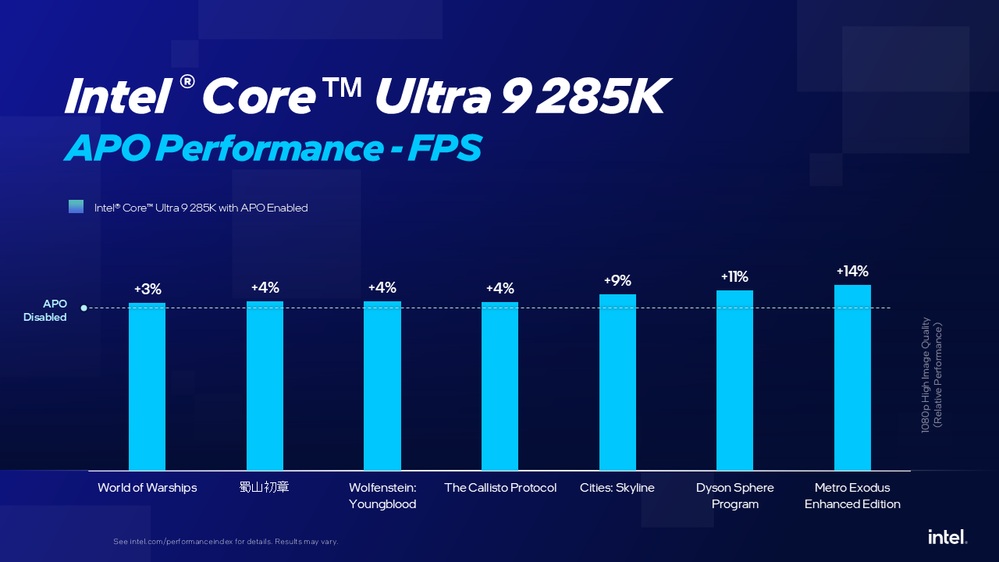
(Intel Ultra 9 285K Tested with an Nvidia GeForce RTX 5090 – Source Intel)
Intel APO Boost Performance in supported Games
Note that Intel’s APO tech doesn’t just boost average framerates. APO can deliver larger boosts to 1st percentile framerates. In many cases, Intel’s APO tech delivers a larger boost to 1st percentile framerates than average framerates. This lessens the gap between 1st percentile and average framerates, increasing framerate consistency. This also lessens feelings of “stutter” and “judder” in games.
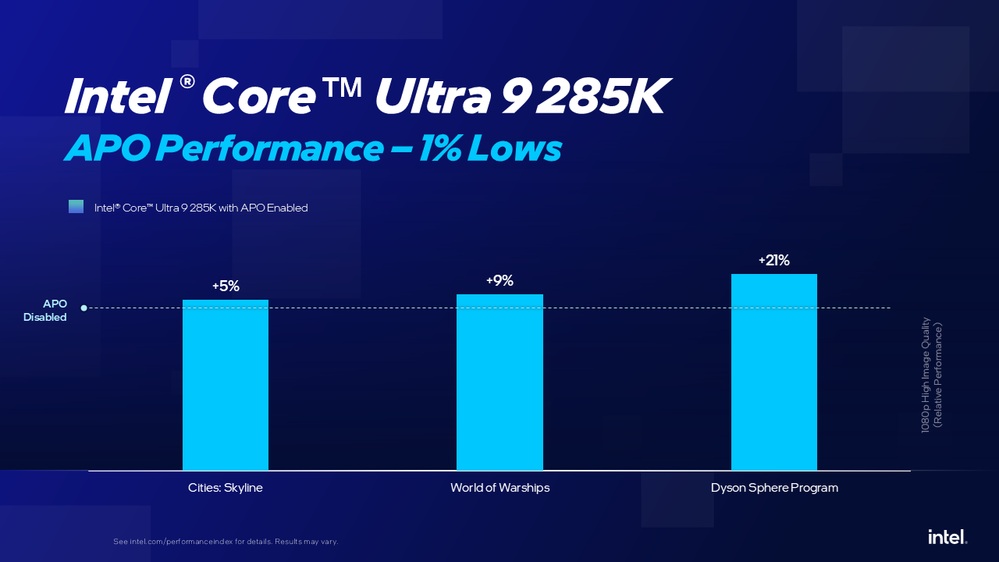
(Intel Ultra 9 285K Tested with an Nvidia GeForce RTX 5090 – Source Intel)
Not all Intel CPUs support APO. Only Intel’s high-end 14th Gen and Core Ultra 200 series CPUs are “supported” by APO. However, limited “Advanced Mode” support is available for Intel 12th-gen and newer CPUs (with 6 P-Cores or more).
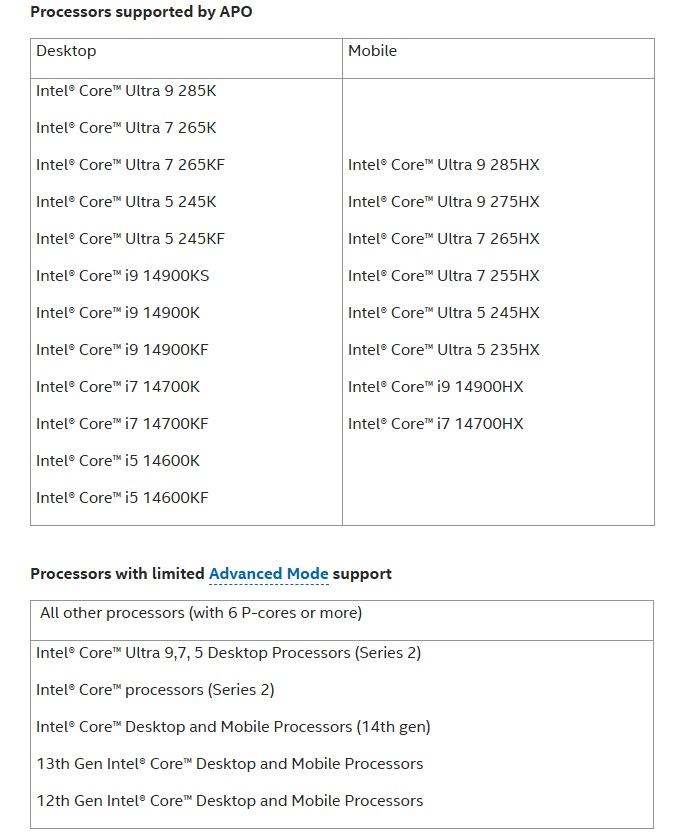
(Intel APO CPU Support)
How to install Intel APO
To utilise Intel’s APO technology, users must be using a supported CPU with Windows 11. Users should ensure that they have the newest Intel chipset drivers and BIOS versions.
To use APO, Intel users need to download and install Intel’s Dynamic Tuning Technology (DTT). Once this is installed, APO will be automatically enabled. For increased tuning, users can install Intel’s APO UI from the Microsoft Store. This will allow users to manage game-specific APO settings.
You can join the discussion on Intel’s newest APO update on the OC3D Forums.
