


Valve adds low-power Display-Off downloads to its Steam Deck handheld

Valve adds display-off downloads to its Steam Deck handhelds
As part of their latest round of beta and preview updates, Valve has added a new low-power display-off download mode to its Steam Deck and Steam Deck OLED handhelds. This allows users to complete active game downloads in a low-power mode where the handheld’s display is turned off. This feature is enabled by default when the device is plugged in, and can also be enabled when using battery power.
This download mode can be activated in two ways. When downloading content, users can press the handheld’s power button and confirm if they wish to continue downloading their games. Alternatively, this mode will be enabled automatically when the device is downloading a game and enters an idle timeout.
Thanks to this new mode, Valve can save power and make game downloads less obtrusive. For example, users can now download games overnight without their screen brightening their room. Furthermore, they can cut down on wear on their Steam Deck’s screens. This can potentially increase the lifespan of these devices.
Today we are adding a new feature to Steam Deck, enabling it to complete all active downloads in a new display-off low-power mode, before going to sleep. This feature is enabled by default when Steam Deck is plugged in to power, and can also be enabled on battery power in Settings > Power.
Display-off downloads are accessible in two ways. While Steam Deck is downloading content, pressing the power button now brings up a new dialog, asking whether you’d like to continue downloading with the screen off. Select Continue, and Steam Deck will go into the new low-power download mode. In addition, Steam Deck will automatically go into this mode after an idle timeout.
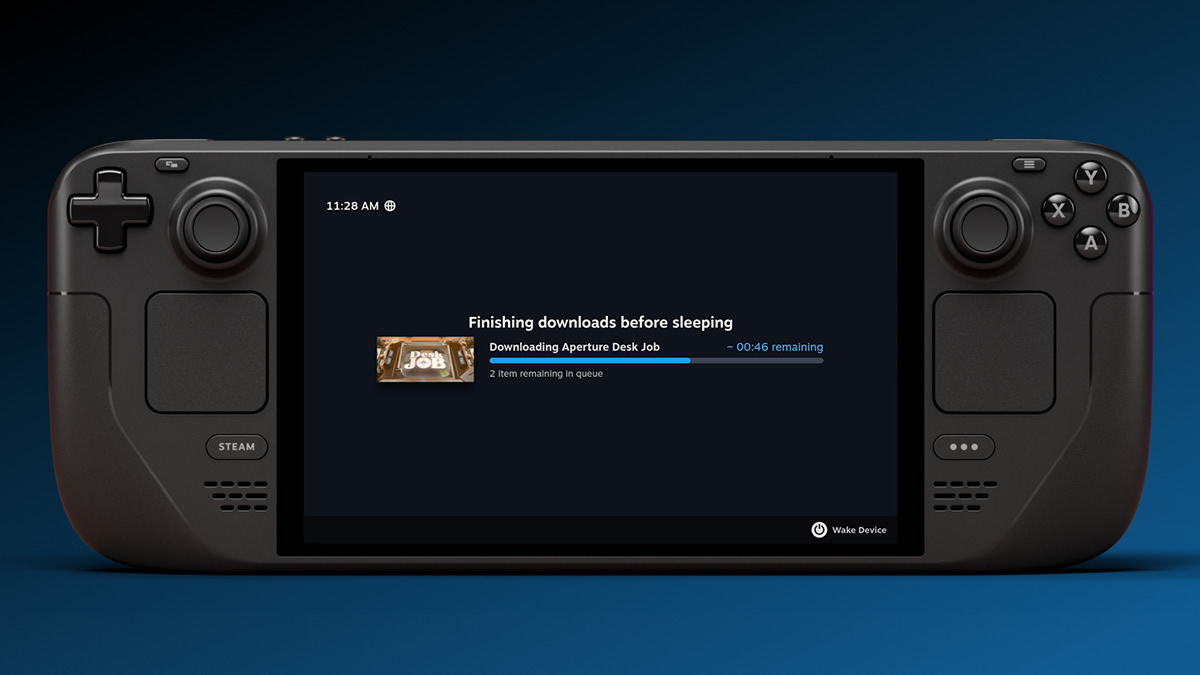
While in this mode, if you press a button or move Steam Deck, a new status screen will be shown with download progress (see above). From here you can fully wake Steam Deck or let it continue downloading with the screen off.
When this feature is active on battery power, Steam Deck will automatically go to full sleep mode if the battery level falls below 20%.
This feature is now available on Steam Deck in the Beta and Preview channels. Let us know what you think in the comments.
– Valve
Display-Off Downloads is especially helpful to Steam Deck OLED users
While the low-power nature of this new display-off download mode is useful for all Steam Deck users, Steam Deck OLED users will be the happiest to see this new change. OLED users are often concerned about potential “burn-in” risks, and download pages with static UI elements present more burn-in risk than more varied gaming workloads.
Display-Off downloads will allow Steam Deck users to download games while eliminating burn-in risks. While Steam’s dark UI could already be seen as a burn-in mitigation, display-off downloads take things one step further.
You can join the discussion on Valve adding “Display Off Downloads” to its Steam Deck on the OC3D Forums.
