


How to Enable DLSS Multi and Dynamic Frame Generation in Halo Campaign Evolved

How to enable DLSS Multi and Dynamic Frame Generation in Halo Campaign Evolved
Halo Campaign Evolved is available now on PC, and Nvidia RTX 50 series owners may quickly discover that Multi Frame Generation and Dynamic Frame Generation are not available within this game’s graphical options menu. Frame Generation can either be enabled or disabled, and only 2x Frame Generation is available.
Thankfully, users of the Nvidia App can use Nvidia’s DLSS Override feature to enable DLSS Multi Frame Generation and Dynamic Frame Generation. These options can unlock higher framerates in Halo Campaign Evolved, boosting the game’s smoothness. This is great news for owners of high-refresh-rate gaming displays, especially the faster displays on the market.
Sadly, DLSS Multi-Frame Generation currently causes a bug with Halo Campaign Evolved cutscenes. The game’s cutscenes are capped at 30 FPS, but this cap is applied after Frame Generation, and Frame Generation is not disabled during these cutscenes. This makes Halo Campaign Evolved’s cutscenes look strange when Frame Generation is enabled. With standard 2x Frame Generation, the game is using frame generation while running the cutscenes at 15 FPS. With DLSS 6x Frame Generation, cutscenes are run at 5 FPS. Hopefully, Halo Studios has plans to address this bug in the future.
Fixing Halo’s Frame Generation Cutscene Bug (Modding time)
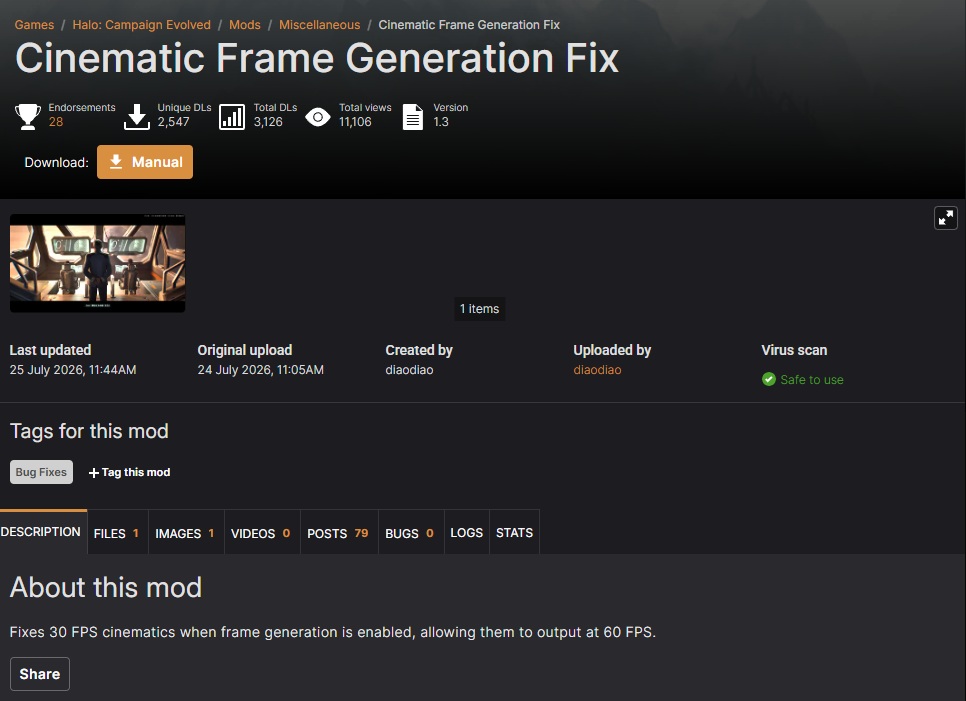
The good news is that modders have already fixed Halo Campaign Evolved’s Frame Generation issues during cutscenes. The “Cinematic Frame Generation Fix” mod on Nexus Mods allows cutscenes to run at their native 30 FPS with Frame Generation enabled. This allows Frame Generation to multiply this framerate, potentially delivering smoother results.
How to access Nvidia DLSS Overrides
To use DLSS Override, Nvidia RTX GPU users need to install the Nvidia App. This App is part of Nvidia’s newest GeForce drivers and is available as an optional install.
Unlike Nvidia’s GeForce Experience app, the Nvidia App does not require user logins to function. This makes the Nvidia App much easier to use than its predecessor.
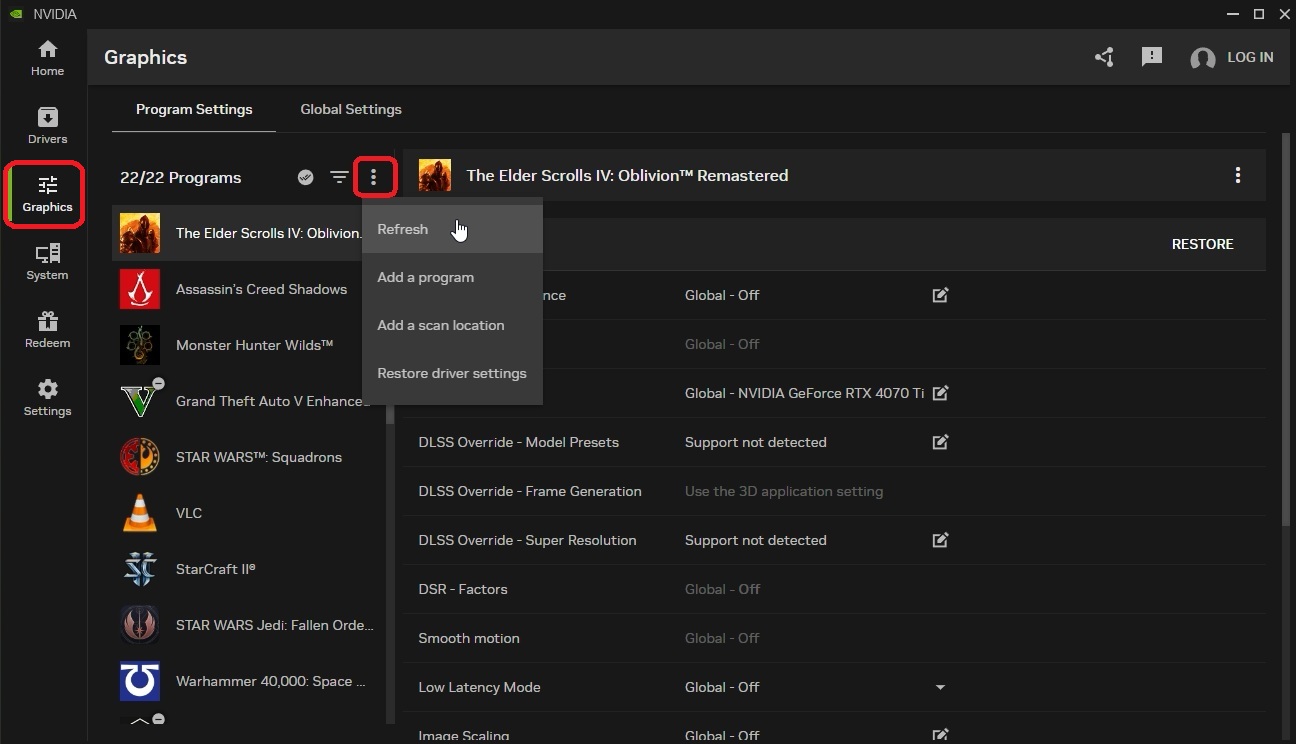
The first thing gamers need to do is navigate to “Graphics” and find Halo: Campiang Evolved as an installed program. If it doesn’t appear on your list, click the three-circle icon and then click “Refresh”. This should make the game appear on your list if it is installed.
DLSS Frame Generation Overrides
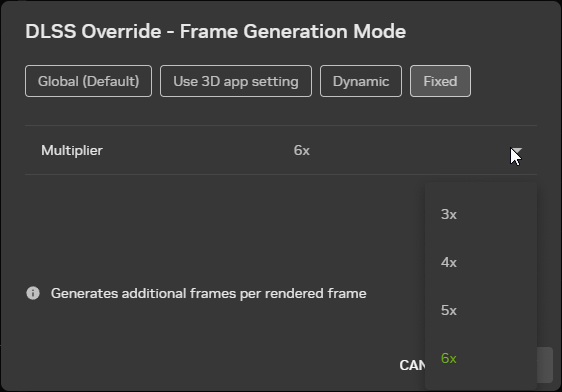
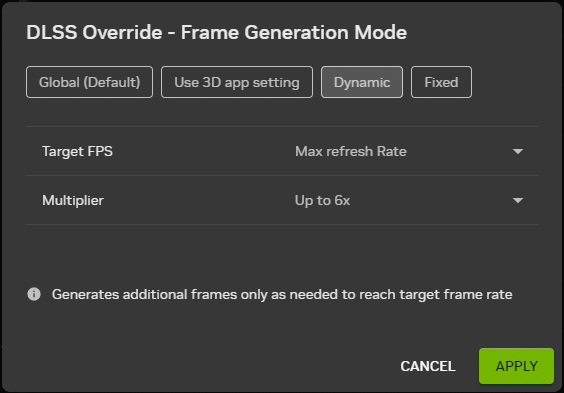
Once you find the game, you can then navigate to “DLSS Override – Frame Generation Mode”. Once you click there, a menu will appear. Within this menu, you will be able to set a DLSS Override for Halo: Campaign Evolved, which will override the game’s selected setting. Up to 6x Frame Generation is available on RTX 50 series GPUs.
DLSS Dynamic Frame Generation can also be used with this menu, an option that is not available in-game.
DLSS Performance in Halo: Campaign Evolved
As expected, enabling DLSS Multi Frame Generation allows the game to operate at much higher framerates. Note that while frame generation increases a game’s frame output, it does not reduce input latency. As such, Frame Generation should only be used when a game’s baseline framerate is high. If this isn’t the case, a game can have a smooth visual output but laggy/unresponsive controls. Frame Generation should only be used to boost an already high framerate. As such, DLSS Multi Frame Generation is most useful when gaming on ultra-high refresh rate displays.
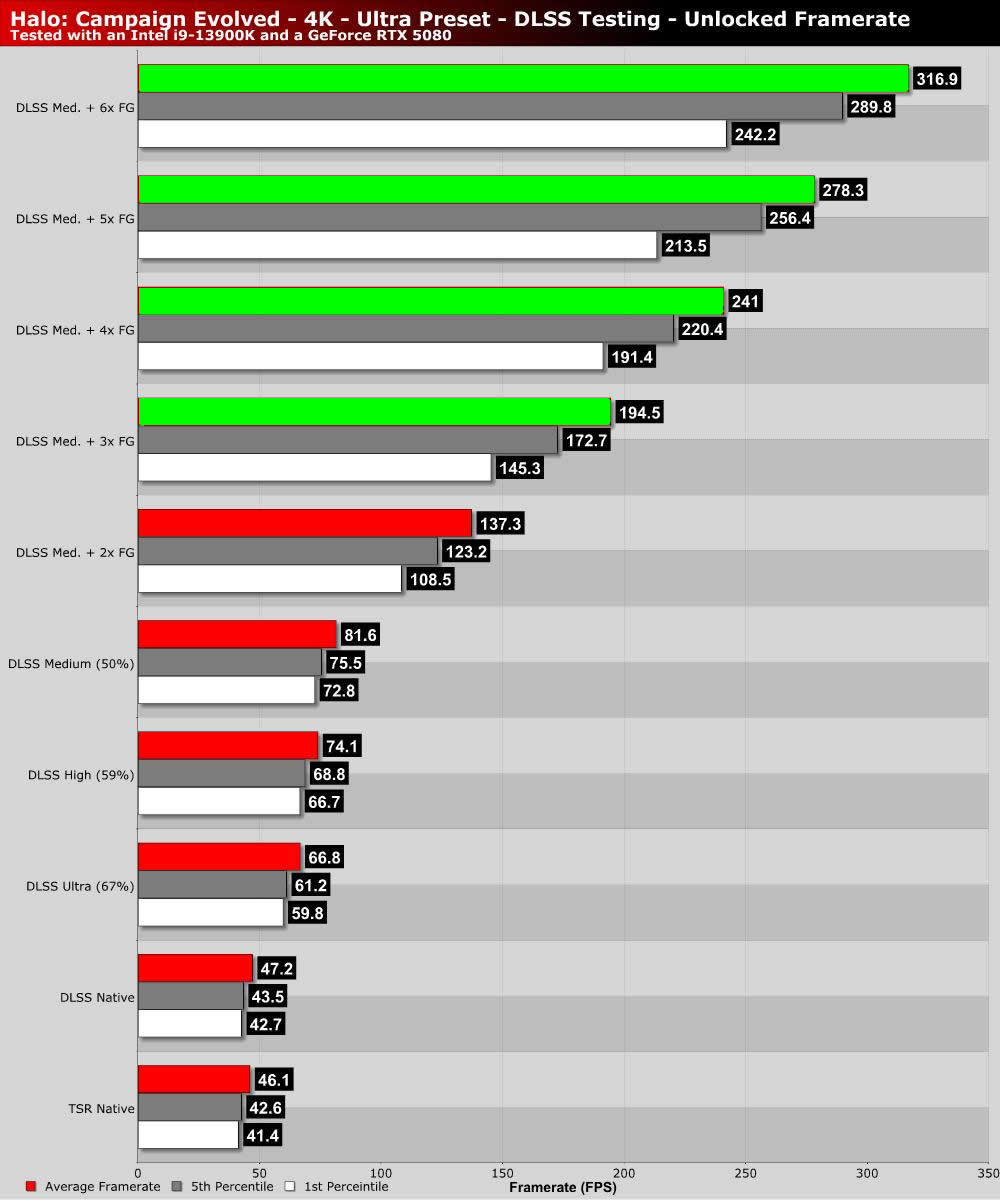
Note that Halo Campaign Evolved does not use Nvidia’s standard DLSS naming scheme. There are no Quality, Balanced, or Performance modes. This game has resolution scaling percentages with Native (100%), Ultra (67%), High (59%), Medium (50%), and Low (33%) settings. We’ve opted to test Native, Ultra, High, and Medium. Using low mode (720p upscaled to 4K) seemed a little excessive for this game.
Even at 4K Ultra settings, Halo Campaign Evolved can run at high framerates with an RTX 5080. That said, setting DLSS to “Ultra” mode is needed to push this game’s average framerate past 60 FPS. Note that our testing was conducted at the start of Halo Campaign Evolved’s Silent Cartographer mission. This mission has one of the most demanding openings in the game.
With DLSS 6x Multi Frame Generation with Medium DLSS, we were able to push our average framerate past 300Hz. Since we know that MSI and Samsung are already working on 360Hz 4K monitors, it is hard to call this framerate entirely excessive. 540Hz 1440p monitors are also available, making Nvidia’s decision to create 6x frame generation even more valid.
Conclusion – More frames for faster displays
DLSS Multi Frame Generation isn’t about making up for poor performance with AI-generated frames. 6x Frame Generation isn’t designed to turn a 20 FPS experience into a 120 FPS one. Multi-Frame Generation is about taking already solid performance levels and turning them into an ultra-fluid gaming experience on ultra-high refresh rate displays.
240Hz 4K monitors exist, and so do 540Hz 1440p monitors. 4K 360Hz monitors are coming. In time, even faster monitors will come to market, and Multi Frame Generation will help gamers enjoy smoother visuals on these screens. To have a good gaming experience, gamers will still need a good baseline framerate. After all, a higher baseline framerate means lower latencies and lower latencies mean more responsive gameplay. Frame Generation isn’t about making up for low baseline framerates; it’s about making games look smoother and making the most out of high refresh rate TVs and monitors.
We plan to conduct more PC testing on Halo Campaign Evolved soon. We didn’t get early access to this game, but we plan to release a full PC performance review soon. This article is just a taster of what’s to come.
You can join the discussion on enabling DLSS Multi Frame Generation in Halo Campaign Evolved on the OC3D Forums.
