


Nvidia adds “Auto Shader Compilation Beta” to the Nvidia App

Nvidia aims to tackle shader stutter with its Auto Shader Compilation Beta
Nvidia is taking action against shader compilation stutter. With its new Auto Shader Compilation (ASC) feature, Nvidia are giving gamers the option to rebuild game shaders outside of runtime to deliver a smoother gaming experience. When your PC is idling, it can be updating your game shaders to save time and prevent stutters later.
One annoying aspect of Shader Compilation Stutter is that shaders need to be recompiled after every GPU driver update and game update. Nvidia’s ASC feature allows users to update their shaders when their system is idle, which means that they do not need to be updated later during game runtime. This option is now available in the Graphics tab of the Nvidia app. There is also a “compile now” option for gamers who want to do this task immediately.
Making driver updates a little less annoying
ASC allows PC gamers to update their GPU drivers, knowing that their game shaders may be recompiled before they are ready to start gaming again. Sadly, this feature only updates already-compiled shaders. It doesn’t download pre-compiled shaders from the internet. This can prevent stutters in games and save users time in initial game loading screens.
While shaders still need to first be generated by games, ASC makes recompilation a hassle-free process. That’s great news for PC gamers, especially those who like to keep their drivers up to date.
We’ve all experienced it: you power your PC on, sit down to play and encounter the dreaded “Compiling Shaders” progress bar. Other times, you get right into the game but your shaders compile in the background, introducing annoying stutters.
To combat these issues, we’re introducing a beta version of NVIDIA Auto Shader Compilation (ASC), which rebuilds DirectX 12 shaders while your system is idle, reducing the frequency of game runtime compilation after driver updates.
Shaders define every pixel on screen. Because this code is written in developer-friendly languages, it must be translated into compatible machine code. This process, known as compilation, begins at game install. During this time, your CPU converts the generic shader code into an optimized format that your GPU can execute. Modern titles require tens of thousands of shader translations, a process that must be repeated after game patches or GPU driver updates. This beta is the first step into optimizing shader compilation for GeForce gamers.
By default, Auto Shader Compilation will be off, but by going to the NVIDIA app’s Graphics tab, you can activate it in Global Settings > Shader Cache. If you want to immediately recompile shaders, rather than waiting for them to be recompiled while your system is idle, you can select the “Compile Now” option located under the 3 dots on the Shader Cache screen.
Please note, after downloading a game for the first time, you must still generate shaders in-game. NVIDIA Auto Shader Compilation will update these shaders following a driver update.
NVIDIA Auto Shader Compilation requires GeForce Game Ready Driver 595.97 WHQL, or newer. If you have NVIDIA Auto Shader Compilation feedback, please share it via the NVIDIA app’s built-in form, found on the top right of the app window.
– Nvidia
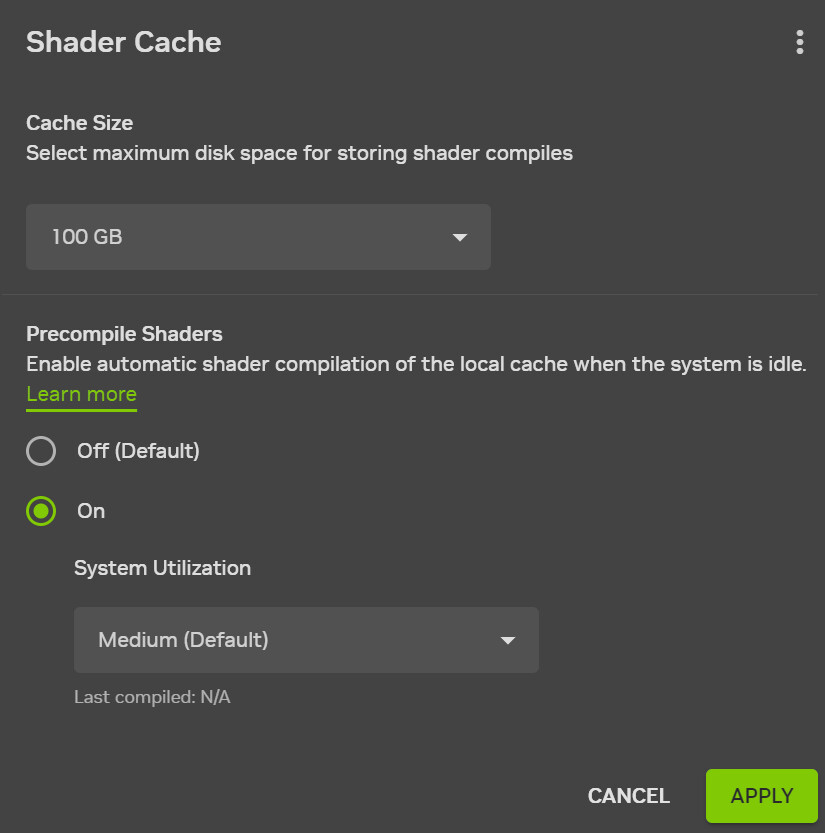
(Nvidia’s Auto Shader Compilation Beta)
Honestly, this is a great feature addition for Nvidia. Shader compilation is one of PC gaming’s biggest bugbears. Having an automatic shader recompilation process is a great addition to the Nvidia App. Currently, this feature is in beta and is disabled by default. If this beta works as intended, we can expect it to become available to all Nvidia users soon.
Right now, this feature requires Nvidia’s GeForce Game Ready 595.97 WHQL driver, or newer.
You can join the discussion on Nvidia’s solution to driver-related shader compilation stutter on the OC3D Forums.
