Gigabyte AB350N Gaming Ryzen ITX Motherboard Review

VRM Temperatures
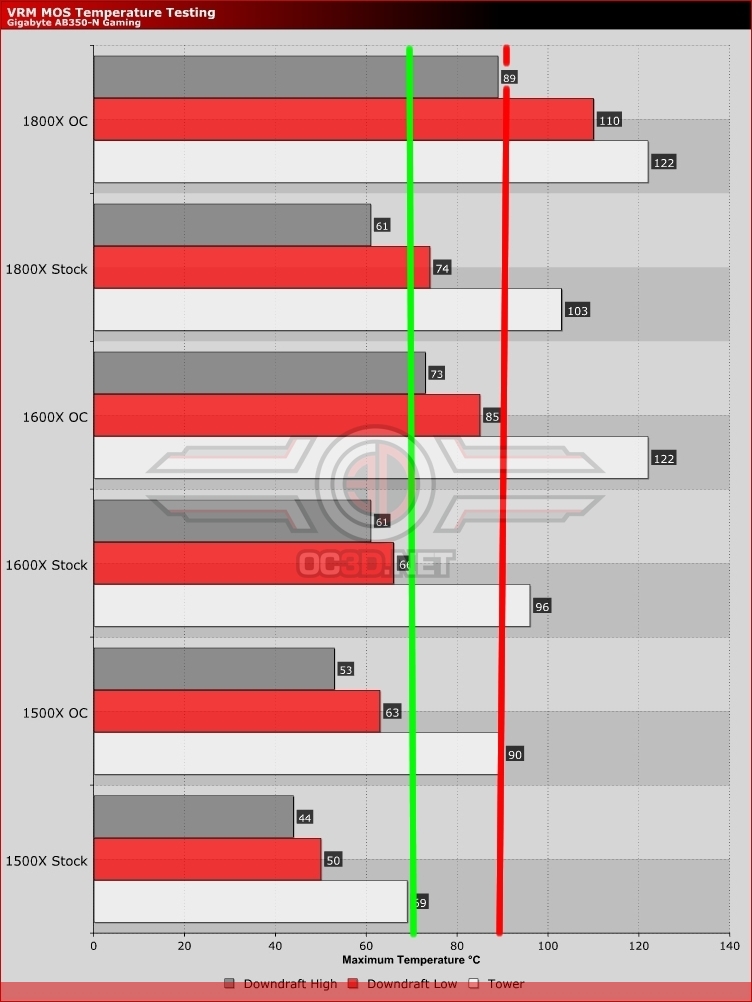
We have three different CPUs – Ryzen 7 1800X, Ryzen 5 1600X and 1500X – as well as two different coolers, with all the CPUs being tested at stock and overclocked, whilst the down-facing Noctua cooler is run with the Noctua NFF12 at full speed and then the even faster EK Vardar also at maximum fan speed.
With Gigabyte informing us that they feel 70°C is the temperature limit for their MOSFETs taken from the temp probe on the motherboard between the actual VRM’s (this means in reality the actual units themselves will be running hotter), there are very few combinations here that would enable you to stay within manufacturer guidelines. Only the Ryzen 5 1500X at stock would sit within that point with the tower cooler style, although all three of the CPUs at stock make it with the downdraft cooler running on high fan speeds. Meanwhile the Ryzen 5 1600X at stock and Ryzen 5 1500X both stock and overclocked are comfortable on low fan speeds too.
We have to say that our lengthy experience with motherboards and power phases means that we would be happy running them at up to 90°C guideline in this instance, and with this in mind you could add the overclocked 1500X, overclocked 1600X and, just, the overclocked 1800X on high fans. We do our testing with OCCT which is a fairly high level stress test, under gaming or normal use the VRM’s will never reach these temperatures. If you’re planning on using some really hardcore intensive CPU applications then you may want to stick to the 70C guide line.