


Gigabyte P67A-UD7 Review


Test Setup
Intel Core i5-2500K
Gigabyte P67A-UD7
Muskin Joule 1200w
4GB Kingston Genesis 2133MHz
Noctua NH-D14
nVidia GTX570
Windows 7 Ultimate x64
Firstly we need to mention that with the i5-2500K being such an outstanding choice of processor we will be using it for all our LGA1155 reviews. Although the i7-2600K has hyper-threading the 2500K is such a bargain and will be so popular we wanted to use what you’re all likely to use.
Secondly as you may have noticed we’ve adjusted the way we do our graphs. With the new chipset comes a chance to give a larger selection of results. For the moment we’re comparing the Gigabyte UD7 against the reference Intel motherboard housing both the i5-2500K and i7-2600K.
The final chance is that rather than stick to a certain speed of overclock to make sure that all the motherboards have a chance to demonstrate their underlying performance we will be using whatever the best stable overclock we can attain is.
Overclocking
Overclocking on the UD7 is, in keeping with the new range of Intel hardware, simplicity itself.
With the previous boards it looked like the only possible way to overclock was to change the turbo multiplier and gain the benefits of your overclock when the processor is under heavy loading.
However Gigabyte have shown this is not the case, as we can overclock the i5-2500K in the same manner we are used to with the processor being constantly running at its new higher speed. You just go to the CPU Configuration part of the BIOS and litterally disable everything, just make sure you leave the active cores section alone! Once you have done this the bios wont have Turbo enabled and allow you to crank the CPU Multiplier way past the maximum that you will find on many other boards to levels normally only available to turbo clocks.
This is an example taken from a Gigabyte press pack that is doing the rounds.
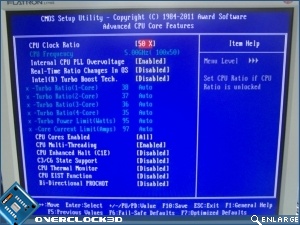
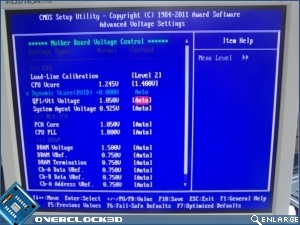
You can still use the Turbo overclocking method if you wish of course, and take the energy savings that it brings. But for our purposes in which a seemingly endlessly moving CPU speed is more of a hindrance than a benefit, we’re delighted to be able to have a more stable platform from which to tweak.
Reaching 4.6GHz is now so easy that anyone who can change their boot order in the BIOS can do it. Simply up your multiplier, put the CPU volts to around 1.3 (CPU dependant as ever this will not work for everyone), and enable Load Line Line Calibration to assist with the vdroop when under load.
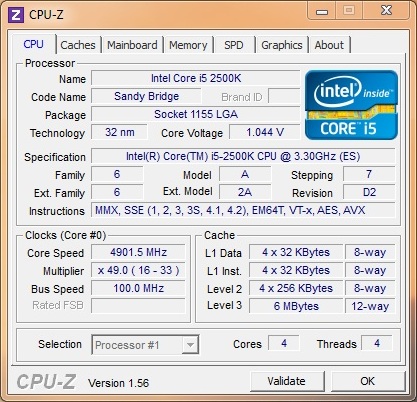
Going beyond that does require a little tweaking, but nothing like the levels we’ve seen on previous chipsets. Whereas the Maximus IV topped out at 4.6GHz the Gigabyte UD7 BIOS is slightly more mature and quite happily strolls along at 4.9GHz without getting above 70°C on our Noctua cooler.
Pretty amazing I think you’ll agree.
wPrime
So what are the benefits of such a high clock speed? wPrime takes advantage of everything you can throw at it and therefore the 2500K is naturally beaten by the hyper-threading enabled i7s. However the UD7 shows its class by being a long way ahead of the reference Intel board.
