ASUS TUF Gaming K7 Keyboard Review

ASUS TUF Gaming K7 Keyboard Review

Software and Lighting

The Armoury II Software is easy enough to use, albeit not as incredibly good as some other software packages around. The Corsair iCUE and Cooler Master Portal software in particular have raised the bar. It’s still a massive step forwards when compared to some of the older software packages with which early customisable keyboards used to be supplied. We love the ability to control the direction of the effect in diagonals. A perfect choice for those of you who might be jaded by the more standard left/right or up/down options.

ASUS TUF Gaming K7 Keyboard Software  
ASUS TUF Gaming K7 Keyboard Armoury II  

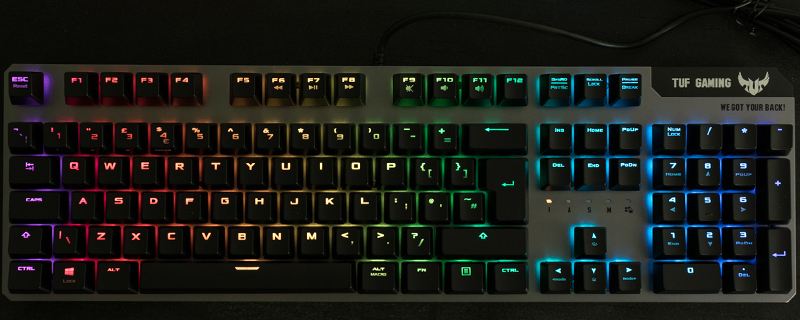
Lighting is very good with the aluminium faceplate working nicely in conjunction with the switch design to bring a lovely glow to proceedings. The white lighting in particular is excellent with none of the “slightly blue” hue that plagues lesser efforts.

ASUS TUF Gaming K7 Keyboard Rainbow  

Red

ASUS TUF Gaming K7 Keyboard RGB Red  

Orange

ASUS TUF Gaming K7 Keyboard Orange  

Green

ASUS TUF Gaming K7 Keyboard Green  

Light Blue

ASUS TUF Gaming K7 Keyboard Blue  

Navy Blue

ASUS TUF Gaming K7 Keyboard Dark Blue  

Pink

ASUS TUF Gaming K7 Keyboard Pink  

Purple

ASUS TUF Gaming K7 Keyboard Purple  

White

ASUS TUF Gaming K7 Keyboard White  

Uh-oh! It looks like you're using an ad blocker.

OC3D relies on ads to provide free content and sustain our operations. By white listing us on your ad blocker, you help support us and ensure we can continue offering valuable content without any cost to you. We only run our own hand picked ads from Industry brands like MSI, BeQuiet, Sapphire and PC-Specialist - meaning they are all relevent to the content you are reading.

We truly appreciate your understanding and support. Thank you for considering whitelisting OC3D