Call of Duty: Black Ops 6 PC Performance Review and Optimisation Guide

FSR 3
FSR 3.1 isn’t working correctly in Black Ops 6’s PC version
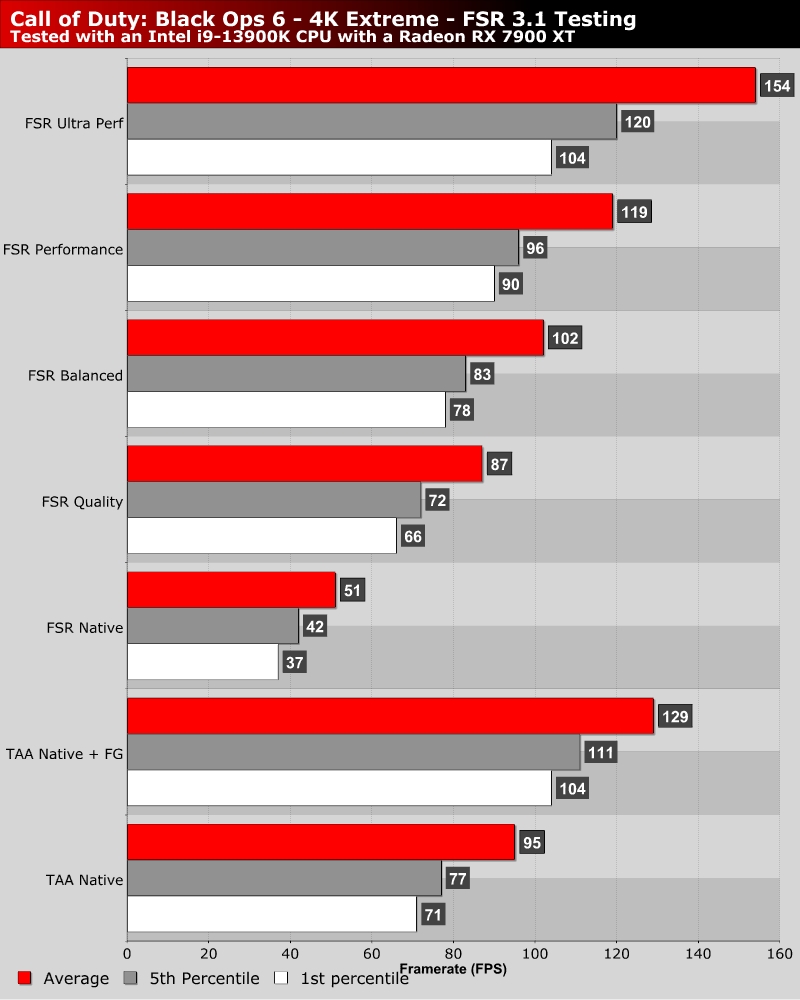
At launch, most upscaling options in Call of Duty: Black Ops 6 do not run as expected on PC. FSR 3, DLSS, and XeSS all have performance issues. This means that low resolution scales are required to even beat native (not upscaled) game performance. We replicated these issues on all of the GPUs we have tested. How this got past QA on a franchise as large as Call of Duty is baffling.
Note that using native resolution FSR 3 (FSR 3 Anti-Aliasing) results in a performance drop of over 45% in Call of Duty Black Ops 6. Activision needs to work on addressing this issue urgently.
FSR 3 Frame Generation is not available in the options menu of Black Ops 6’s multiplayer mode. However, it remains enabled if you enable it in the game’s campaign mode. This is how we used Frame Generation in this game’s multiplayer benchmark. We did not test all FSR modes with Frame Generation enabled, as the workaround we used required multiple game reboots. FSR 3 Frame Generation works as expected in Black Ops 6. Sadly, FSR 3.1 upscaling does not work as intended.