Gears of War 4 PC Performance Review

Graphical Options and Settings
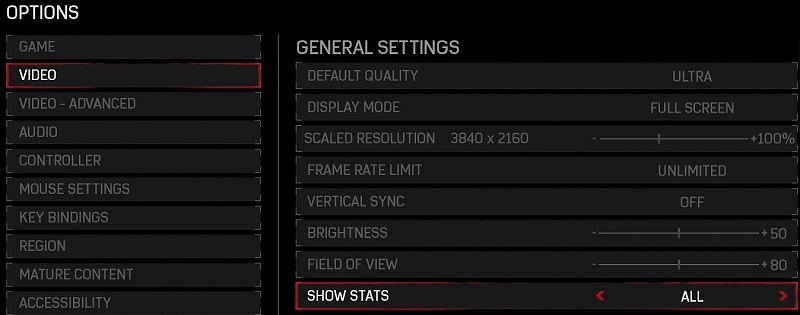
Gear of War 4 has a huge graphical options menu, allowing PC gamers to change every graphical option that they could desire, be it adding a framerate limit, a resolution scale or even going deeper into the options to adjust the game’s 20+ graphical options.
Each graphical option will detail how much it will affect CPU, GPU and VRAM usage, allowing PC gamers to know exactly which options they will need to adjust to get their desired framerate in game.
One other option that has been included in Gears of War which is a must have for any UWP game given that they are incompatibile with most framerate monitoring programs, which is built-in performance metrics, which will allow gamers to see if their framerate is being limited by their CPU, GPU or VRAM. This option makes it much easier for PC gamers to adjust their in-game settings for optimal performance.
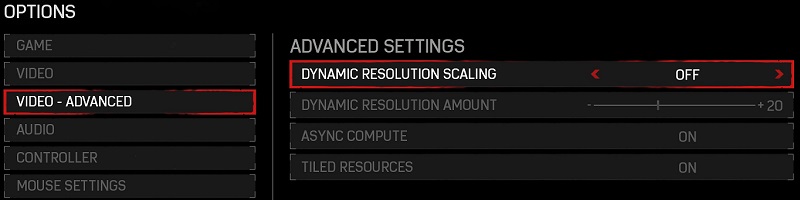
In the advanced graphical options menu Gears of War 4 gives gamers the option to adjust several DirectX 12 features within the game, including whether or not to utilise Asynchronous Compute or Tiled Resources to improve the game’s performance.
Alongside these DirectX 12 options, the advanced settings menu also provides a Dynamic Resolution Scaling option, which is a technique that both the Xbox One and PS4 use to dynamically change a game’s internal resolution to achieve a desired framerate.
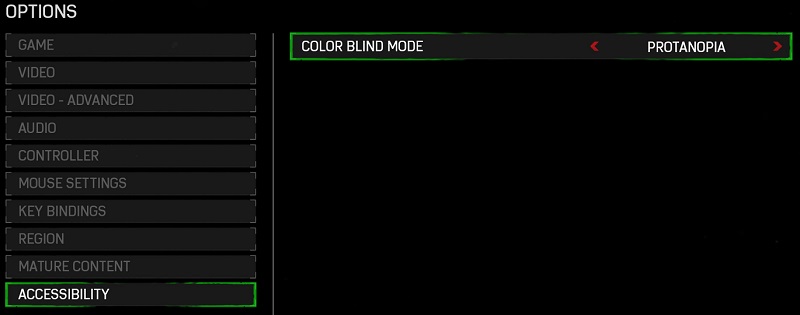
One other nice option that The Coalition has added to Gears of War 4 is the ability to set the game to easier to use for colorblind people, allowing gamers to set the game to several color blind modes in order to adjust the game for their vision.