


How to transition from Skype to Teams early


Here’s how to transition your chats and contacts from Skype to Teams
Last month, Microsoft confirmed that they are killing Skype. Soon, Teams will be Microsoft’s primary communications app, and Skype users will need to transition to it.
OC3D has used Skype for a long time. The application is almost 22 years old, and many people still use it for business or personal chats. Sadly, Microsoft has not made the move from Skype to Teams as simple as it should be. At least for now, users need to jump through some hoops on both apps to migrate their chats and contacts.
Skype will be closed down on May 5th. Users of the app have until then to move to Teams. This guide will show you how to transition to Teams today.
Become a Skype Insider
To migrate from Skype, users must become members of the Skype Insider Program. This will give you access to all of Skype’s newest features. Since Skype is about to close down, its current insider version is similar to its standard version. This insider version will allow users to transition their chats and other information to Teams.
Once you download and install Skype’s insider version, you can log into the app as normal.

Join the Teams Insider Program
Next, you will need to download and install the Teams app, which you can download here. Alternatively, you can use the web-based version of Teams.

Sign into Teams using the same login details as your Skype account. Once inside the app, enter the Teams settings menu and join the app’s Insider program. Once you do this, the app will restart.

Ensure your Skype Contacts are Synced with Teams
When inside Teams’ settings menu, you can also sync your Teams contacts with Skype, ensuring that they have transferred over. The same can be done with Outlook accounts and your mobile phone.
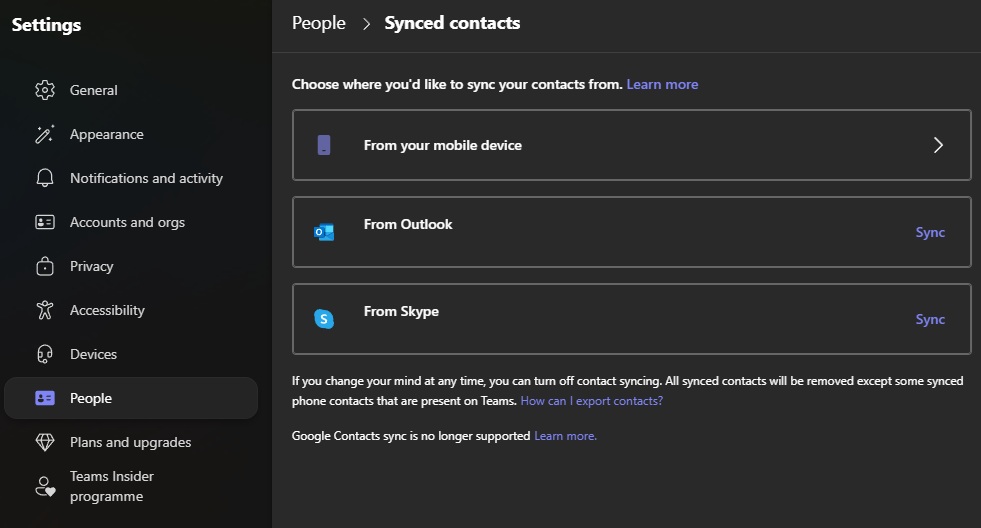
Once you have completed these steps, you should be able to access your Skype chats and contacts on Teams. At the time of writing, linked Skype chats will function on both apps. This means that you will be able to continue messaging Skype’s remaining users through Teams. It also means that you can continue using Skype as normal until the App’s closure.
You can join the discussion on transitioning from Skype to Teams on the OC3D Forums.
