


Intel explains how overclocking works on its CPUs

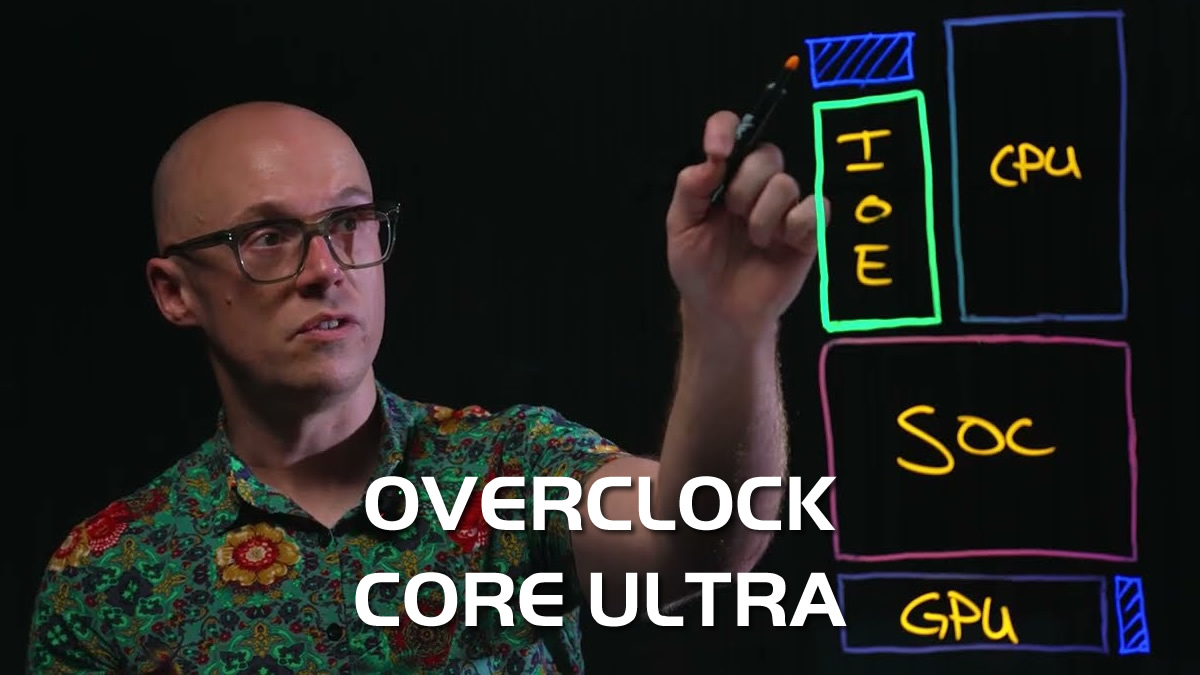
Intel’s Robert Hallock is letting you know how to get the most out of your Intel CPU
As part of a newly released video in their “The Blueprint” series, Intel’s Robert Hallock has decided to dive deep into the world of Intel CPU overclocking. Specifically, he has explained how overclocking works for Intel’s Core Ultra 200S series CPUs. To put it simply, there’s more to it than CPU core clock speeds alone.
In addition to CPU core frequencies, several components of Intel’s latest desktop CPUs are overclockable. This includes memory, fabric speeds, and ring frequencies. In the video below, Hallock explains what these elements are and why they matter when users want to boost the performance of Intel’s latest CPUs.
CPU Core clock speeds and Ring Bus
For starters, we have CPU clock speeds. If CPU clock speeds are increased, the CPU can complete more clock cycles per second. This enables them to complete computational tasks faster, delivering higher performance. While most overclockers focus on increasing CPU core clock speed, there’s more to CPU performance than clock speed alone. How these cores are fed and how quickly data can be transferred through a chip matter. After all, crunching through data faster is good, but it doesn’t help if your chip isn’t being fed data fast enough.
The CPU’s ring bus connects all CPU cores. This allows all CPU cores to communicate. Intel’s CPU ring frequency is overclockable, meaning the speed at which CPU cores communicate can be increased. This can boost performance across many workloads.
D2D, Fabric, NGU, and more
Next, we have D2D frequency. Simply put, D2D frequency is the speed of the internconnect between Intel’s main CPU die and its SOC chiplet. This chiplet sits between your system’s DDR5 memory and your CPU cores. Increasing this frequency can enable data to move between chiplets faster, reducing memory latency and improving performance for some memory-bound workloads.
Inside the SOC tile is another ring bus with its own clock speed. This speed is often referred to as the Fabric or NGU speed. Increasing this speed enables data to move through the SOC die more quickly. Since this die sits between your CPU die and memory controller, increasing the speed of this fabric can boost performance.
Finally, we have memory controller speed and memory frequency. These are typically overclocked using XMP profiles, which enable higher DRAM and memory controller speeds. Overclocking this can also accelerate memory performance.

Intel’s 200S Boost feature already overclocks many of these elements
Most of these features of Intel’s Core Ultra 200S series CPUs can be overclocked via Intel’s “200S Boost” feature on Z890 motherboards. That said, this feature can only be used with Intel 200S K-series CPUs. While this setting does not change CPU clock speeds or CPU ring bus speeds, it does change D2D, Fabric, and memory speeds. This can deliver a significant performance boost for memory-bound workloads.
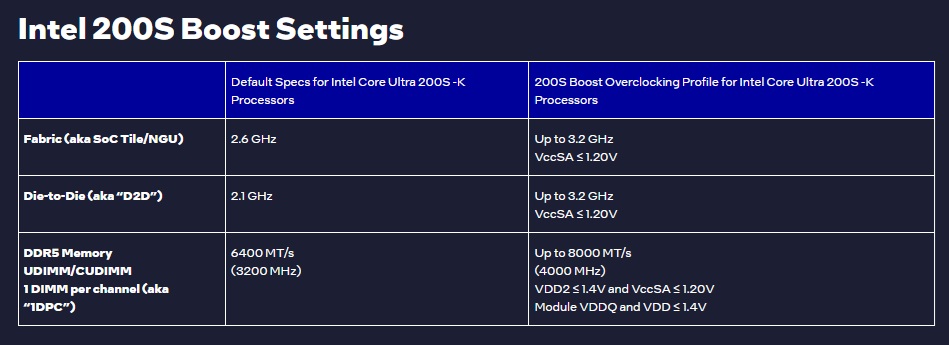
Since Intel’s Core Ultra 200S series CPUs were released over a year ago, it is strange that Intel is releasing a dedicated overclocking video now. That said, the principles within this video will likely apply to many future Intel processors. There are rumours of a refreshed lineup of Core Ultra 200S “Arrow Lake” CPUs, and perhaps these CPUs feature higher default speeds for some of these values. Perhaps this is why Intel has released this overclocking explainer, as it might explain how Intel has boosted its next wave of Core Ultra 200S series CPUs.
You can join the discussion on Intel’s overclocking blueprint for Core Ultra 200S series CPUs on the OC3D Forums.
