


25% loss! Puget Systems details mistake that greatly lowers PC performance

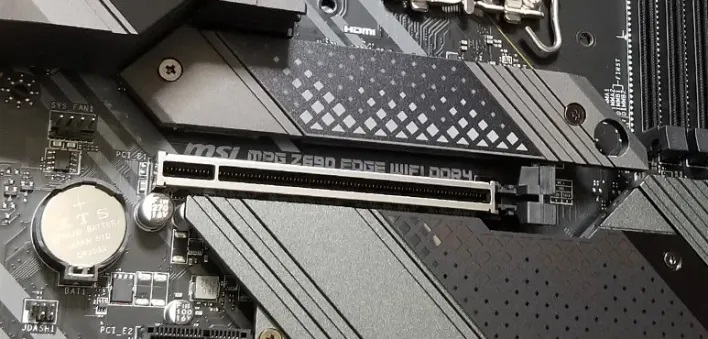
Puget Systems details how misconfigured PCIe lanes could lower your content creation performance by up to 25%
With the release of Nvidia’s RTX Blackwell and AMD RDNA 4 graphics cards, PCIe 5.0 has become broadly available on new graphics cards. Using Nvidia’s RTX 5090, Puget Systems has benchmarked the impact of PCIe bandwidth on the content creation performance of Nvidia’s flagship, revealing that poor PCIe lane configurations can reduce performance by as much as 25%.
Higher levels of PCIe bandwidth enable PC components to communicate more efficiently. Graphics cards and storage solutions are connected to PCs using PCIe lanes. Using a newer/faster PCIe standard enables higher connection speeds, but so does having access to more PCIe lanes. With this in mind, misconfiguring your system can have a dramatic impact on PCIe bandwidth and system performance.
25% performance loss using 4x PCIe 4.0 lanes
Nvidia’s RTX 5090 GPU has sixteen PCIe 5.0 lanes. Dropping to PCIe 4.0 halves the GPU’s maximum PCIe bandwidth, as does using the GPU on a PCIe slot with only eight active lanes. Thankfully, a PCIe 5.0 x8 configuration or a PCIe 4.0 16x configuration doesn’t lower the performance of Nvidia’s RTX 5090 significantly. That said, larger drops in bandwidth have a much larger impact.
With PCIe 4.0 with an x4 lane configuration, Puget Systems’ PugetBench for Davinci Resolve runs 25% slower than a full PCIe 5.0 x16 configuration. This drop in bandwidth can occur simply by installing your graphics card in the wrong PCIe slot on your motherboard. As such, it’s always important to install your GPU on the fastest available PCIe slot.
Performance could be further lowered with a PCIe 3.0 configuration at 4x. However, this scenario is incredibly unlikely to happen in reality.
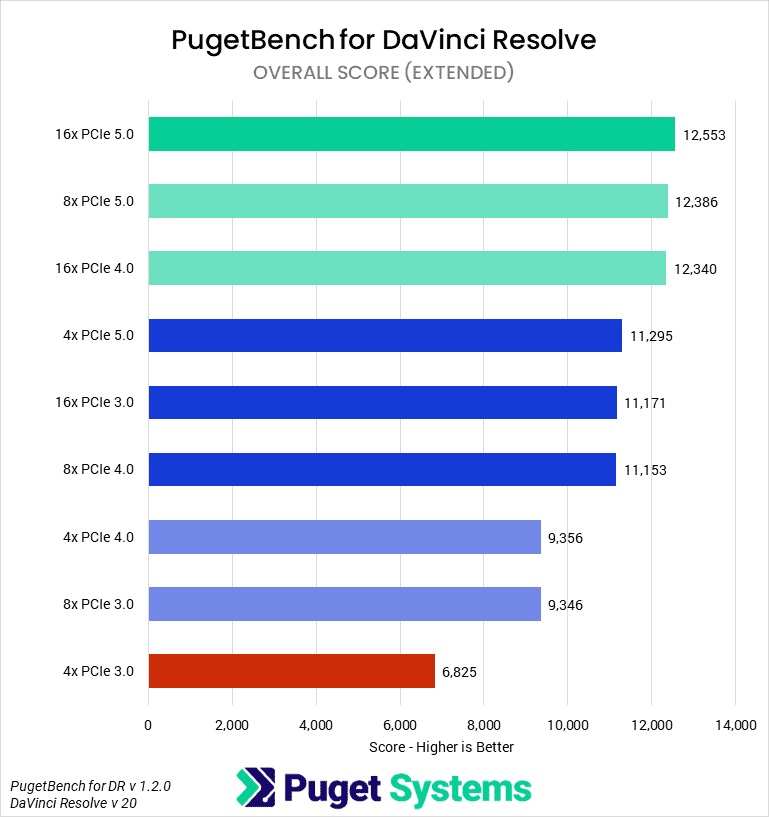
(Data from Puget Systems)
Unreal Engine Content Creation Benchmarks
When using Unreal Engine 5.5, PCIe bandwidth has a minimal impact on content creation performance. The effect of PCIe bandwidth will vary significantly on an application-by-application basis. While having access to more bandwidth is always beneficial, not all workloads require ultra-high bandwidth GPU-to-CPU communication.
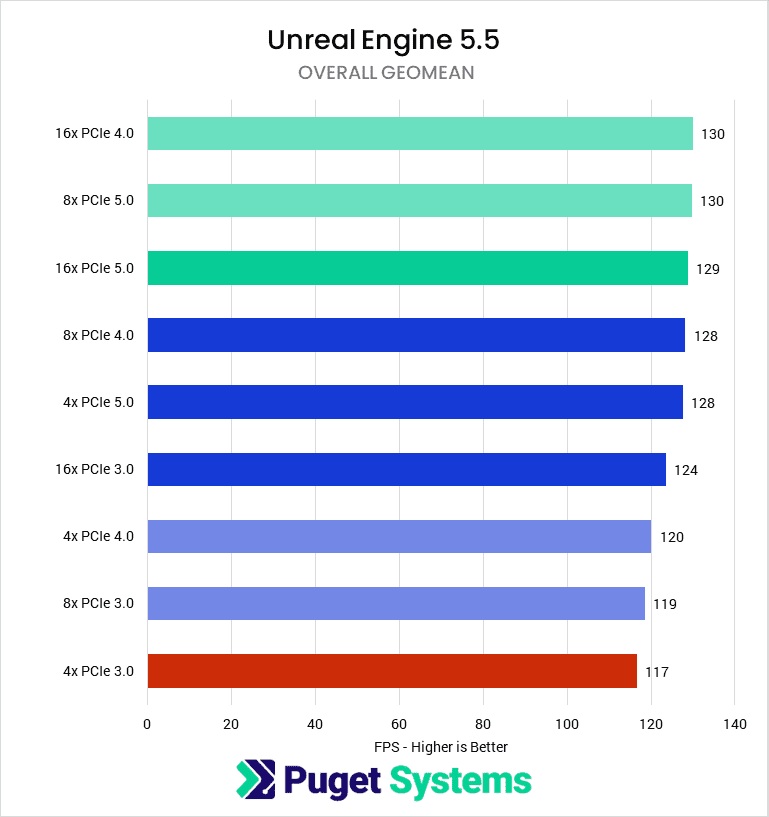
(Data from Puget Systems)
In Puget’s Llama LMM test, PCIe bandwidth had very little impact on inferencing performance. This workload uses data that is loaded on the graphics card’s VRAM, which means that it doesn’t rely on loading external data quickly. While starting this workflow will take longer on systems with little PCIe bandwidth, the workload will perform similarly once data is initially loaded.
Note that some AI workloads will use both GPU memory and CPU/system memory. In these cases, AI workloads will run faster with more available PCIe bandwidth. However, these workloads will always be slower than systems where the full data set is loaded onto GPU memory. This is why large GPU memory pools are desirable for AI workloads.
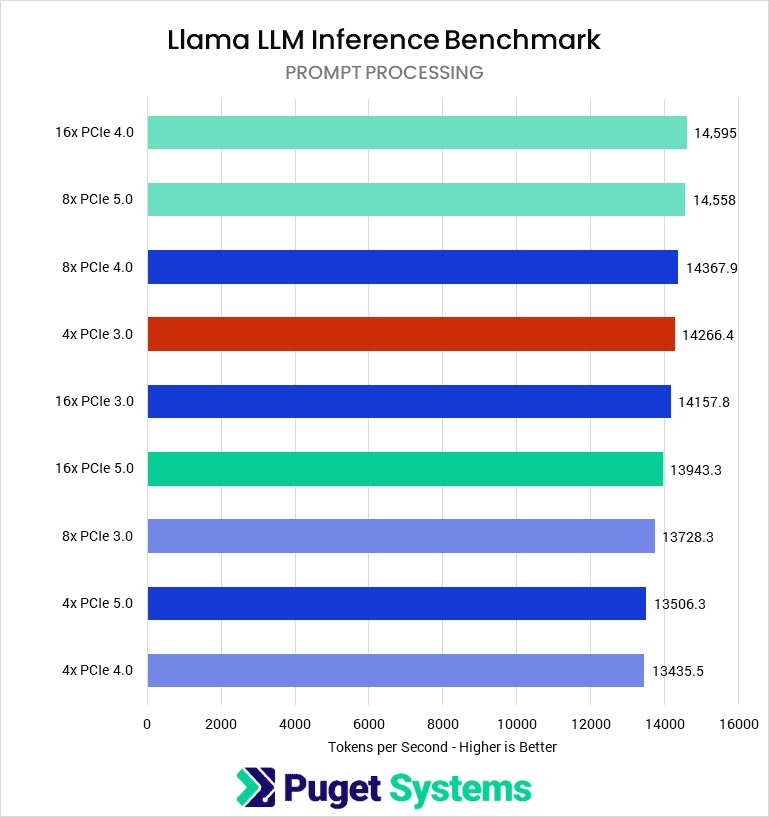
(Data from Puget Systems)
Don’t make this mistake when building your PC
When building a PC, ensure your GPU is connected to the PC’s fastest PCIe connector. Using the wrong connector could limit performance. This should also be considered if you want to use add-on cards within your PC, as installing add-on cards can often impact the bandwidth available on your PC’s primary PCIe lane.
If you have a GPU connected on a PCIe lane with a PCIe 4.0 x4 connection, it will limit the performance of today’s graphics cards in many workloads. This problem can be easily avoided. All you need to do is ensure your using the right PCIe slots for your GPU.
You can join the discussion on Puget Systems’ PCIe bandwidth testing on the OC3D Forums.
