


Less clutter, more control – Microsoft has fixed Windows 11 Search

Microsoft’s efforts to fix Windows are bearing fruit
Microsoft’s “Windows K2” project is underway, a major revamp of Windows 11 that aims to regain user trust and deliver a faster, more responsive, and less frustrating OS. Today, Microsoft has detailed major changes that are coming to Windows 11 Search. These changes are available now to Experimental Windows Insiders, but will roll out to other users soon.
So far, Microsoft has made some big changes to Windows 11. These include taskbar/start menu fixes, improved performance through Microsoft’s Low Latency Profile (LPP), and the axing of Windows 11’s unwanted MSN feed.
Soon, all Windows 11 users will benefit from a more useful search bar. Users can disable web searches and Microsoft Store search results. Furthermore, promotional content has been removed from web results. Microsoft has worked to lessen the visual clutter seen in Windows 11’s search results, giving users a better visual experience.
Local results are now prioritised
I don’t know about you, but when I use Windows’ search bar, I am searching for something on my PC. With Microsoft’s new search function, local results are now prioritised if they are a better match. Finding local apps is also more forgiving, as Microsoft has improved typo handling. Searches for Windows settings have also been improved, though more tuning for this is underway.
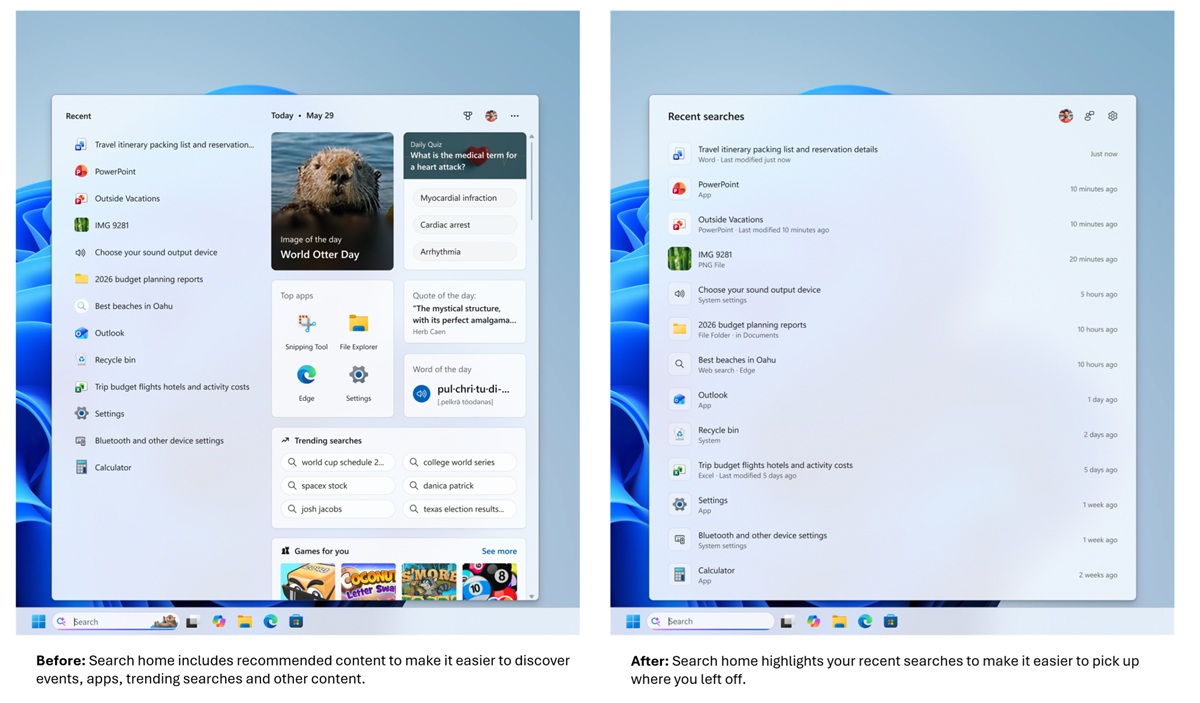
Microsoft’s Search improvements
Here’s what Microsoft is changing with Windows 11 Search. These changes are now available to Windows Insiders in the Experimental channel and will roll out to other Windows users soon.
- A calmer home screen. Search home has been simplified to reduce visual clutter and make it easier to get back to recent searches quickly.
- Clearer results. Search does a better job showing where a result comes from—app, setting, file, web result, or Store suggestion—so it’s easier to tell what you’re looking at and where you will go before you click.
- Promotional content has been removed from web results. Web results show the most relevant answer, instead of first showing related products and promotions, helping search feel more focused and less distracting.
- You’re in control of web and Microsoft Store results. A new setting in Settings > Privacy & Security > Search lets you choose whether web and Microsoft Store suggestions appear alongside local results.
- Local results prioritized when they’re the better match. Apps, settings, and files more reliably appear ahead of web and Store suggestions when your content is the stronger match. System items like This PC and Recycle Bin are easier to discover.
- Finding apps is more forgiving. Search is better at handling typos, dropped letters, extra letters, and partial words for apps. Queries like “utlook” can still find Outlook.
- Settings results are improving. We’ve made a first round of ranking improvements to help more relevant settings appear higher in results, with more tuning planned in the coming months.
- Finding files is improving. Search is better at surfacing the right local files with added support for two-character file searches. We’ve also made improvements to show cloud and connected files in results when they’re the stronger match. These changes help you get to the document, download, or folder you are looking for faster.
- Reliability is improving. Improved search reliability, including reducing likelihood of crashing and loading issue, with more work underway.
Microsoft is winning its (self-created) battle against Windows’ bloat, but the war is far from over
Microsoft’s Windows team has made several strides in improving Windows 11. In most cases, Microsoft’s proposed changes are things Windows users have wanted since Windows 10 launched over a decade ago. That’s how long Microsoft has taken to respond to feedback. As such, this year’s changes to Windows 11, while welcome, haven’t fundamentally altered the perception of users. Most people still view Windows 11 negatively. That said, continued improvements like this are having an impact, and continued waves of welcomed improvements could transform Windows 11 into one of Microsoft’s best OS’ to date.
Let’s face it, Microsoft has spent more than a decade making Windows worse. While it is good to see Microsoft improve things, it cannot be forgotten that Microsoft ultimately caused Windows’ decline. While Windows 11 has improved in 2026, a few quarters of improvement isn’t nearly enough to get forgiven for a decade of decline.
Microsoft knows that it needs to regain the trust of Windows users. Improving search is one way to start achieving this. Let’s hope that Microsoft can stick to its Project K2 goals, as a small list of improvements won’t be enough to regain the trust of Windows’ user base.
You can join the discussion on Microsoft fixing Windows 11 Search on the OC3D Forums.
