


Microsoft aims to speed up Windows 11 with File Explorer changes


Windows 11 Insider build includes an improved version of file explorer
Microsoft is finally taking the performance of its Windows OS seriously. In the company’s latest insider builds, Windows 11 ships with an improved File Explorer that utilises fewer system resources. This reduces RAM usage, disk I/O cycles, and CPU utilisation.
In simple terms, Microsoft’s new file explorer eliminates duplicate file-indexing operations. This prevents the OS from doing non-useful work. This makes file searches faster and less resource-intensive. This prevents File Explorer from consuming excessive system resources, benefiting all Windows 11 users.
Made some improvements to File Explorer search performance by eliminating duplicate file indexing operations, which should result in faster searches and reduced system resource usage during file operations.
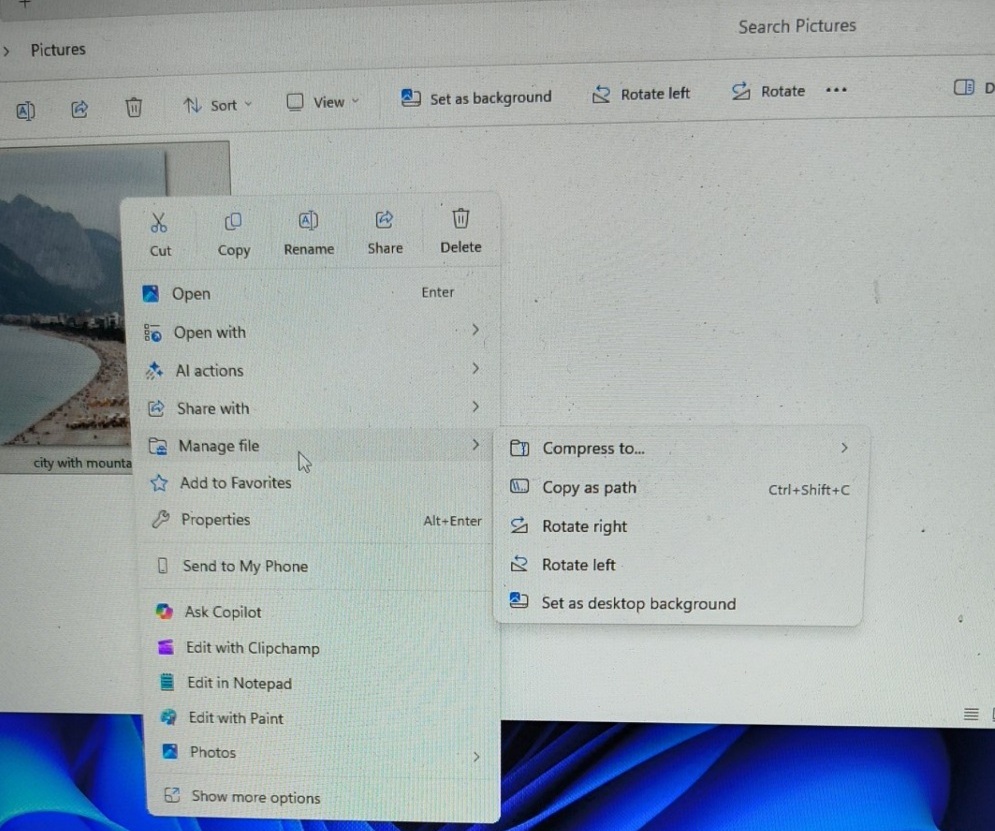
(New “Manage File” option – image from Windows Latest)
Context Menu Changes
Microsoft has also made changes to its File Explorer by altering its context menu. Soon, options like “Compress to”, “Copy as path”, “Rotate Right”, “Rotate Left”, and “Set as Desktop background” will be available in a new submenu called “Manage file”. This will make the menu less cluttered.
This change suggests that Microsoft wants to further declutter the context menu by placing other lesser-used options into submenus. In time, this could remove the need for the “show more options” part of the menu.
Honestly, it is strange that it has taken Microsoft this long to make some of these changes to Windows. Earlier this month, Microsoft committed to optimising Windows 11 for gamers. Now it seems clear that a broader Windows 11 overhaul is underway. Let’s hope that Microsoft can make Windows snappy again.
Microsoft’s changes to its file explorer are expected to be rolled out to all Windows 11 users over the next few months.
You can join the discussion in Windows 11’s file explorer update on the OC3D Forums.
