be quiet! Light Mount TKL Review

Conclusion
Conclusion
There are a lot of cool tricks built in to the be quiet! Light Mount TKL.
We already adored the Dark Mount when we reviewed it last year. As you can imagine we type novels of text every year, so our fingers are very particular. The OG Mount hit all of our pleasure receptors. It was smooth and silky to type on, quiet, and had oodles of extra bits of the tech nerd in our soul. Over time we heard of a few cases of individual switches packing up. Not a massive issue as they’re easy to replace, but nobody wants to move switches from a key they don’t use much to one they do whilst awaiting a replacement.
Switches and Keys, Oh my!
To their credit be quiet! rose to the challenge and redesigned their Orange Switches to V2, now more robust. However, that extra strength hasn’t come at the expense of the quietness for which they were famed. By using extra gold the contact point is good for thousands of presses, whilst the factory lubrication has been optimised for even quieter use. Place those on the extant triple-layer sound dampening and in the aluminium shell and you have something free from echoes or creaks or any nasty noises. The Orange Switches are still Cherry MX compatible stalks, so any third party keycap set will fit should you want to delve even deeper into the custom world.
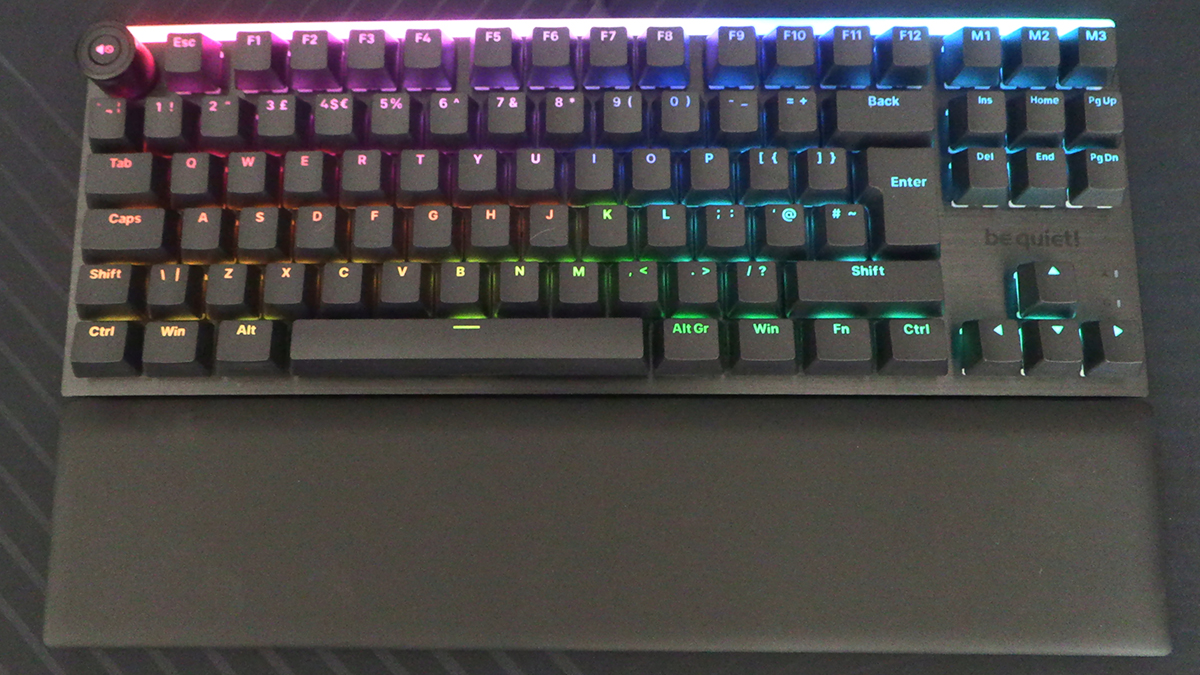
Whilst the TKL design is compact, and we’d always want the full size model ourselves, be quiet! haven’t scrimped on customisation. With three extra M keys on the top right you have options without adjusting anything. Should you wish to change more then the Fn key can combine with all the other keys for massive personalisation in the software. Additionally each macro in the software can support up to 999 actions. If you somehow need more than that, you might be beyond help. The media key placement is probably the only unusual thing, being where Escape normally is. This has moved to abut the F1 key. All the F-keys are therefore slightly further right than you might be used to. Touch typists beware.
Should you type by touch you won’t have a difficulty getting the Light Mount TKL placed just so. Three feet heights, 3°, 6° and 9° let you angle it perfectly, whilst the supplied wrist rest stops fatigue in those marathon writing sessions.
Colouriffic
We feel the colour calibration option requires a special, dedicated mention. If you run multiple RGB devices, like we all do, then you’ll be aware that one manufacturers purple isn’t the same as anothers. With the be quiet! io center you can calibrate the colours so that the Light Mount matches those of your other devices. No more green yellows or pinky purples. It’s such a ridiculously helpful option we’re amazed we’ve not seen it before, nor have we even considered it before. Like the typing experience, the software is buttery smooth to use. Whether you go for the full install app, or just use the in-browser version, you’ll be pleased at how much is built in and how much flexibility is on offer.
The be quiet! Light Mount TKL is a fantastically built, deeply customisable keyboard with a tiny footprint. The lighting is excellent, but the star of the show is still how smooth it is to type upon and how quiet it is in use. An easy winner of our OC3D Gamers Choice Award.
We can’t wait to get our hands on the revised full size Dark Mount…

Discuss the be quiet! Light Mount TKL in our OC3D Forums.