


Keysonic ACK-612 RF Wireless Multimedia Keyboard

Testing
Unlike most keyboard reviews conducted here at Overclock3D the Keysonic ACK-612 RF is not aimed at the enthusiast or gaming community and therefore it would be unfair to test it in this manor. In fact, during our use of the ACK-612 RF over the past few weeks it has become quite clear that they keyboard could not be used in this environment due to a small amount of lag often exhibited between pressing a key and the keypress being registered by the system. However, being a keyboard aimed at HTPC users and office environments this is certainly a non-issue and todays testing will focus around the following areas instead: Usability, Wireless Range and Battery Life.
Usability
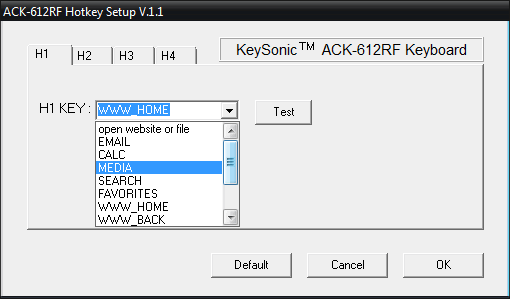
Starting with the installation of the ACK-612 RF, it really is as simple as plug’n’play. Under Windows Vista the system did not ask for any additional drivers and the full functionality of the keyboard and touch-pad were immediately available. The additional software provided on the CD is extremely basic in appearance (shown below), but does the job of allowing the function keys to be remapped nicely.
Anyone who has had previous experience with typing on a laptop keyboard will feel at home with the ACK-612 RF. The keys are quite close together and certain keys such as Return and the Space Bar have been reduced in size in order to squeeze everything in. Key presses are soft and silent but unfortunately the bottom row of keys (such as Space, CTRL and ALT) were slightly awkward to hit with a thumb due to the keypads slightly recessed design.
Moving on to the touch-pad, the actual usable area of the pad is 45x35mm making it quite a bit smaller than the average laptop touch-pad. Much like the keyboard, the touch-pad was also slightly recessed which further reduced the accessible area of the pad slightly. Obviously this isn’t such a big problem if you increase the mouse sensitivity in Windows – allowing the mouse cursor to travel further with less finger movement – but a slightly larger or flush mounted touch-pad would certainly be more beneficial.
Range
With a fresh set of fully charged batteries, the maximum range of the ACK-612 RF is quoted to be 10 metres. During our testing this certainly seemed to be about right with a perfect line of sight free from obstacles. However, taking into consideration that most users will be plugging in the USB receiver around the back of their HTPC’s (rather than in a front USB port), this range is reduced to around 7 metres. When at maximum range, text input and mouse movement does become very laggy with some key presses being lost.
Battery Life
Obviously an important factor in the purchase of any wireless device is battery life. Unlike some wireless keyboards, the ACK-612 RF is stripped right down to the bare basics with no underlit keys, no power lights and not even any Caps/Num Lock LED’s. This, combined with the fact that both the keyboard and touch-pad can be disabled by the aforementioned switches should ensure minimal power wastage. While time unfortunately limits us from testing the full battery life of the keyboard, in the two weeks we had it in testing the battery voltage from the provided Energizer batteries dropped from 1.57v to 1.46v with occasional daily usage. This possibly indicates that the ACK-612 RF should have no problems operating for a couple of months on a single set of batteries providing it is not used heavily.
