Apex Legends PC Performance Review

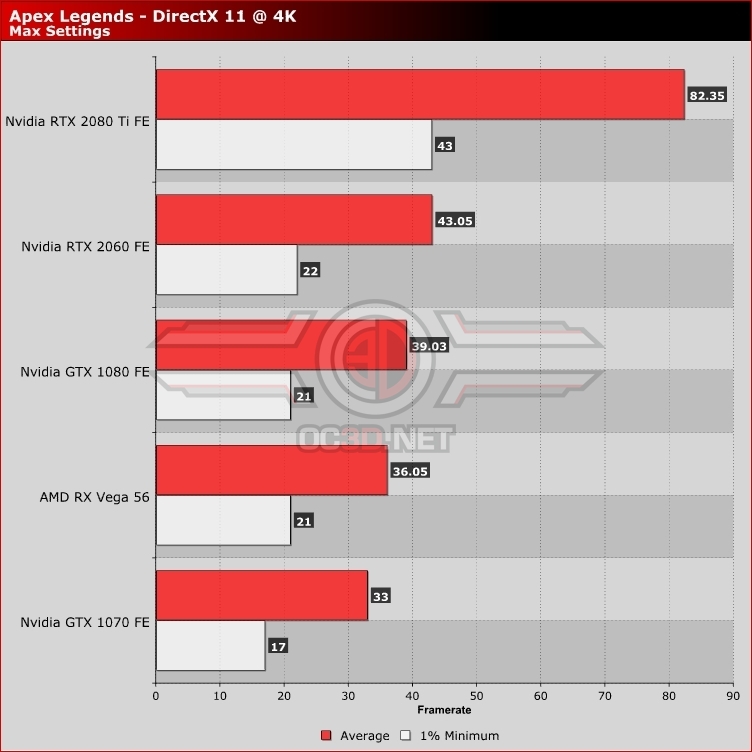
4K Performance – GPU Benchmark Results
At 4K even Nvidia’s mightly Geforce RTX 2080 Ti can dip below 60FPS at max settings, though it is worth noting once again that the graphics card will remain at over 60FPS in most situations. Only the most demanding of combat scenes will force the RTX 2080 Ti to dip further. Again, this is a reason why we advocate the use of Apex legend’s dynamic resolution scaler, as it mitigates these drops without compromising the game’s graphical quality in most scenes, and only reduced the game’s resolution when necessary.
In the case of the RTX 2080 Ti, a momentary dip from 4K to somewhere between 4K and 1440p is not a big deal, especially when it only typically lasts a few seconds. If you are wondering why Apex Legends can even challenge the likes of the RTX 2080 Ti, remember that the PS4 Pro has an average resolution/framerate of 1080p 60FPS in this title, dipping lower or reaching a little higher depending on the scene.
Graphics cards like the RTX 2080, Radeon VII and GTX 1080 Ti are likely also capable of 4K 60FPS framerates when used with the dynamic resolution scaler, creating some sort of faux-K 60FPS combination. These lower-end graphics cards will make dips to lower resolutions more frequent, but they should be more than tolerable if it’s what it takes to achieve a steady 60FPS. Lower-end graphics cards should aim for 1440p gameplay.