Destroy All Human PC Performance Review and Optimisation Guide


Settings Scaling and Optimisation Tips
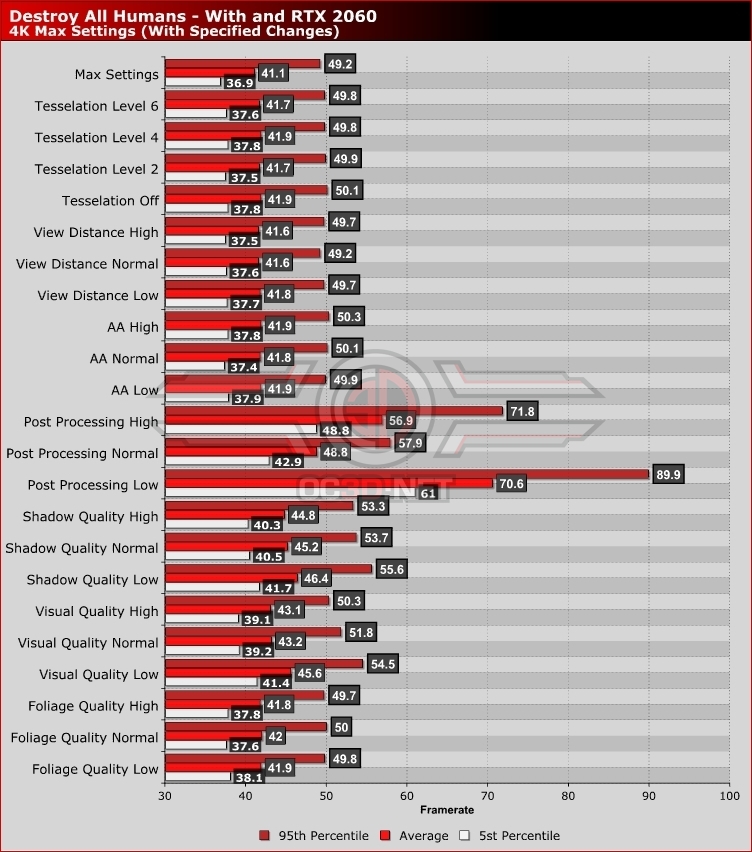
When playing Destroy All Humans on PC, it is clear that the game’s scalability is limited outside of post-processing. Looking at the chart below, we can see that post-processing has the largest impact on performance by far.
Setting post-processing to High will increase game performance by 38% on an RTX 2060 at 4K, which is almost enough to get the game running at an average framerate of over 60 FPS at 4K.
Users of older graphics cards will find that lowering Destroy Al Humans’ Tesselation quality will have a larger impact on performance than what we can see below. Even so, lowering Tesselation from level 8 to level 6 does have a notable impact with our RTX 2060. Yes, the impact is small, but given the limited visual graphical difference higher levels of tesselation provides here, it is worth the performance leap.
Strangely, setting post-processing to normal will provide gamers with lower framerates than setting post-processing to high. This is because Ambient Occlusion is Disabled at High settings and enable at normal settings. We can only assume that Black Forest Games made a mistake by doing this.
Lowering Shadow Quality to High will also give gamers a notable performance increase in Destroy All Humans, with high settings enabling a performance increase of 9%. With High Shadows and High Post Processing, Destroy All Humans’ average framerates will be above 60 FPS at 4K.