Gears 5 PC Performance Review & Optimisation Guide

4K Performance – Benchmark Results
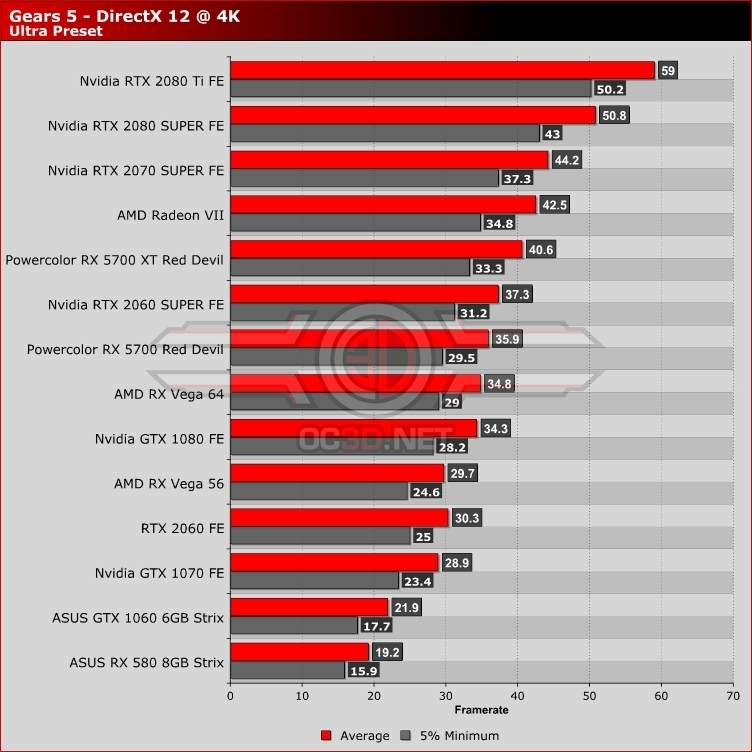
4K 60FPS is a challenging task when playing Gears 5 at its highest settings. That said we will re-iterate that this game’s benchmark is more performance-intensive than most of the full game. With our RTX 2080 Ti, we played through all of act 1 without noticing a dip below 60FPS in gameplay. That said, some sections of Act 2 can deliver dips that get close to our measured minimums below.
There are two ways to gain more performance in Gears 5. Lowering game settings, or activating the game’s minimum framerate (variable resolution) feature. We will note again that Shadow Quality, Ambient Occlusion, Depth of Field, Volumetric Fog and Screen Space Reflections are some of Gears 5’s most impactful graphical settings.
If you can handle a non-native 4K when necessary, we recommend turning on Gears 5’s minimum framerate feature and set it to 60. This allowed even our RX Vega 56 to run at an average framerate of 60FPS. Yes, the resolution drops bring things down to Faux-K territory, but we believe that resolution dips are well worth it when it gives us framerate stability.
At 4K we can see Nvidia’s RTX 2070 SUPEr finally gain a significant lead over AMD’s Radeon RX 5700 XT Red Devil, but even then it still handily beats Nvidia’s RTX 2060 SUPER.