Mortal Shell PC Performance Review and Optimisation Guide

Optimisation Tips – How to get higher framerates
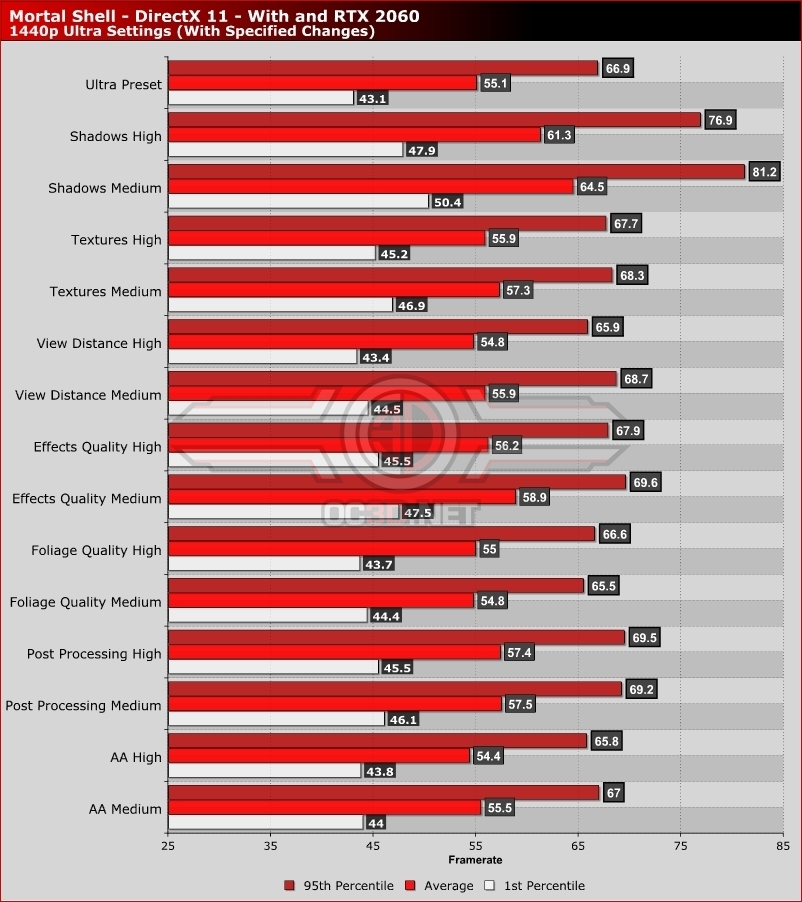
In Mortal Shell, the game’s Shadow setting has by far the largest performance impact on our RTX 2060, with High and Medium settings presenting us with hefty performance increases. If you want higher framerates, these settings should be your first port of call.
Based on our benchmark runs, Mortal Shell players should keep the game’s Anti-Aliasing set to Ultra. The performance difference wasn’t large when compared to Medium or High but the difference in quality was more than enough to make the change worthwhile Aliasing is reduced and the ghosting seen at high is practically eliminated.
Every other setting within Mortal Shell provided us with relatively small performance boosts. However, lowering Post Processing to High and Effects to Medium will deliver players a notable performance boost.