The Best Settings for Kena: Bridge of Spirits – A PC Optimisation Guide

Optimised Settings – The Best PC settings for Visuals and Performance
After looking at all of the game’s options. We decided on these settings for our own playthrough. These options give us the best balance between performance and visuals, and similar performance benefits should be possible on your hardware configuration.
We started with Kena: Bridge of Spirits’ Ultra preset and then lowered shadow quality to high. This maintains high levels of shadow detail and nets us a significant performance boost. After that, we set Volumetric Fog to Medium, giving us another notable performance boost while maintaining high levels of detail. After that, we set Ambient Occlusion to Low.
Beyond that, we lowered Kena’s resolution scale to 90%. At 4K, we cannot tell the difference between native 4K and 90% 4K while the game is in motion. With these optimised settings, our average framerates on Nvidia’s RTX 3070 increased by 57% at 4K. Similar gains can be seen on our RX 6800.
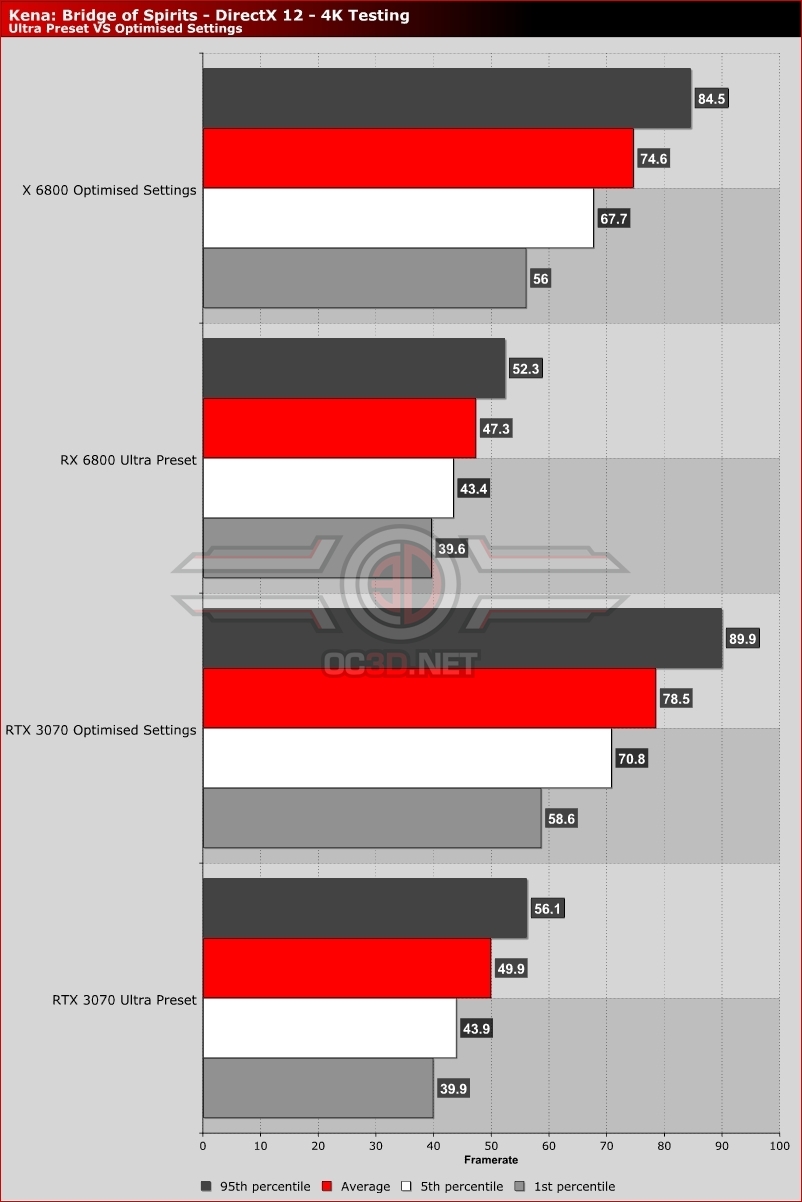
Below are some comparison images of Ultra settings and our optimised settings. As you can see, there are very few differences in overall image quality. Any changes in image detail are minor when compared to the 57% performance increase that we received.


With performance gains like these, we do not miss Ultra settings. We can barely see the difference between Kena’s Ultra Preset and our optimised settings. Any minor losses in image quality here are nothing when compared to the 50% performance gains that we received.