ASUS X299-E Strix Gaming Review

Introduction
We are all busy checking down the back of the sofa and inside old suit jackets to see if we can rustle up the money to grab one of the new Intel CPUs, particularly those of us in the office who spend half of the time it takes to do a review just looking at progress bars slowly crawling towards completion. Whilst we wait to see if any of the fluff and lint we’ve found somehow magically turns into diamonds, it’s time to check out the latest motherboard in the hugely popular ASUS Strix range. This is in the guise of the X299-E Strix Gaming. It seems odd that ASUS have placed the E after the 299 bit rather than the Strix bit as they have previously, but there must be a reason behind it.
Technical Specifications
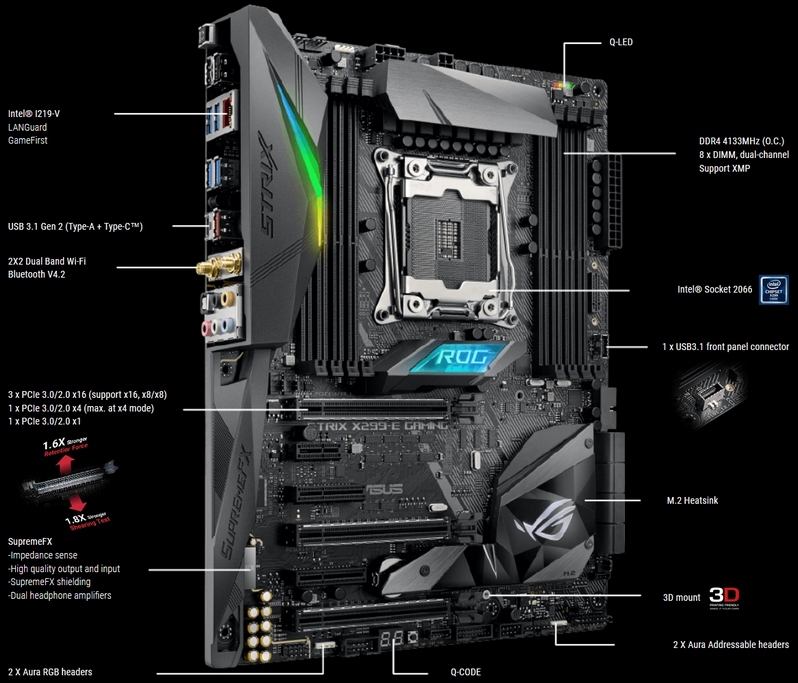
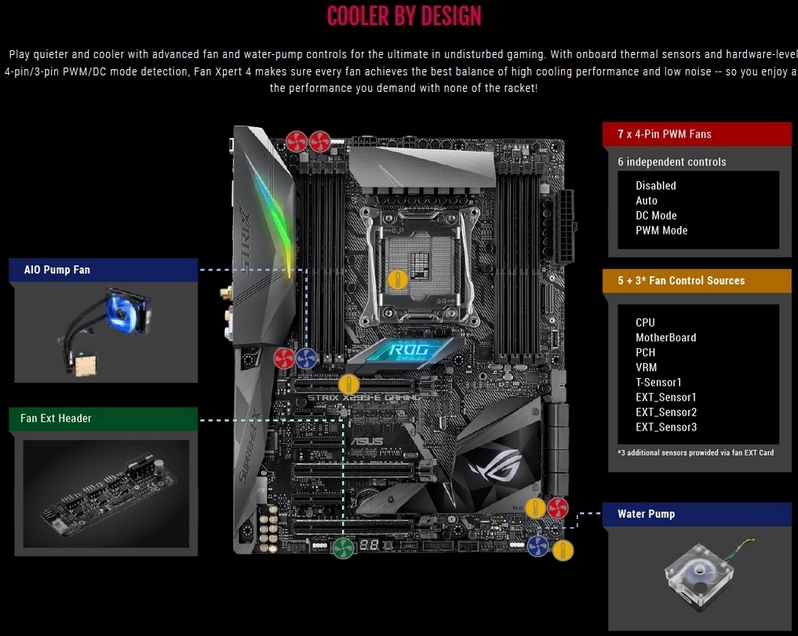
As you would expect from a motherboard containing the very latest and greatest chipset, the Strix ticks all the boxes. As always we’d like a few more USB ports, but for some reason USB port numbers seem to be the only way that manufacturers differentiate between their premium models and the more affordable ones. However, everywhere else is a veritable swathe of high bandwidth devices, multi-M.2, U.2, WiFi, blistering memory speeds and PCI Express slots. The other factor that makes the Strix a very attractive purchase is the amount of cooling available. Nearly all of us use AIO cooling for our CPUs and those who don’t usually have a twin fan cooler. Naturally as our GPUs require ever more cooling then the extra headers for case fans and the like become even more useful. It’s also nice to have the ability to control the fans to be quiet during those moments when you are just idly browsing the net, and the ASUS allows for that.