


AMD Kaveri A10-7850K & A10-7700K Review


Test Setup
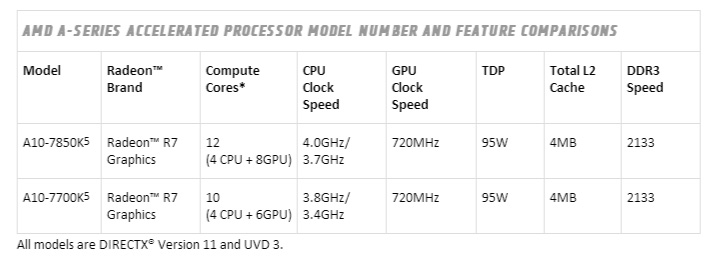
There’s perhaps more factors to take into consideration for Kaveri APUs than we’d normally have to do in our testing. AMD claim memory speed makes a large impact to results, and also as the processor itself supports Crossfire, we’ve added a string of Crossfire graphics results in with our usual tests, and also tested at two different RAM speeds.
Specifications
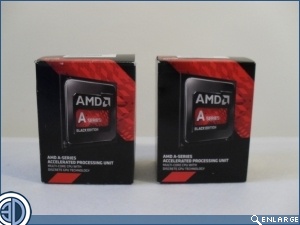
| CPU | AMD Kaveri A10-7850K / A10-7700K |
| Motherboard | Gigabyte F2A88XM-DS2 |
| Memory | 1) AMD Radeon Memory @ 1600MHz 2) AMD Radeon Memory @ 2400MHz |
| Graphics |
1) Integrated R7 Graphics |
| Cooling | Corsair H80i |
| Power Supply | Corsair HX850 |
| Case | Corsair 300R |
| Storage | 2x Corsair 60GB LS Solid State Drives |
First Test
To begin with, we tested all of our benchmarks using the iGPU on both processors with the memory clocks set at 1600MHz. This gave a basis of comparison to the older models of APUs which were tested at 1600MHz also.
Second Test
We then increased the memory speed of the Radeon Memory to 2400MHz and ran through the majority of the tests that we did in the first test. Since this was to give a general idea of the affect of memory speed on the performance of the Kaveri CPUs, we didn’t feel it necessary to run every test, but the majority have still be done to enable us to accurately draw a conclusion.
Third Test
Using the same 2400MHz memory speed, we then added a Club3D R7 250 to the system and enabled Dual Graphics to allow the iGPU and the R7 250 in both processors to work in sync in Crossfire mode. As this is purely a graphics test, we ran this through a series of our graphics tests to give insight into the performance of Crossfire on Kaveri.
Power Consumption
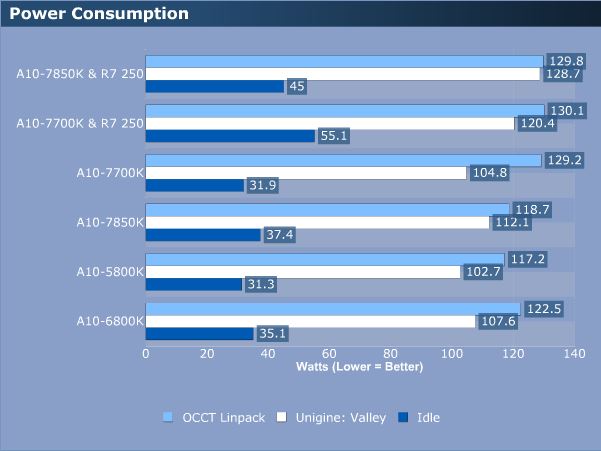
We cans see here that the Kaveri APUs consume a similar amount of power to the previous generations. However, if the Kaveri chips perform better, then this will still mean you’ll be seeing better performance per watt on Kaveri than on Trinity or Richland.
It is also worth noting just how efficient the R7 250 is, which under these tests only pulls a mere 25-30 watts of power under load.
