


How to enable AMD FSR 4 on Radeon RDNA 4 GPUs

FSR 4 Performance Scaling & Conclusion
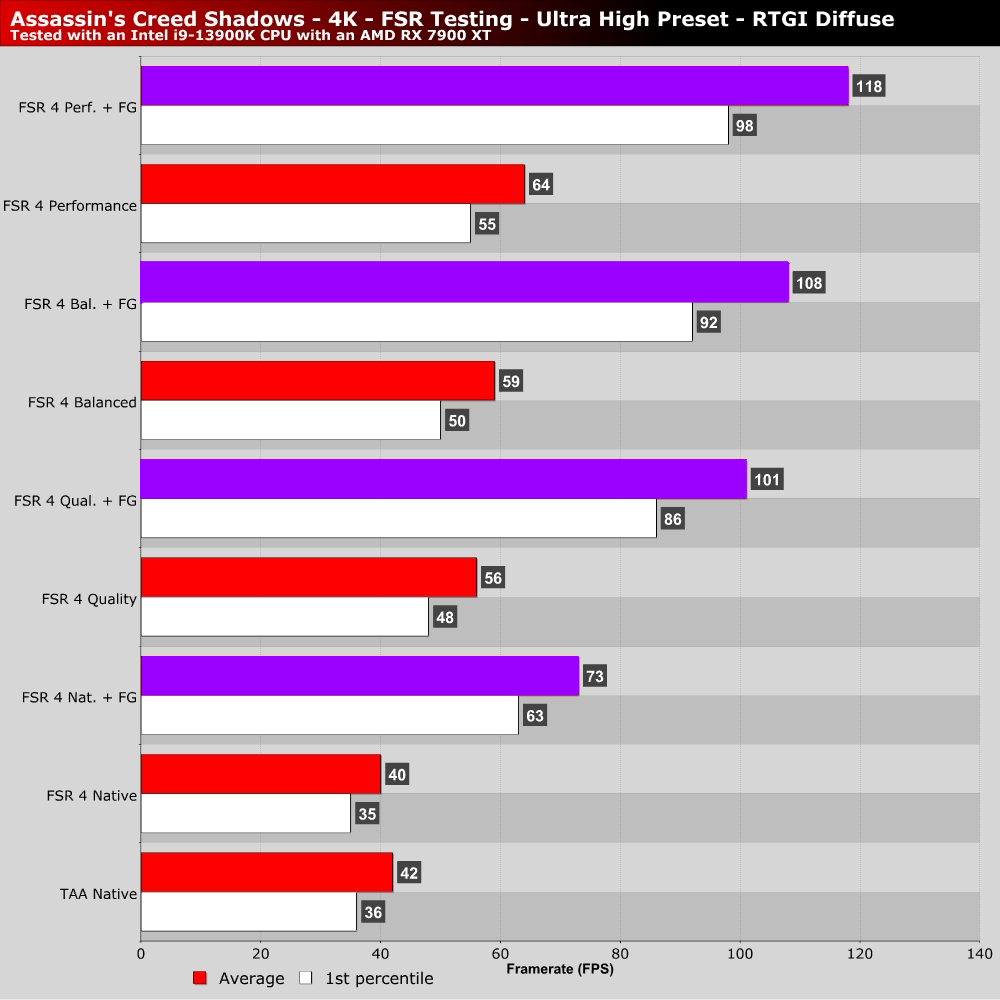
FSR 4 Performance Scaling – Upscaling and Frame Generation
Like all upscaling solutions, FSR 4 can deliver significant performance benefits to PC gamers. In Assassin’s Creed Shadows, enabling FSR 4 in quality mode can boost this game’s average framerate from 42 FPS (with TAA Native) to 56 FPS. Add on frame generation, and the game can run with an average framerate of 100 FPS. Not bad considering how demanding Assassin’s Creed: Shadows is at Ultra High settings.
Conclusion – Should you enable AMD FSR 4?
If you are wondering if you should enable FSR 4 within AMD Software, the answer is almost always yes. FSR 4 delivers major image quality benefits over FSR 3.1. Furthermore, it enhances AMD’s FSR Frame Generation by improving the image quality of input frames.
With FSR 4, AMD’s upscaling technology is now on the same level as Nvidia DLSS. It’s just a shame that FSR 4 still can’t be integrated directly into games, and that this tech is only available through AMD’s “FSR 4 Upgrade” feature. While this feature is useful, it feels kinda hacky. It also comes with the downside of not being enabled by default. This alone means that there will be Radeon RX 9000 series GPU users who are missing out on FSR 4.
Moving forward, AMD’s FSR 4 technology will become more advanced. At Computex, AMD unveiled “FSR 4 Redstone.” With Redstone, AMD will push its AI tech to the next level. With Neural Radiance Caching, Ray Regeneration, and AI Frame Generation, AMD plans to continue boosting image quality for games with and without ray tracing. We plan to cover these technologies in-depth as they become available in games.
You can join the discussion on AMD’s FSR 4 technology on the OC3D Forums.

