

Corsair Clipper Pro Mini 60 Keyboard Review

Introduction
Introduction
Peripherals are one of the great personalised things in computing. You might have the processor or graphics card you do for cost or performance reasons. Maybe your cooler cools the best. But keyboards and mice are reflective of their user.
For us, we do enough writing and creation that we need full size keyboards. Fair enough. However, if you’ve even been aware of streaming in passing you’ll have seen people tend towards more compact keyboards. Many gamers away from the camera have smaller options too. When you just need WASD and a few others, why take up a huge amount of desk space and backpack space unnecessarily?
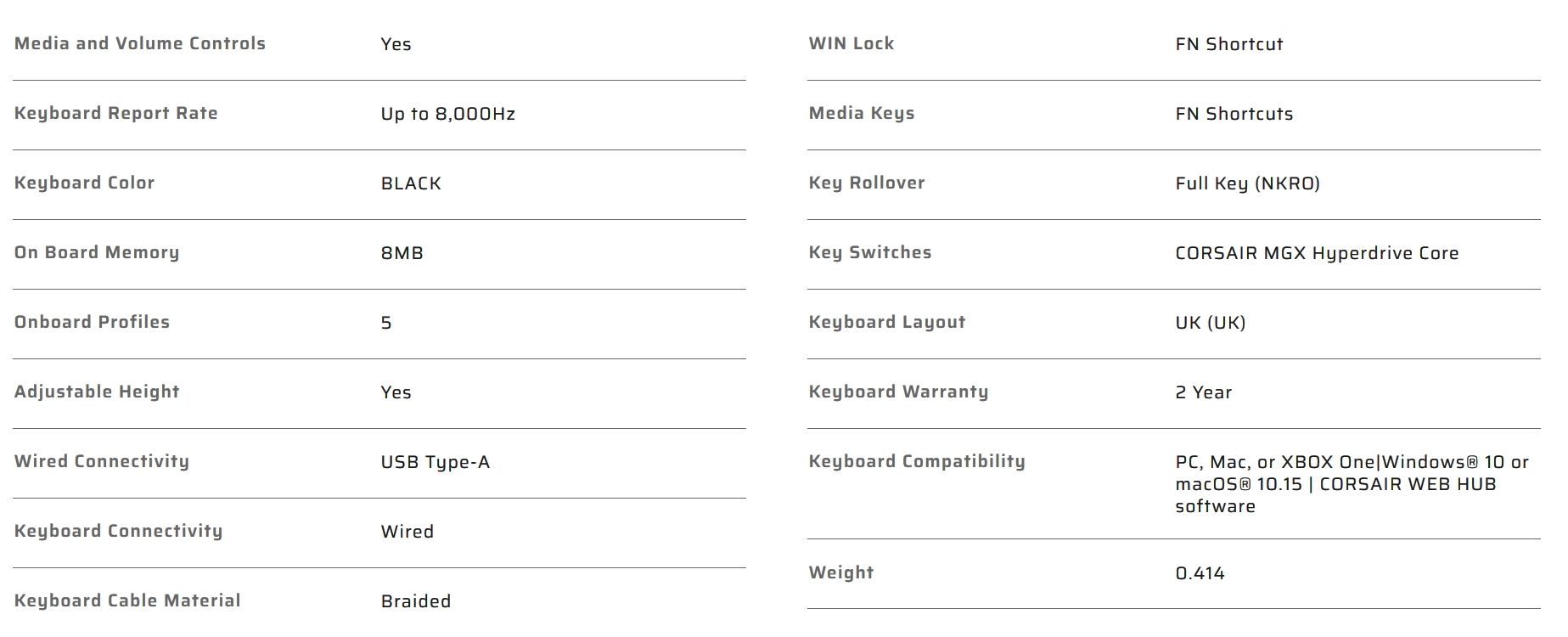
Corsair definitely feel that making something small doesn’t also mean cutting features. The Clipper Pro Mini 60 which we have in the office today boasts all you could need. Just in a form factor that fits in a pocket. The first thing is the Corsair MGX Hyperdrive Core magnetic switches. This isn’t the first keyboard we’ve reviewed that eschews mechanical switches. Generally they’re excellent to type on and very customisable. That should be the case here.
By using magnetic switches Corsair are able to include a lot of gamer focussed technologies. Rapid Trigger counts the key as being “off” the moment you lift, meaning you can reactivate with tiny pressure for faster actions. If you tire of holding a key Tap Lock lets you toggle things on and off with a hold. So even if the game doesn’t let you toggle crouch, the Clipper Pro Mini 60 does. Smart Tap lets a key do two things dependant on whether you’re tapping it or holding it. Lastly Multi-Action leverages the hall-effect switches to let you assign up to four different actions depending upon key press depth.
Let’s take a look.
Technical Specifications