Halo: Campaign Evolved PC Performance Review

Nvidia DLSS
DLSS in Halo: Campaign Evolved
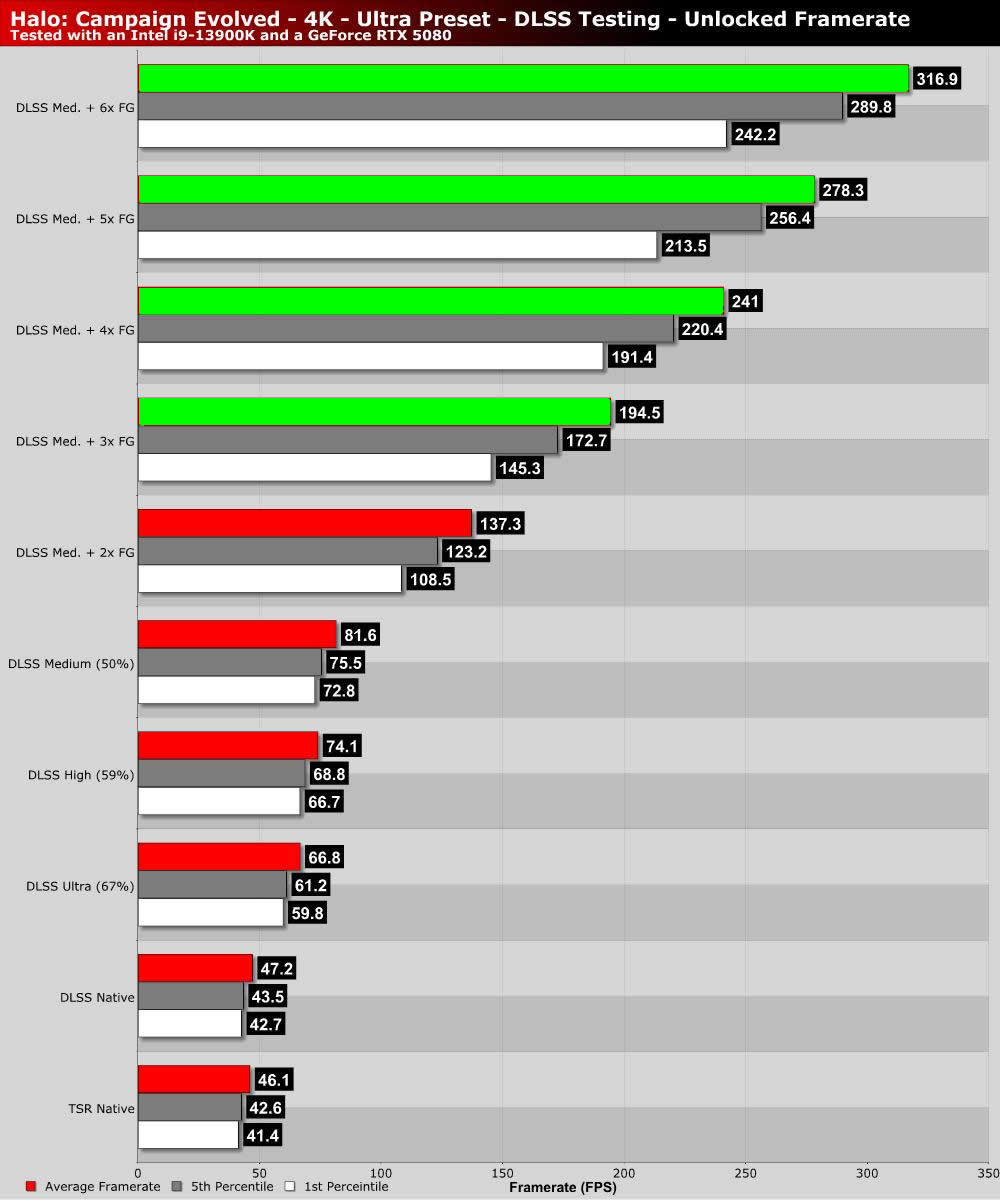
By default, Halo: Campaign Evolved only supports 2x Frame Generation. This applies to DLSS and all other upscaling options. Another issue is that enabling frame generation forced this game’s 30 FPS cutscenes to run at half its original framerate (15 FPS). Forcing higher frame generation settings with the Nvidia App makes this worse. With 6x Frame Generation, cutscenes run at 5 FPS… Yikes.
Thankfully, there is a mod that fixes this. We have details on this in our DLSS Multi Frame Generation Guide for Halo: Campaign Evolved. Hopefully, Halo Studios will address this issue with a future game update, doing away with the need for this mod.
Note that Halo Campaign Evolved does not use Nvidia’s standard DLSS naming scheme. There are no Quality, Balanced, or Performance modes. This game has resolution scaling percentages with Native (100%), Ultra (67%), High (59%), Medium (50%), and Low (33%) settings. We’ve opted to test Native, Ultra, High, and Medium. Using low mode (720p upscaled to 4K) seemed a little excessive for this game.