


MSI X870E MPG Carbon WiFi Review

Conclusion
Conclusion
MSI generally have three different tiers of product. At the base level there are the MAG models. The MPGs sit in the middle and the MEG range at the top. Anyone who has looked at the price of a MEG Godlike, for example, will understand why we use the word top. This model, the MSI X870E MPG Carbon WiFi, sits in the middle of the MSI range, but you wouldn’t think so to look at it.
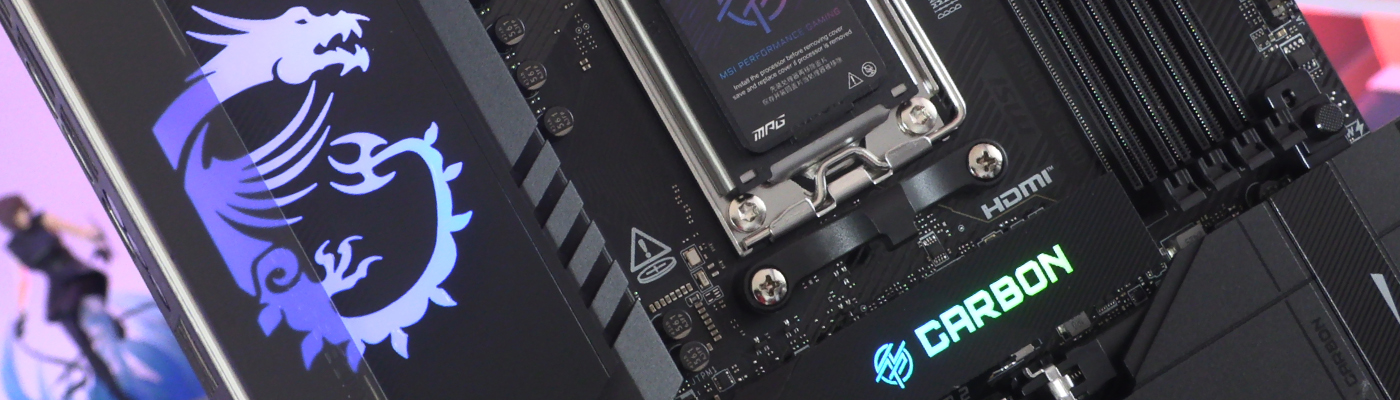
In fact stop a moment. Just look a the image that graces the top of this, and every, page. The Dragon logo on the VRM heatsink is crisp and clean, with a smooth gradient throughout. Additionally the M.2 heatsink atop the uppermost slot has an RGB Carbon logo, and it too is crisp and has a smooth colour gradient. Neither of those things should be taken for granted. We think the MPG Carbon WiFi looks gorgeous when it’s off, but when it’s on it’s a thing of true beauty. No faffing about. No attempts to look like street graffiti. The kind of motherboard that’s perfect for modern looking systems.
As you can tell, we’re fans of the aesthetic.
More Than Just Looks
It’s not merely the aesthetic we like though. MSI have put in a lot of details. Design elements that are unique – so far – to the Carbon. The placement of the back buttons. Latches you can remove with one hand. There has been a lot of work put into the power design too. With heat pipes and high quality thermal pads everywhere it’s set up for low temperatures and that is exactly what the MSI MPG Carbon delivers. We had the lowest CPU temperatures of any of our boards, and whilst the VRM were nominally the highest, they weren’t actually high.
If you only care about connectivity then the Carbon being based on the X870E chipset should leave you smiling. You get two PCI Express 5.0 slots and a single 4.0 slot. If you prefer storage there are two 128 Gbps Gen5 M.2 and two 64 Gbps Gen4 M.2 slots for you. As well as the 4 SATA ports, obviously. Networking fans will be happy with WiFi 7 and Bluetooth 5.4 for the wireless types, whilst those who prefer the security of cables had both a 2.5G and 5G LAN port to pick from. Lastly if you have a plethora of peripherals then the 22 total USB ports should ensure you’ve always got a place to plug things in. 2 40G USB4 ports, 1 20G, 11 10G and 4 5G sit alongside 4 USB 2.0 internal ports. It’s a stunning array of choices.
The MSI MPG X870E Carbon WiFi looks gorgeous, has a ton of carefully considered design choices and performance to burn, all of which earn it our OC3D Enthusiast Award.

Discuss the MSI X870E MPG Carbon WiFi in our OC3D Forums.

