Stray PC Performance Review and Optimisation Guide


1080p performance
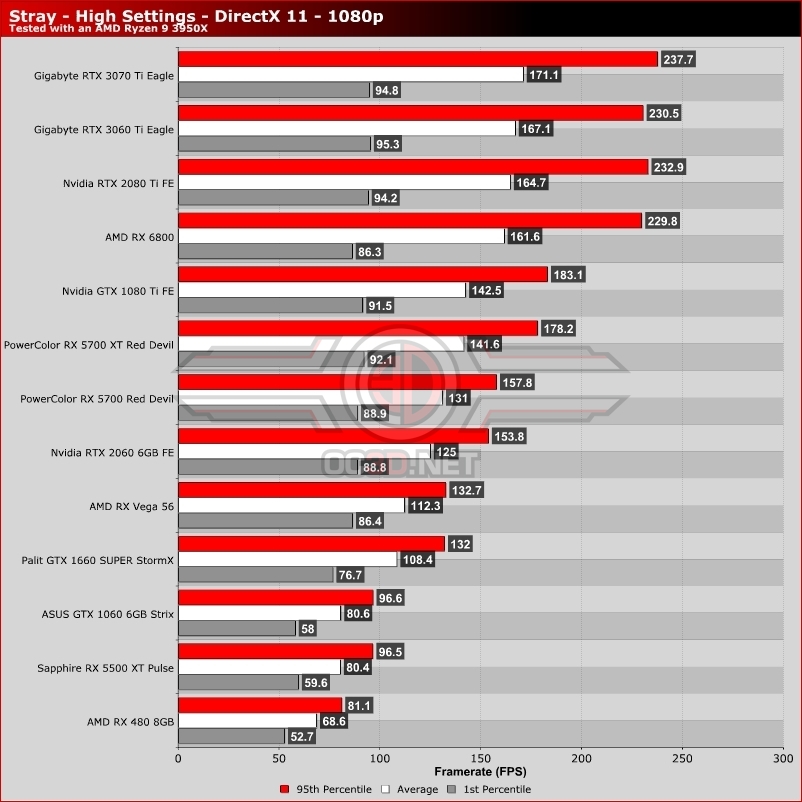
At 1080p, Stray is an easy game to run, though users of older hardware or low-end graphics cards may struggle to get the game running at 60+ FPS. On page 5, we detail settings that you can change to deliver a dramatic framerate boost without major visual downgrades. Adjusting these settings allow even our aging RX 480 and GTX 1060 to run the game with 1st percentile framerates above 60 FPS.
One thing that we will note there is that on our high-end GPUs, framerates can vary wildly. For the most part, these performance bumps are not caused by GPU performance, which means that our system is running into another bottleneck. For a consistent experience, gamers can simply cap Stray’s framerate to 60 FPS, enabling a more consistent experience. In Stray’s options menu, 30 FPS and 60 FPS framerate caps are available, though it would have been nice to have also seen larger caps, like 90 FPS or 120 FPS.