


AMD FSR 4 Tested with Borderlands 4

Intro: Borderlands 4 with FSR 4
Borderlands 4 supports AMD FSR 4 on day-1
Borderlands 4 is here, and it has launched with support for AMD’s FSR 4 technology. This makes Borderlands 4 one of the first games to support AMD’s AI upscaling technology on day-1, and today we are testing that aspect of the game.
FSR 4 support comes thanks to AMD’s “FSR 4 Upgrade” feature. This feature automatically upgrades games to the latest version of AMD’s FSR 4 tech. It is currently available for all DirectX 12 games that have a signed FSR 3.1 DLL. This means that AMD RDNA 4 GPU users can enjoy AMD’s AI upscaler in Borderlands 4, despite the fact that the game doesn’t officially support it.
OC3D Gaming Test Rig Upgrades
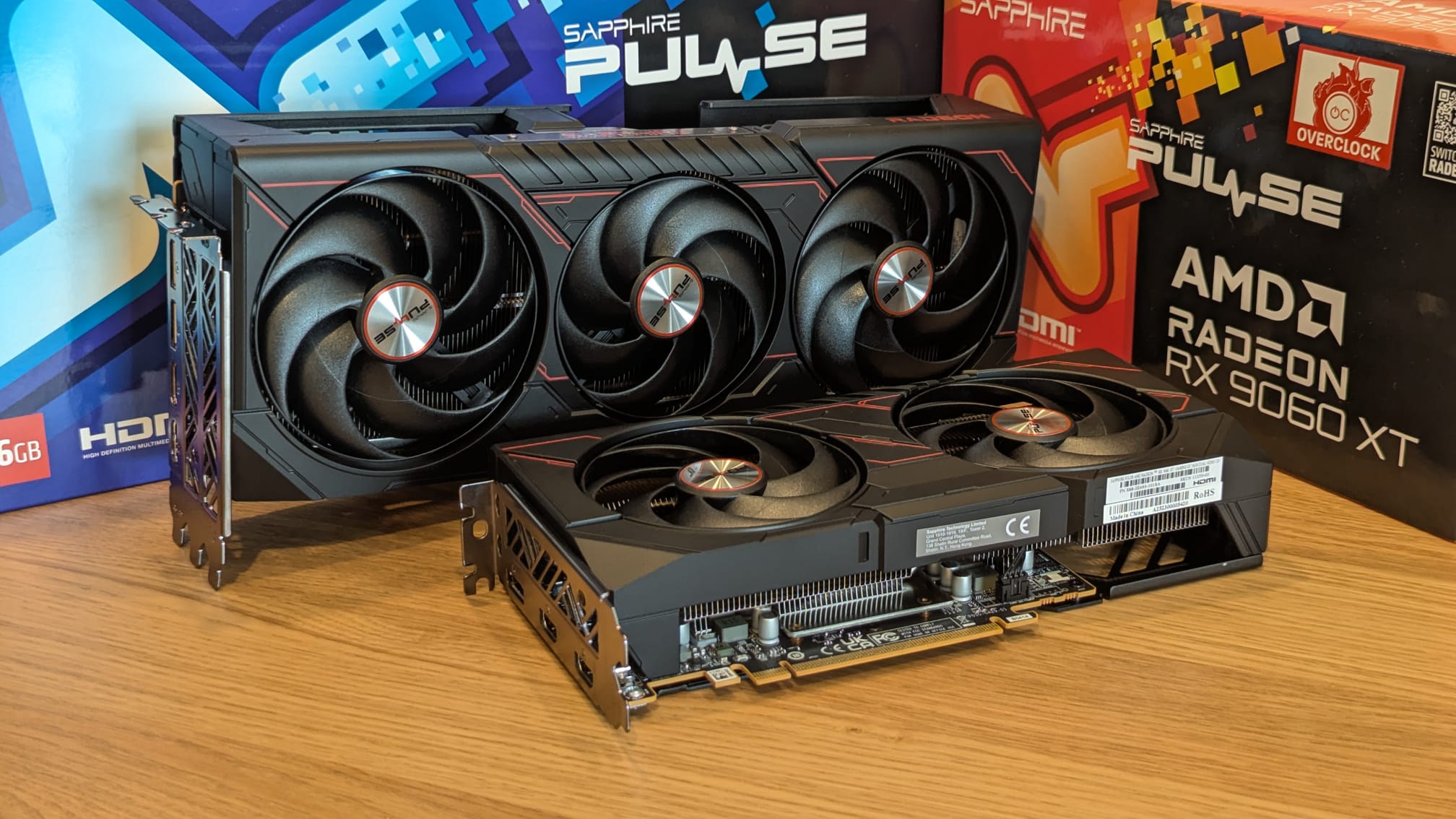
Thanks to Sapphire, we have been able to upgrade our gaming test suite with some AMD RDNA 4 graphics cards. For today’s analysis, we will be using Sapphire’s Radeon RX 9070 XT Pulse and RX 9060 XT Pulse (16GB) graphics cards. Both of these GPUs support AMD’s FSR 4 upscaler in Borderlands 4 thanks to AMD Software 25.9.1 and AMD’s FSR 4 Upgrade feature.
With AMD’s latest drivers, FSR 4 can now be enabled in most DirectX 12 games that support FSR 3.1 (or newer). Since Borderlands 4 meets those requirements, FSR 4 is available within this game.
GPU pricing
For anyone interested in Sapphire’s new Pulse series GPUs, here are some links to them at UK retailers. As always, GPU pricing can change rapidly due to fluctuations in supply and demand.
Sapphire RX 9070 XT Pulse
Sapphire RX 9060 XT Pulse 16GB
How to enable FSR 4 in Borderlands 4
RDNA 4 GPU users need to enable AMD’s “FSR 4 Upgrade” option within AMD Software to use FSR 4 in supported games. Since Borderlands 4 supports AMD FSR 3.1 and is a DirectX 12 title, the game supports AMD’s “FSR 4 Upgrade” feature. If this option is available, users just need to enable FSR in-game to enable FSR 4.
We have created a guide to help AMD RDNA 4 GPU users enable FSR 4 within AMD Software. You can read this guide here.
FSR 3 VS FSR 4 VS FXAA VS TSR
In Borderlands 4, the game offers a vast array of anti-aliasing and upscaling options. Upscaling options include TSR (Unreal Engine 5 Temporal Super Resolution), AMD FSR, Intel XeSS, and Nvidia DLSS. Users of FSR, XeSS, and DLSS can also enable Frame Generation in Borderlands 4.
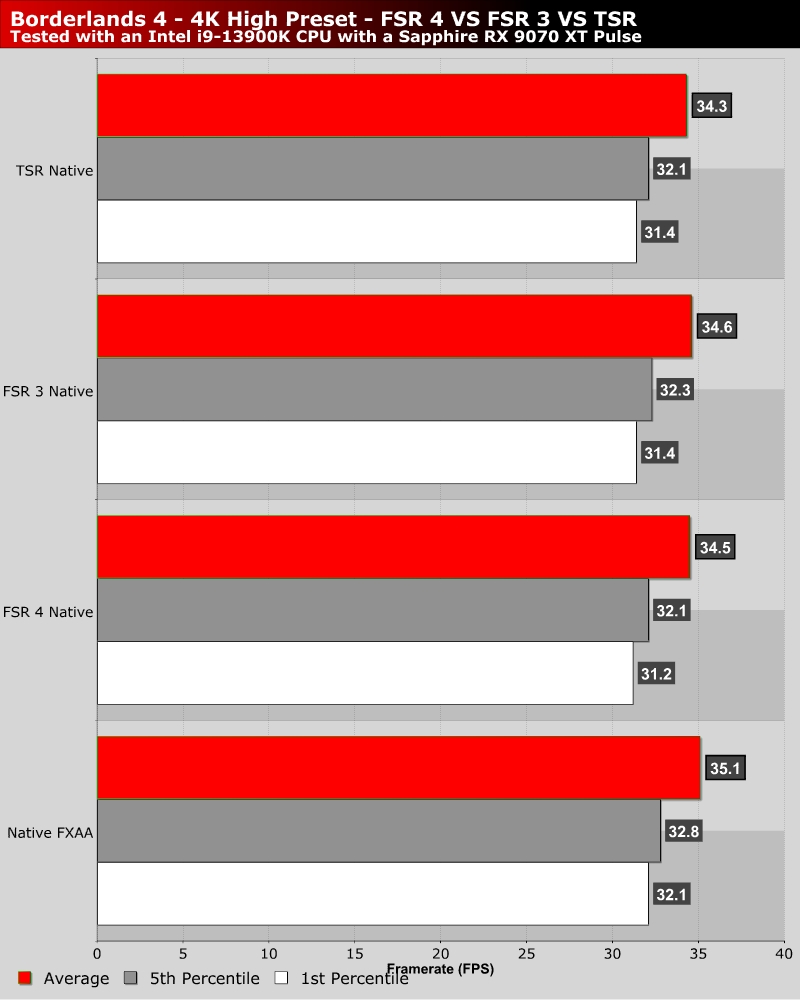
If you disable upscaling, PC gamers can enable FXAA. This is Borderlands 4’s most performant anti-aliasing solution. However, this option also delivers the worst visual result. Using TSR, FSR, XeSS, or DLSS at “Full Resolution” is a preferable option, at least from an image quality standpoint. Another thing to note is that FXAA isn’t much less performant than using upscalers at full/native resolution.
Overall, FSR 3, FSR 4, and TSR are similarly performant. Later in this article we will compare the image quality of each and determine which is the best.
System Specs
Below are the full specifications of our new GPU/Games testing system and links to all the components we used.
OC3D GPU/Games Test System Specifications (Affiliate Links below)
CPU – Intel i9-13900K
Cooling – Corsair iCUE H150i Elite CAPELLIX XT
Motherboard – ASUS ROG Strix Z790-F Gaming WiFi
Memory – Corsair Vengeance 2x16GB (32GB) DDR5-6000 CL36 Memory
Storage – Corsair MP600 PRO NH 2TB PCIe 4.0 SSD
Case – Corsair iCUE 5000T RGB
Power Supply – Corsair HX1500i
OS – Windows 11

