
Dying Light: The Beast PC Performance Review and Optimisation Guide

VRAM Use
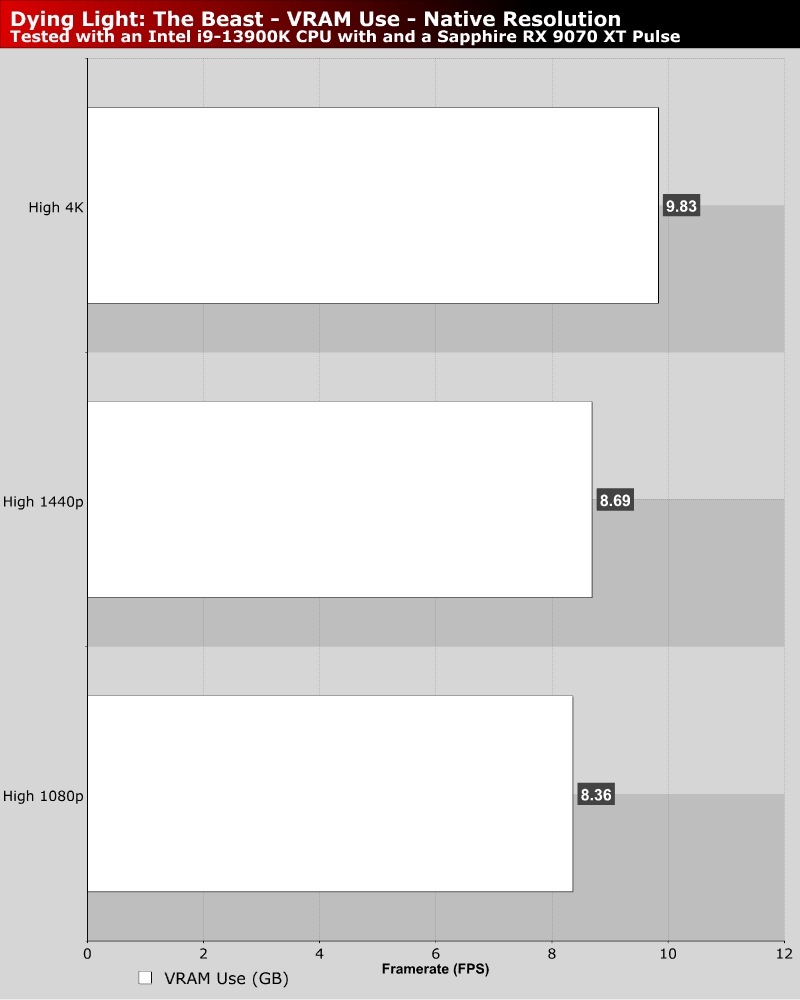
VRAM Usage – 8GB GPU users should use Medium Textures

If you use an 8GB GPU, you should probably turn Dying Light: The Beast’s texture setting to medium on PC. While this game doesn’t use a huge amount of VRAM, it can easily use more than 8GB when using the game’s High preset. 8GB GPUs can stuggle at times when playing this game, but lowering texture settings fixes this.

Mark Campbell

Mark Campbell

A Northern Irish father, husband, and techie that works to turn tea and coffee into articles when he isn’t painting his extensive minis collection or using things to make other things.

Follow Mark Campbell on Twitter
View more about me and my articles.

Uh-oh! It looks like you're using an ad blocker.

OC3D relies on ads to provide free content and sustain our operations. By white listing us on your ad blocker, you help support us and ensure we can continue offering valuable content without any cost to you. We only run our own hand picked ads from Industry brands like MSI, BeQuiet, Sapphire and PC-Specialist - meaning they are all relevent to the content you are reading.

We truly appreciate your understanding and support. Thank you for considering whitelisting OC3D