Horizon: Forbidden West PC Performance Review and Optimisation Guide

DLSS 3
DLSS 3 Performance
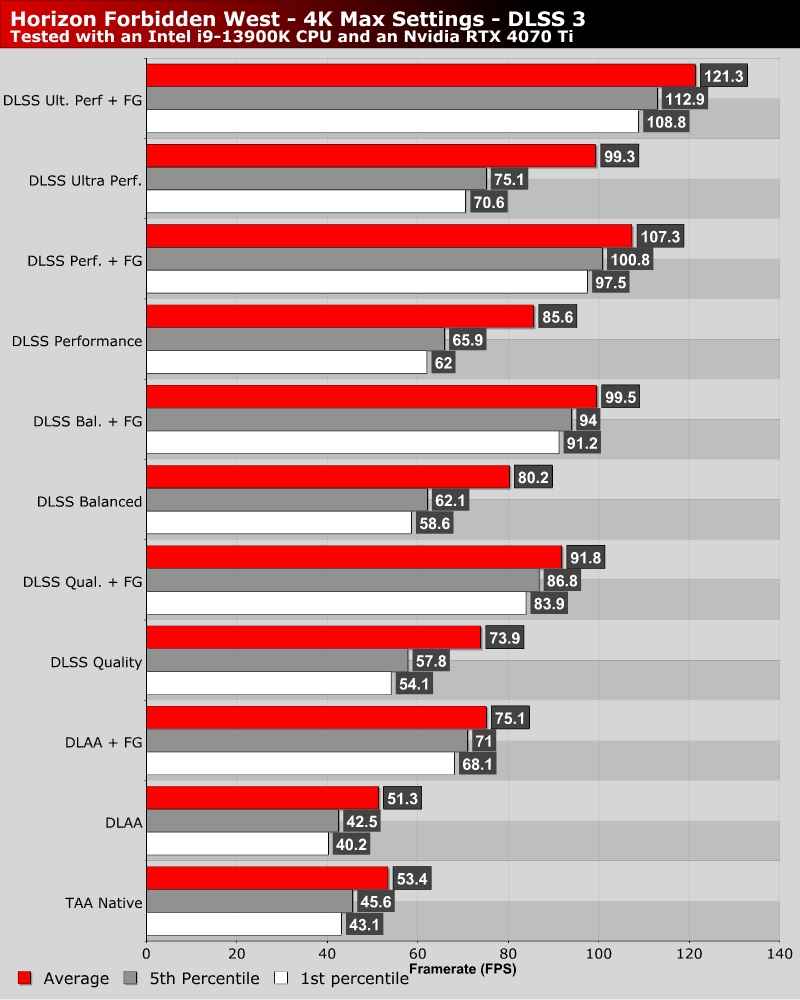
As mentioned on the last page, Horizon: Forbidden West’s performance scaling is limited if you rely solely on graphical settings. You need to utilise resolution scaling to achieve large performance boosts in this game. There’s a reason why this game has variable resolution options on PC.
Below, we can see what kind of performance increases we can achieve using Nvidia’s DLSS Super Resolution and Frame Generation technologies. With DLAA, gamers can achieve a better visual experience than with this game’s default TAA anti-aliasing solution with a small performance cost. DLSS in Balanced and Quality mode also deliver strong upscaling results with minimal visual downsides, with Frame Generation providing an additional FPS boost.
With DLSS, Horizon: Forbidden West can run well on a huge variety of PC hardware configurations. With DLSS offering better quality upscaling than this game’s PS5 version, PC gamers can also achieve a better visual experience than PS5 with relative ease. This is true even with more modest PC hardware.