
ROG Xbox Ally X Review

Controls

ASUS ROG Xbox Ally X Review

Controls
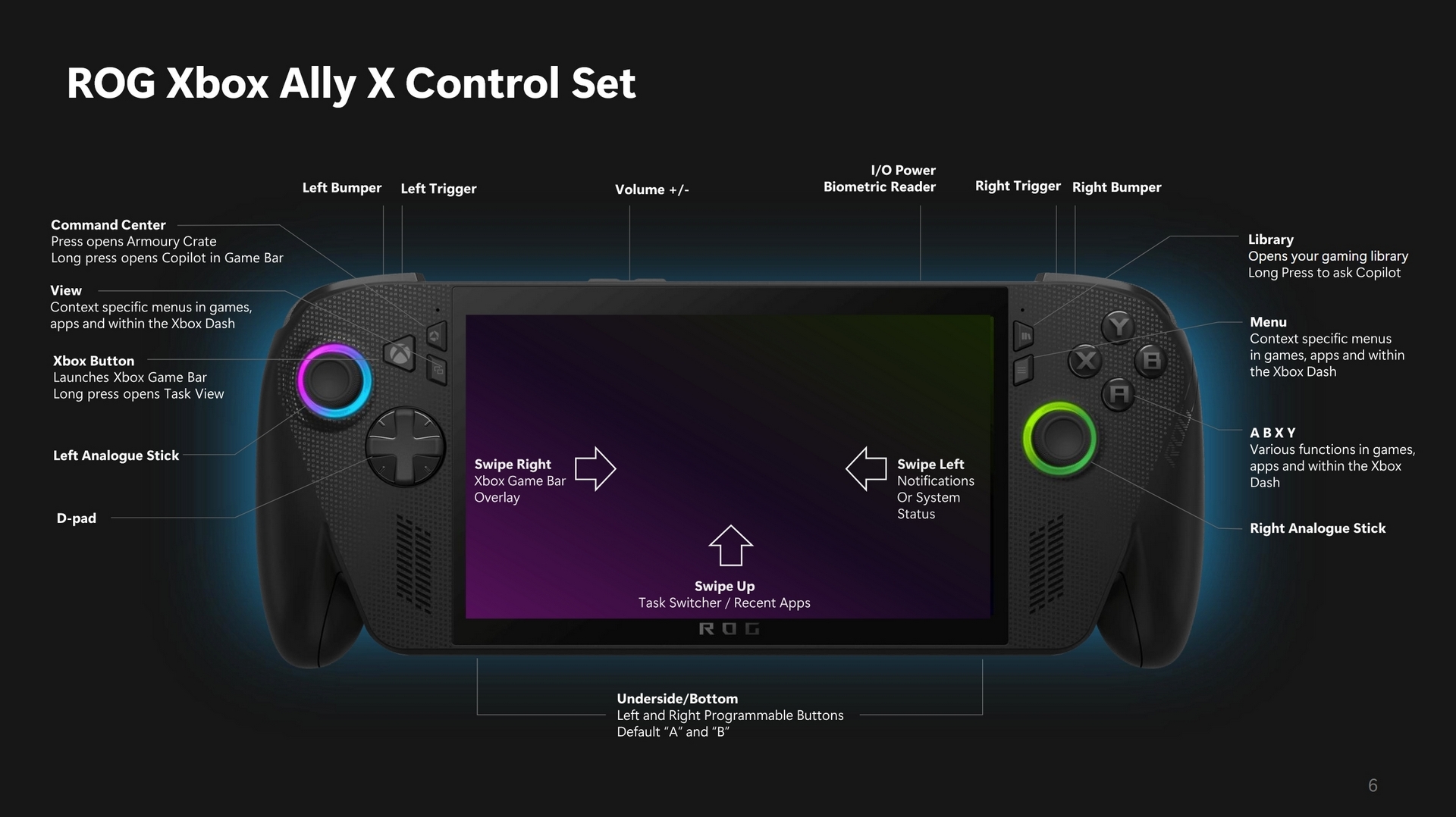
We’ve covered most of this in our detailed look above. However, there is never a bad time to have an overview. Of particular interest is the default setup for the “extra” buttons underneath. If you’re familiar with an Xbox pad then you’ll know the M1 and M2 buttons aren’t there. The Ally X uses them in conjunction with DPAD and face buttons to bring handy shortcuts to your fingertips.
Tom Logan - TTL - tinytomlogan

Tom Logan - TTL - tinytomlogan

The dude from the videos, really not that tiny, fully signed up member of the crazy cat man club.

Follow Tom Logan - TTL - tinytomlogan on Twitter
View more about me and my articles.

Uh-oh! It looks like you're using an ad blocker.

OC3D relies on ads to provide free content and sustain our operations. By white listing us on your ad blocker, you help support us and ensure we can continue offering valuable content without any cost to you. We only run our own hand picked ads from Industry brands like MSI, BeQuiet, Sapphire and PC-Specialist - meaning they are all relevent to the content you are reading.

We truly appreciate your understanding and support. Thank you for considering whitelisting OC3D
