Agents of Mayhem PC Performance Review


Disabling Nvidia branded options. – How much does performance change?
When somebody mentions Nvidia GameWorks, there is a large number of gamers who simply cannot wait to complain about the performance impact of Nvidia-pushed graphical effects. Most of us can remember the controversy surrounding Nvidia HairWorks, so it is always worth testing to see what happen when you play the game at its highest settings and only disable Nvidia branded graphical settings.
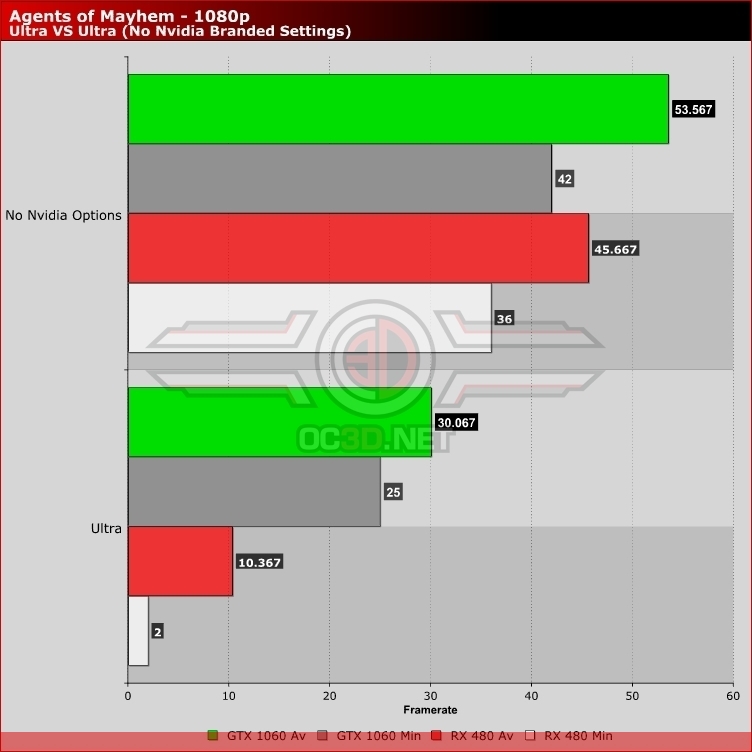
Below we tested Agents of Mayhem using the game’s default Ultra settings and then the same settings with Shadow Quality set to high instead of “Nvidia HFTS” and God Rays to screenspace instead of “Nvidia Volumetric”.
As can be seen in the graph below, disabling these Nvidia branded graphical settings gives users significant performance gains on both Nvidia and AMD hardware, though the performance of AMD graphics cards is simply crippled by Nvidia HFTS shadows.
We would recommend that PC gamers turn off these options immediately to achieve better in-game performance, as their absence will be hard to notice in-game and the performance gains will be hugely beneficial.