
DOOM: The Dark Ages PC Performance Review and Optimisation Guide

Preset Scaling – Low to Ultra Nightmare
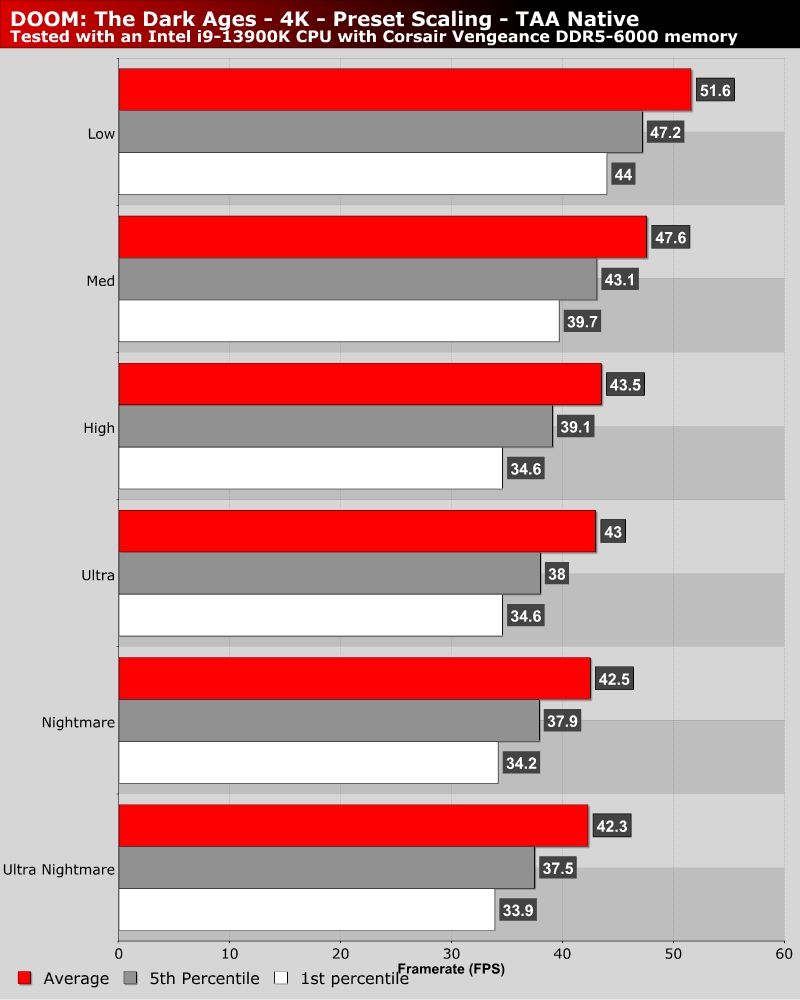
Preset scaling – Big settings changes are needed for any real performance gains

DOOM: The Dark Ages’ PC version doesn’t see its performance change significantly when its graphical settings are lowered. Clearly, id Software has made this game with resolution scaling in mind. Ultra and above graphical settings perform almost identically, which means that most gamers will need to move from Ultra Nightmare to High or Medium to achieve notable performance gains. For most gamers, using FSR, DLSS, XeSS, or TAA upscaling will achieve larger performance gains than traditional settings tinkering.

Mark Campbell

Mark Campbell

A Northern Irish father, husband, and techie that works to turn tea and coffee into articles when he isn’t painting his extensive minis collection or using things to make other things.

Follow Mark Campbell on Twitter
View more about me and my articles.

Uh-oh! It looks like you're using an ad blocker.

OC3D relies on ads to provide free content and sustain our operations. By white listing us on your ad blocker, you help support us and ensure we can continue offering valuable content without any cost to you. We only run our own hand picked ads from Industry brands like MSI, BeQuiet, Sapphire and PC-Specialist - meaning they are all relevent to the content you are reading.

We truly appreciate your understanding and support. Thank you for considering whitelisting OC3D