Assassin’s Creed Odyssey PC Performance Review

Impact Assessment – Which Settings are the most demanding?
Assassin’s Creed: Odyssey is an extremely demanding game on PC, so much so that most PC gamers will be searching for settings/tweaking guides to help them get the best balance between graphical fidelity and performance within the game.
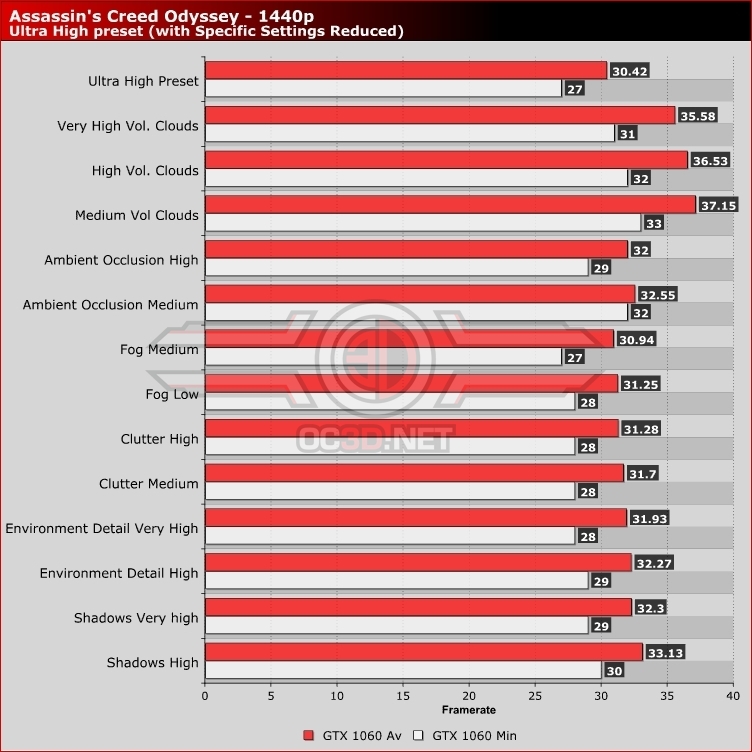
For starter, I will say that everyone who is playing Assassin’s Creed: Odyssey should keep Volumetric Clouds at High or lower, as the graphical benefits of higher settings are difficult to notice and will have a huge performance impact. Moving this setting from Ultra High to High offers a performance increase of 20%, which is more than worthwhile given the fact that most Assassin’s Creed players will not be spending their time with their eyes in the clouds.
After changing the game’s Volumetric Shadows settings, the next place where players can regain performance is by turning shadows down to High or by turning Ambient Occlusion down to High or Medium, both of which will have a notable impact on performance while offering a minimal impact of the game’s graphics.
If you are having performance issues when chatting to NPCs, it is likely that your graphics card is bandwidth limited, a factor which is caused by the game’s depth of field setting. Reducing this from High to Low will offer players a significant performance uplift where this blurring effect is used but a minor performance impact everywhere else. If you do not like how the camera blurs when speaking to NPC, you have the option to turn off this option entirely.
Even during foggy scenes, the graphical impact of higher fog settings is difficult to spot, making Fog an option that can easily be dropped to low without most players noticing. Yes, the performance impact is minimal, but if it comes adds no real graphical detail there is no reason to keep it turned to high.