Resident Evil 4 Remake PC Performance Review and Optimisation Guide


Resolution Scaling, FSR 2 and Interlacing
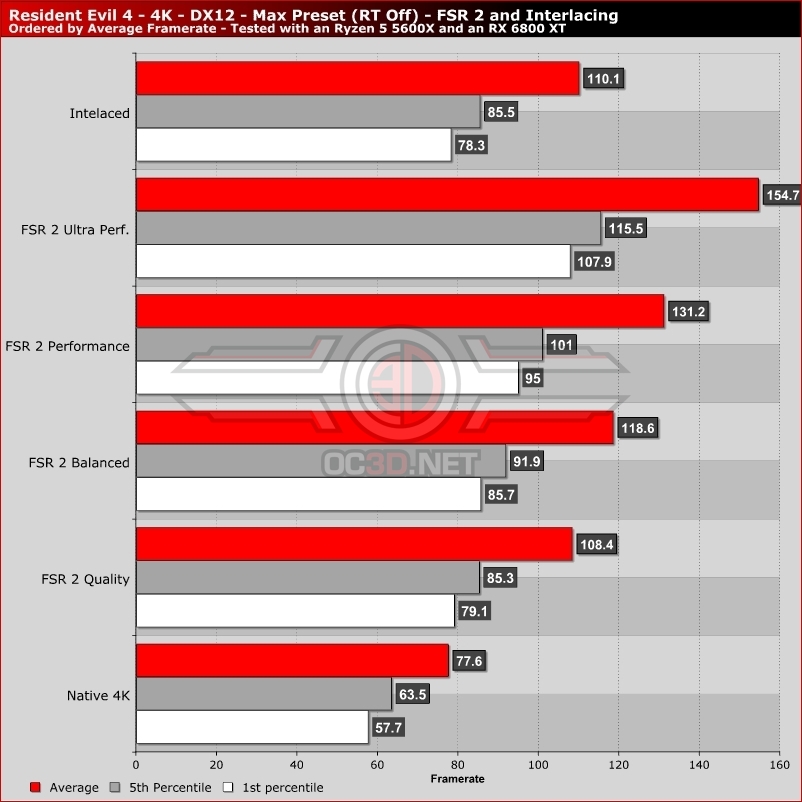
While Resident Evil 4 runs well at native resolutions, scaling options are available for those who want to play RE4 at higher framerates. AMD’s FidelityFX Super Resolution technology is available, but it doesn’t deliver images that are as sharp as a native resolution rendering. This means that using FSR can deliver a noticeable downgrade in image clarity, and is a sign that Capcom could have implemented this feature better.
Interlacing is another resolutions scaling option that RE4 features on PC, and in some scenarios it can offer a clearer image than FSR 2’s Quality mode, but is other areas FSR 2 has a lead. Both features cannot be used together, but it may be worth while checking which upscaler you prefer the look of.
With FSR delivering poorer than expected image quality, it would have been nice to have seen DLSS support and XeSS support for Intel and Nvidia GPU users. That said, if FSR was implemented poorly, would DLSS and XeSS have been done even better.
With FSR 2’s output looking blurry, it is possible that RE4’s FSR 2 support could be improved with changes to FSR 2’s sharpening component, or by upgrading to AMD’s new FSR 2.2 codepath.